Godot Stable 4.3
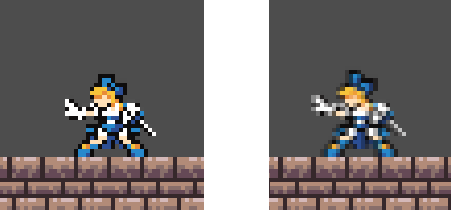
Basically, in my scene, when the player moves, sometimes they seem to get offset by 1/2 of a pixel? Causing blurring. And yes, “Snap 2D Transforms to Pixel” and “Snap 2D Vertices to Pixel” are enabled.
Godot Stable 4.3
Basically, in my scene, when the player moves, sometimes they seem to get offset by 1/2 of a pixel? Causing blurring. And yes, “Snap 2D Transforms to Pixel” and “Snap 2D Vertices to Pixel” are enabled.
Set sprite’s texture filtering to “nearest”.
It’s already set to nearest, as you can see on the picture on the left. Sometimes though, the Sprite will end up blurred after I walk around for a bit.
It looks as if the sprite is being stretched horizontally, are you doing anything to affect its scale?
Nope. My player script is actually pretty simple right now:
extends CharacterBody2D

const SPEED = 160.0 # The horizontal movement speed of the player
const JUMP_VELOCITY = -300.0 # The initial velocity of takeoff when jumping.
const JUMP_GRAVITY_MULTIPLER = 1.5 # The speed at which the player will decelarate when jumping

@exportexport var SPRITE : AnimatedSprite2D # Points to the Animated Sprite used by the player.

func \_ready() → void:
SPRITE.play(“Idle”)

func \_physics_process(delta: float) → void:


# Add the gravity.
if not is_on_floor():
	velocity += get_gravity() * delta * (1 if velocity.y >= 0 else JUMP_GRAVITY_MULTIPLER) # Gravity is increased if travelling upwards.

# Handle jump.
if Input.is_action_just_pressed("Jump") and is_on_floor():
	velocity.y = JUMP_VELOCITY # Set the player's Y velocity to Jump Velocity

if velocity.y < 0 and not Input.is_action_pressed("Jump"):
	velocity.y = 0

var direction := Input.get_axis("ui_left", "ui_right") # Get player movement direction.
if direction:
	velocity.x = (1 if direction > 0 else -1) * SPEED # Set the horizontal movement to the walk speed.
	SPRITE.play("Walk") # Start the walking animation
	SPRITE.flip_h = direction < 0 # Set the Sprite to be facing left or right
else:
	SPRITE.play("Idle") # Start the idle animation.
	velocity.x = move_toward(velocity.x, 0, SPEED) # Stop the player's horizontal movement.

# Play the jump animation if in the air
if not is_on_floor():
	SPRITE.play("Jump")

move_and_slide() # Update the player's position based on velocity
The only thing that I should mention is that the entire scene is being captured by a static (unmoving) camera 2D, and then fed into a subviewport, where it is upscaled to 2x resolution so I can apply a CRT effect overtop (Also, that way it’ll be in a 480p standard resolution). Even so, all of the pixels should line up properly, and do for the most part. However it seems that sometimes the player sprite is misaligned with the pixels, causing a blur effect.
is your viewport texture filter also set to nearest?
That was the problem, yes. Thank you! I did not know that viewports don’t use default texture filtering!