Godot Version
godot-4
Question
i have been debugging [Tool]’s written in C# for over a year now with no problem but now suddenly it stopped working and I’ve been pulling my hair out for days trying to figure out why
"name": "Launch Editor",
            "type": "coreclr",
            "request": "launch",
            "preLaunchTask": "build",
            "program": "${env:GODOT4}",
            "cwd": "${workspaceFolder}",
            "console": "internalConsole",
            "stopAtEntry": false,
            "justMyCode": true,
            "args": [
                "--path",
                "${workspaceRoot}",
                "--editor"
            ]
this is the configuration I’ve been using in launch.json, it would launch the editor and i was able to debug the [Tool] scripts as it was running in the editor.
i have also been using
"name": "Attach to Process",
        "type": "coreclr",
        "request": "attach",
        "justMyCode": true,
        "processName": "Godot_v4.4-stable_mono_win64.exe"
to attach to an existing editor and debug the already running [Tool]’s
for the build task i’m doing
{
	"version": "2.0.0",
	"tasks": [
	    {
		   "label": "build",
		   "command": "dotnet",
		   "type": "shell",
		   "args": [
			  "build",
			  "/property:GenerateFullPaths=true",
			  "/consoleloggerparameters:NoSummary"
		   ],
		   "group": {
			  "kind": "build",
			  "isDefault": true
		   },
		   "presentation": {
			  "reveal": "silent"
		   },
		   "problemMatcher": "$msCompile"
	    }
	]
 }
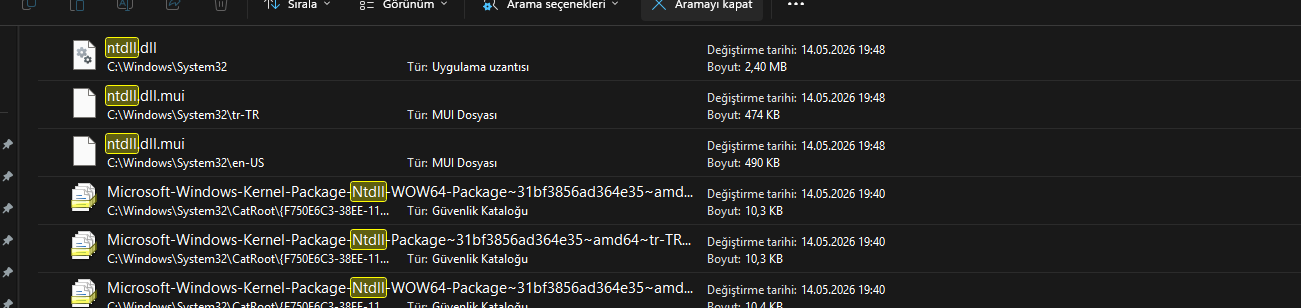
This worked perfectly up until a few days ago, now whenever i try to do either of these it just silently crashes the editor with no errors. I have tried reinstalling GODOT/.NET SDK/VS CODE and also switching versions but i keep getting the same problem.
The only messages i get in the terminal before crash are
Godot Engine v4.6.2.stable.mono.official.71f334935 - https://godotengine.org
D3D12 12_0 - Forward+ - Using Device #0: NVIDIA - NVIDIA GeForce RTX 5080

Godot_v4.6.2-stable_mono_win64.exe (14948): Loaded 'C:\Program Files\dotnet\shared\Microsoft.NETCore.App\9.0.16\System.Private.CoreLib.dll'. Skipped loading symbols. Module is optimized and the debugger option 'Just My Code' is enabled.
Godot_v4.6.2-stable_mono_win64.exe (14948): Loaded 'D:\Software\Godot\Godot_v4.6.2-stable_mono_win64\GodotSharp\Api\Debug\GodotPlugins.dll'. Symbols loaded.
Godot_v4.6.2-stable_mono_win64.exe (14948): Loaded 'C:\Program Files\dotnet\shared\Microsoft.NETCore.App\9.0.16\System.Runtime.dll'. Skipped loading symbols. Module is optimized and the debugger option 'Just My Code' is enabled.
Godot_v4.6.2-stable_mono_win64.exe (14948): Loaded 'C:\Program Files\dotnet\shared\Microsoft.NETCore.App\9.0.16\System.Runtime.InteropServices.dll'. Skipped loading symbols. Module is optimized and the debugger option 'Just My Code' is enabled.
Godot_v4.6.2-stable_mono_win64.exe (14948): Loaded 'D:\Software\Godot\Godot_v4.6.2-stable_mono_win64\GodotSharp\Api\Debug\GodotSharp.dll'. Symbols loaded.
Godot_v4.6.2-stable_mono_win64.exe (14948): Loaded 'C:\Program Files\dotnet\shared\Microsoft.NETCore.App\9.0.16\System.Collections.dll'. Skipped loading symbols. Module is optimized and the debugger option 'Just My Code' is enabled.
Godot_v4.6.2-stable_mono_win64.exe (14948): Loaded 'C:\Program Files\dotnet\shared\Microsoft.NETCore.App\9.0.16\System.Console.dll'. Skipped loading symbols. Module is optimized and the debugger option 'Just My Code' is enabled.
Godot_v4.6.2-stable_mono_win64.exe (14948): Loaded 'C:\Program Files\dotnet\shared\Microsoft.NETCore.App\9.0.16\System.Runtime.Loader.dll'. Skipped loading symbols. Module is optimized and the debugger option 'Just My Code' is enabled.
Godot_v4.6.2-stable_mono_win64.exe (14948): Loaded 'D:\Software\Godot\Godot_v4.6.2-stable_mono_win64\GodotSharp\Api\Debug\GodotSharpEditor.dll'. Symbols loaded.
Godot_v4.6.2-stable_mono_win64.exe (14948): Loaded 'C:\Program Files\dotnet\shared\Microsoft.NETCore.App\9.0.16\System.Threading.dll'. Skipped loading symbols. Module is optimized and the debugger option 'Just My Code' is enabled.
Godot_v4.6.2-stable_mono_win64.exe (14948): Loaded 'C:\Program Files\dotnet\shared\Microsoft.NETCore.App\9.0.16\System.Collections.Concurrent.dll'. Skipped loading symbols. Module is optimized and the debugger option 'Just My Code' is enabled.
Godot_v4.6.2-stable_mono_win64.exe (14948): Loaded 'C:\Program Files\dotnet\shared\Microsoft.NETCore.App\9.0.16\System.Diagnostics.TraceSource.dll'. Skipped loading symbols. Module is optimized and the debugger option 'Just My Code' is enabled.
Godot_v4.6.2-stable_mono_win64.exe (14948): Loaded 'Test Debug'. Symbols loaded.
Godot_v4.6.2-stable_mono_win64.exe (14948): Loaded 'C:\Program Files\dotnet\shared\Microsoft.NETCore.App\9.0.16\System.Linq.dll'. Skipped loading symbols. Module is optimized and the debugger option 'Just My Code' is enabled.
Godot_v4.6.2-stable_mono_win64.exe (14948): Loaded 'GodotTools'. Skipped loading symbols. Module is optimized and the debugger option 'Just My Code' is enabled.
I cant find any data on this specific subject, please if anybody knows how to debug [Tool]’s with VS code while they are running in the editor or had some similar problems please help.