Godot Version
4.4
Question
AnimatedSprite2D issue
Shortly, I tried to put animated sprites into AnimatedSprite2D and code its change with it:
func player_animation():
	var h = clamp(health_amount, 0, 6)
	if h == 6:
		health.play("Full Health")
	else:
		health.play("Minus %d" % (6 - h))

func _on_health_bar_animation_finished():
	if health.animation == "Minus 1":
		print("done")
		health.play("Health Minus 1")
health : AnimatedSprite2D. Animation “Minus 1“ works when health_amount changes. Print command works perfectly and in time, when “Minus 1“ finishes. But the main issue it’s that “Health Minus 1“ doesn’t play at all. I checked the name, it’s correct. I tried stopping animation before, I tried writing that health.is_playing == false before the code. Didn’t work. I just want to change the animation when the other one finishes.
AnimationPlayer issue
But okay, I thought I should finally try AnimationPlayer. I took keyframes from AnimatedSprite2D and made all animations out of them. I wrote code like that:
func player_animation():
	var h = clamp(health_amount, 0, 6)
	if h == 6:
		hurt.play("Full Health")
	else:
		hurt.play("Minus %d" % (6 - h))

func _on_injured_animation_finished(anim_name: StringName):
	if anim_name == ("Minus 1"):
		hurt.play("Health Minus 1")
hurt : AnimationPlayer. I thought it would work, but I was too naive. “Full Health“ played in loop, not changing the animation to the other ones at all. Loop isn’t turned on. I tried changing clamp with clampi to make in int, but it didn’t help either. It’s just a freaking hell.
Can someone explain what’s wrong with this code? How can get a simple code, that triggers animation change to “Minus 1-6“ every time when health_amount changes, and when “Minus 1-6“ play idle animations “Health Minus 1-6“. I’m really confused. Please, help me.
Not enough information here. Specifically, you are telling us that you set up the AnimatedSprite2D and the AnimationPlayer correctly. And while I believe you think that, I believe that’s where your problem is - because your code looks fine from what I can tell.
First, I will say that your naming convention is very confusing. What is the difference between “Minus 1” and “Health Minus 1”? It is unclear from your post.
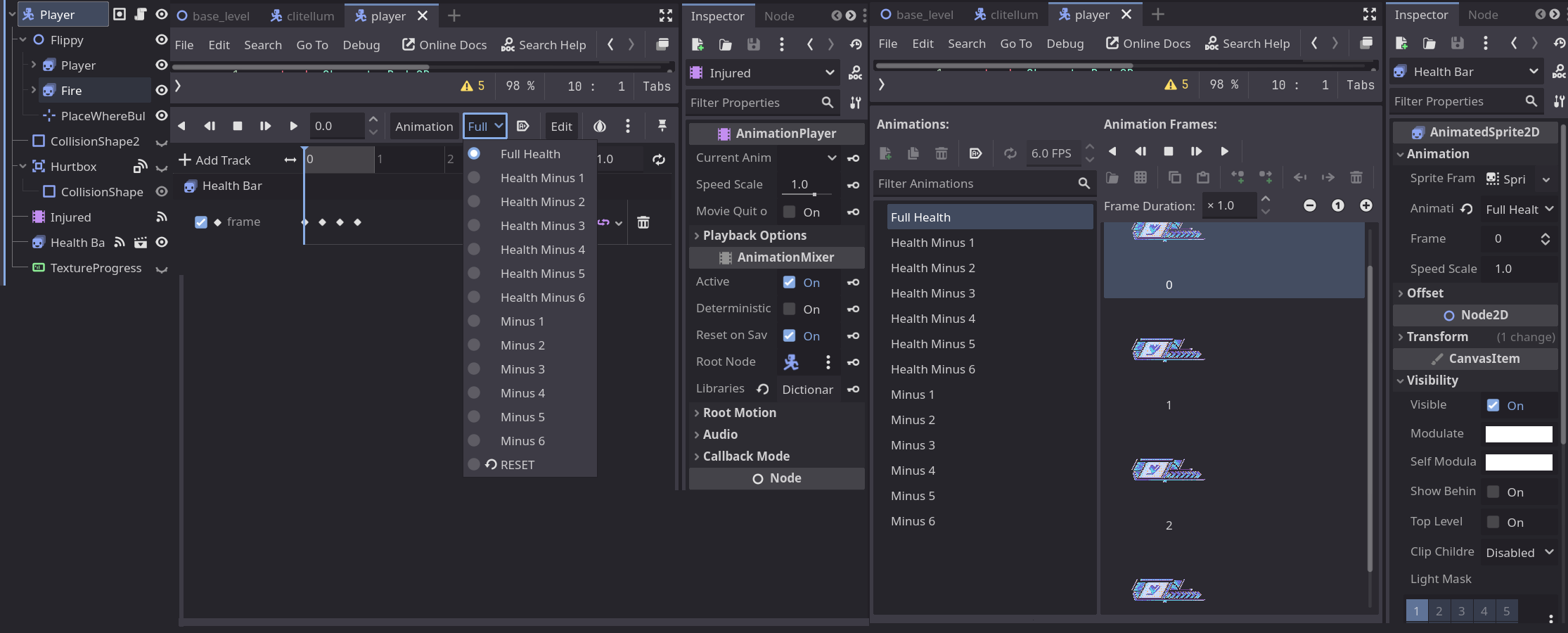
Second, we need screenshots. We need to see the setup of your AnimatedSprite2D and AnimationPlayer.
Third, where is that code located? What node is it attached to? Your “it keeps playing” problem sounds like it is related to how your calling those functions and has nothing to do with how you setup the player. What’s the whole script look like?
Fourth, there is absolutely no reason to have your actual health variable named h and your animation player named health. You do you, but you are creating more work for yourself in the future. Variable name length hasn’t affected the speed of processing for code since the 1980s.
If the animation player isnt playing that usually means there is either a configuration issue or the animation has played and is finished, so you need to set the animation up as a one-shot.
My usual approach is to first go to ‘manage animations’ in the animation player drop-down, then in the pop up window i make the library ‘unique’, then for the animations i need to change, usually to make them loop or something, i just make them unique and save them.
You could try making the animation into a loopjng animation then carefully control it with code, kind of babysit or micro-manage the animation with timers, calls to get the animation time, etc.
Often when an animation is frozen, i.e. a motion blendspace, it is because the animation doesnt loop and freezes when it has finished playing.
-
Okay. So, “Minus 1“ is an animation, when player gets a damage. It shows how the HP bar becomes smaller. After it play “Health Minus 1“ - an idle animation, but with 1 empty slot, similar to “Full Health“.
-
-
All code is in the CharacterBody2D “Player“.
-
And the whole code:
extends CharacterBody2D

@onready var animated_sprite_2d: AnimatedSprite2D = $Flippy/Player
@onready var place_where_bullet_should_be: Marker2D = $Flippy/PlaceWhereBullerShouldBe
@onready var fire : AnimatedSprite2D = $Flippy/Fire
@onready var health : AnimatedSprite2D = $"Health Bar"
@onready var BULLET = preload("res://player/bullet.tscn")
@onready var hurt : AnimationPlayer = $Injured
@onready var bar : TextureProgressBar = $TextureProgressBar

const GRAVITY = 1600
@export var speed : int = 666
@export var jump : int = -696
@export var jump_h : int = 300
@export var shoot_speed : int = 1.0
@export var health_amount : int = 6

enum Type { Idle, Walk, Jump }

var current_state : Type

var character_sprite : Sprite2D
var can_shoot : bool = false
var bullet_direction := Vector2(1, 0)
var has_gun := false
var vulnerable := true

func _physics_process(delta : float):

	player_falling(delta)
	player_idle(delta)
	player_run(delta)
	player_jump(delta)

	player_shooting(delta)

	move_and_slide()

	player_animation()

func player_falling(delta: float) -> void:
	if !is_on_floor():
		velocity.y += GRAVITY * delta

func player_idle(_delta : float):
	var direction = velocity.x

	if is_on_floor():
		current_state = Type.Idle

	if direction > 0:
		$Flippy.scale.x = 1
	if direction < 0:
		$Flippy.scale.x = -1

func player_run(_delta : float):
	var direction = input_movement()

	if direction:
		velocity.x = direction * speed
	else:
		velocity.x = move_toward(velocity.x, 0, speed)

	if is_on_floor():
		if direction != 0:
			if Input.is_action_just_pressed("move_left") or ("move_right"):
				current_state = Type.Walk
				$Flippy.scale.x = 1 if direction > 0 else -1

func player_shooting(_delta : float):
	if can_shoot == true and has_gun == true and Input.is_action_just_pressed("shoot"):
		fire.play()
		var b = BULLET.instantiate()
		b.global_position = place_where_bullet_should_be.global_position
		b.vel = $Flippy.scale.x
		get_parent().add_child(b)

func _on_timer_timeout():
	fire.stop()

func player_jump(_delta : float):
	if Input.is_action_just_pressed("jump") and is_on_floor():
		velocity.y = jump
		current_state = Type.Jump
	elif velocity.y < 0.0:
		if Input.is_action_just_released("jump"):
			velocity.y = 2
	if !is_on_floor() and current_state == Type.Jump:
		var direction = Input.get_axis("move_left", "move_right")
		if direction > 0:
			$Flippy.scale.x = 1
		if direction < 0:
			$Flippy.scale.x = -1

func get_damage(amount):
	if vulnerable:
		var tween = create_tween()
		tween.tween_property(animated_sprite_2d, "material:shader_parameter/amount", 1.0, 0.0)
		tween.tween_property(animated_sprite_2d, "material:shader_parameter/amount", 0.0, 0.1).set_delay(0.15)
		health_amount -= amount
		bar.value -= amount
		vulnerable = false
		$Flippy/Player/Vulnerable.start()

func _on_vulnerable_timeout():
	vulnerable = true

func _process(_delta):
	check_death()

func check_death():
	if health_amount <= 0:
		queue_free()

func player_animation():
	if !has_gun:
		if current_state == Type.Idle:
			animated_sprite_2d.play("Idle")
		elif current_state == Type.Walk:
			animated_sprite_2d.play("Walk")
		elif current_state == Type.Jump:
			animated_sprite_2d.play("Jump")
	if has_gun and can_shoot:
		if current_state == Type.Idle:
			animated_sprite_2d.play("Idle_Gun")
		elif current_state == Type.Walk:
			animated_sprite_2d.play("Walk_Gun")
		elif current_state == Type.Jump:
			animated_sprite_2d.play("Jump_Gun")

	var h = clampi(health_amount, 0, 6)
	if h == 6:
		health.play("Full Health")
	else:
		health.play("Minus %d" % [6 - h])

func _on_health_bar_animation_finished():
	if health.animation == "Minus 1":
		print("done")
		health.play("Health Minus 1")

func input_movement():
	var direction : float = Input.get_axis("move_left", "move_right")
	return direction
The version with the code of AnimationPlayer is just the same code, just replaced names and signals. And ‘bout the variables, I’ll take it in mind.
Ok, so here’s the problem. Every physics tick (60 times per second), you are calling player_animation(). h gets evaluated every frame, the animation kicks off again. So the signal for the animation finishing never kicks off because you are restarting it every frame.
1 Like
Oh, I understood. But what should I do to fix it? I tried making a new function for this part, but it didn’t work, so animation didn’t play. If I’ll keep it in func player_animation(), then of course it won’t work as it needs to.
Check if the animation is already playing and if so - don’t start it over again.
1 Like