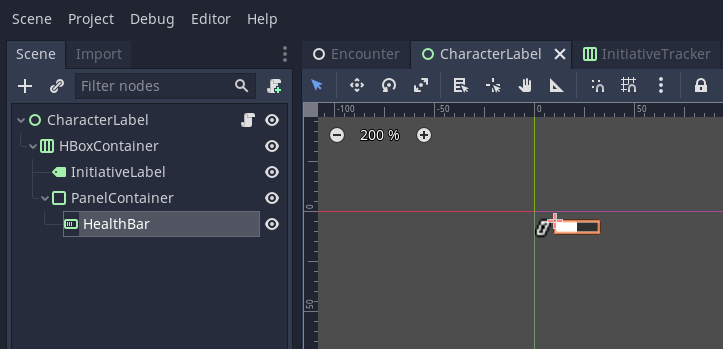
I am working on implementing a health bar using ProgressBar that hovers near a character. I am currently encountering an issue where the bar does not visually update, despite changing its current value.
I have connected the node with the health bar to a signal that indicates when the character’s health has changed. The signal is successfully captured and the value of the ProgressBar is registered as being changed. The problem is that despite the value getting updated via code, the visual of the ProgressBar does not change.
What’s weird is that I am already doing something similar elsewhere with no issue. I have an initiative tracker that also uses a ProgressBar to display character health. Each one of those also connects to the health changed signal. All of those ProgressBars update without issue.
Video Capture
The health bar of TestEnemy1 (yellow) is red and positioned in the upper left corner of the game window. In the top middle of the game window is the initiative tracker.
Node Layout
The ProgressBar is a child of a node that has a label and several containers. There is a PanelContainer that is used to create a border around the ProgressBar.
It should be noted that the CharacterLabel is set as a child node of the character it is for.
Code
This is the script for the node with the details related to the ProgressBar. There are other parts in the original code, but none of them deal with the ProgressBar.
class_name CharacterLabel
extends Control


onready var _health_bar: ProgressBar = $HBoxContainer/PanelContainer/HealthBar


# Sets the value of the current health.
func set_cur_health(value: int) -> void:
	print("old value: %d" % [_health_bar.value])
	var true_value: float = clamp(value, 0.0, _health_bar.max_value)
	_health_bar.set_value_no_signal(true_value)
	print("new value: %d" % [_health_bar.value])


# Sets the value of max health.
func set_max_health(value: int) -> void:
	_health_bar.max_value = float(value)


# Updates the current health value of the label.
func _on_CharacterStats_health_changed(new_value: int, _old_value: int) -> void:
	print("Update health label")
	set_cur_health(new_value)


# Updates the max  health value of the label.
func _on_CharacterStats_max_health_changed(new_value: int) -> void:
	set_max_health(new_value)
Prior Research
I found that someone asked a similar question, but it has yet to be solved and the last update to it was in May of 2024.
I think your code is OK, but the top bar with 9 players and enemies is a bit confusing because you have only 2 players and 2 enemies. I watched the video and I noticed that the progressBars are decreasing when you change their values but they are switching positions with other players and enemies when players and enemies exchange turns. Look at the screenshots I took:
You are partly right. The characters dislayed are shifted to the left as characters take turns. I plan on adding in logic later that makes it obvious that the displays are sliding to the left.
The issue that I am having is not with the nine displays. There is another bar in the very top left that should update when TestEnemy1 (the yellow one) takes damage. I am able to successfuly change the value of the progress bar, but the change is nkt displayed visibly.
Sorry, now I understand. So it works normally in the editor but in game it doesn’t? Why is it white in the screenshot that only showes the health bar but ingame it is red? Did you change it before or after you recorded the video? Are you using custom healthBar background? Didn’t you accidentally created progressBar background with the same color red as the fill?
You can try playing only the healthBar (CharacterLabel) scene and decrease the value while you are playing it if it works isolated from everything else or not.
I am using a custom theme to create the progress bar design. There is a bit of code that I left out in the original post that updates the modulate color of the progress bar based on the character type. That is why the bar is white in the editor but colored differently in game.
I will try testing the CharacterLabel in isolation.
I created a new scene, Test, with two buttons that emit a signal, value_changed, when pressed. The signal passes along an integer that is defined in the editor. I added the CustomLabel scene to Test and connected the value_changed signal of both buttons to CustomLabel. I am still getting the same issue.
This is the script for the test buttons
extends Button


signal value_changed(value, value)

export(int, -10, 10) var value = 0


func _on_Button_pressed():
	emit_signal("value_changed", value, value)
The value_changed signal connects to the _on_Character_health_changed function, which originally connects to a signal that provides two values.
# Updates the current health value of the label.
func _on_CharacterStats_health_changed(new_value: int, _old_value: int) -> void:
	print("Update health label")
	set_cur_health(new_value)
I FIGURED IT OUT! For some reason, it is not enough to simply set the value of the progress bar in order to get the values to visually update. You need to set both the max_value and value in order for the change to register visually.
ProgressBar Test Code
extends ProgressBar


# Sets the value of the current health.
func _set_cur_value(new_value: int) -> void:
	print("old: %f" % [self.value])
	new_value += int(self.value)
	var true_value: float = clamp(new_value, 0.0, self.max_value)
	# Need to set both max and current in order to get the display to update
	max_value = max_value
	set_value_no_signal(true_value)
	print("new: %f" % [self.value])


func _on_Button_value_changed(v: int) -> void:
	print("Update")
	_set_cur_value(v)
Maybe that’s a Godot 3.x thing, because in Godot 4.5 I can most certainly update my progress bars by changing the value only without touching the max_value.
Glad you found a solution though, maybe it will help someone struggling in the future.
Consider also replying to this other unsolved post with your found solution, in case someone finds this other post when looking for an answer.