Godot Version
4.4.1
Question
Has anyone encountered Quest approval for a 3D game using encryption and getting dinged for the >4 second load time?
So previously I solved the bugs/issues with encryption in Godot specifically for the Quest: Encryption on Quest
Recently I sought approval for my game in the Quest store. I got dinged because in using encryption it caused the load time of the Engine (and therefore my loading page) to take 8-10 seconds (obb was 400mb).
The way the engine boots up, if you use the expansion pack, you can’t render ANYTHING in Godot until this boot sequence is completed. Since all files are placed into an external OBB file which needs to be decrypted, the Engine cannot initialize yet.
Those fields which ostensibly seem like you can make exceptions for certain files to remain in the APK do not work as some might think (i.e. if you make decryption exceptions, they still go into the obb, but are not encrypted, wohwah).
I thought perhaps I could use an Android-specific loading page in the Android template. I am quite familiar with coding Android apps so I proceeded to add a little loading page. I swiftly realized that because the app is in immersive mode these do not work and are simply ignored or cause crashes.
I thought, “hey, let’s try writing frames directly to the Vulkan API to create a gimpy loading page while Godot does its thing.” It seems that you cannot touch Vulkan. Quest Vulkan is unavailable until Android creates the native window and Meta/OpenXR owns the surface, so boot-time Vulkan calls are invalid by definition and do some pretty weird things to the quest immersive home or crash. The only place I found that I can eventually screw with Vulkan is at the end of Engine init which defeats the purpose.
The last option was to refactor the boot sequence. This is what I did.
1–I first created a new option under encryption which endures in each preset config–Use Boot PCK.
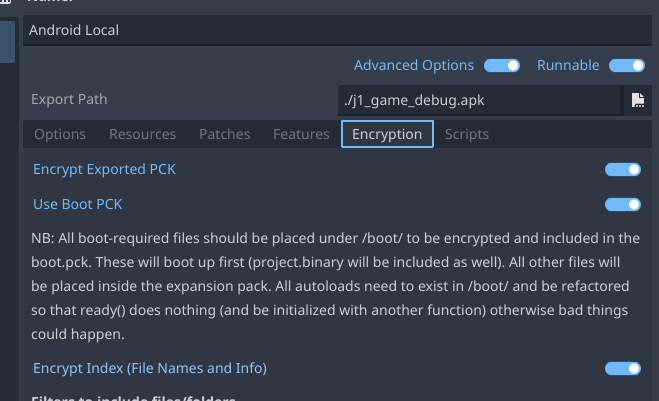
2–Then I refactored a project putting all my autoloads into /boot/ and created a small loading page. I had to refactor all of my autoloads so that ready() sets process to false and created an init_autoload() which I can invoke later. I set my initial page in the project settings to point to this loading page.
3–I refactored the encryption process. If this boot preset is selected, I ignore /boot/ files in the main obb as well as the project.binary and create an encrypted boot.pck which is placed at /assets/boot.pck. (Unrelated, but I also made it so that if vr_splash.png is found in /boot/ it moves it to /assets/vr_splash.png–this is needed by Meta/Quest to show by default as soon as you launch the app as your default splash image. I had created a shell script to take the APK, unzip, add the vr_splash and zip it back up and sign it, not fun, since Godot by default deletes everything in /assets/ when creating the apk).
4–I changed the Android template so that if /assets/boot.pck is found it copies the encrypted file over to a real location on the quest (this is necessary in order to open the file normally so you can decrypt using the default decryption routine). Then I pass it to the quest startup as the main-pack.
5–At this point the Engine loads with this small boot.pck and displays the loading page. This happens consistently in 2-3 seconds. Then the decryption of the big fat obb happens like normal.
6–I created two JNI bridge functions: one to report decryption progress and another to signal when decryption has completed. I added these guys to my loading page gdscript to poll. I can now display accurate progress (progress is marked by a percentage of the files processed in the big fat obb), and when decryption is complete, I invoke my autoload init functions and switch to my main scene without a hitch.
So for anyone who wants to ship on the quest and use decryption, you may run into this problem. I’ve found that roughly 100mb = 1 second of additional load time for the engine (if decrypting an obb and not using a boot.pck).
If you don’t wish to go down this route, you could also do something silly. You can add android widget toasts in your startup process to get past the Quest 4 second rule. I’ve found Toasts are the only things which seem to render on the Android side (use all caps and no symbols–Quest’s system toast font and text renderer are optimized for uppercase ASCII, while lowercase glyphs and symbols could fall back to inconsistent fonts or code paths). This is how I initially got approved on Quest, but it is ugly and amateur-looking, but works, if the approver is in a good mood. 