"Random" infinite freezing without errors - a tool for tracking internal processes?

Godot Version

4.6.2 Stable

Question

And so, the essence of the error is stated in the title - when testing the game, it periodically just freezes forever, without reporting any recursion errors or anything like that. The problem is that the game I’m working on is very, very complex (it’s kind of a mix of Kenshi and Terraria) so actually, I can’t provide any code, because I have no idea which of the code snippets of the codebase itself is causing the error (there are currently 36.000 lines of code in the project) - just the Gdscript. I suspect that the error has something to do with the UI and the recalculation of Control’s sizes and containers, since the UI in the game is complex and it looks like the problem appeared somewhere at the stage of adding its ui logic, but since it is impossible to debug the problem, I actually do not know what exactly I should fix.

Therefore, my question down to the following: is there a way to constantly monitor the processes taking place inside the game so that, in the event of an infinity freeze, I can see in some third-party analyzer the current task that the game is trying to complete?

UPD:

Okay, it seems to be related to the fact that Godot cannot handle a reference to a node that has already been free. The problem occurs when I iterate over objects in an array where the object may already have been freed using queue_free() and is therefore null. When I attempt to interact with such an array element, the game freezes indefinitely without any errors. Even a simple check like (if obj == null) causes the game to freeze (after removing the check, I instantly received an error about a previously freed object). I don’t know if this is the right thing to do, and I might have made a mistake somewhere, but it’s confusing me.

Basically, here’s what’s happening:

  1. I have a Thing (Sprite2D) object that’s being added to the world. It’s also being added to the object_pool array for the TileData of the nearest tile (TileData is a Resource)
  2. Removing the Thing via queue_free() without manually removing it from the tile’s object_pool results in a reference to the previous free null remaining in the object_pool.
  3. When iterating through the array elements, any attempt to interact with this null causes an infinite loop for some reason. For example, I originally did is_instance_valid(obj) and it caused a hang. However, even a simple if obj == null is sufficient.
  4. If I remove any checks and directly interact with the object, I get the error previous free object.

The solution is obviously to manually remove the object from the object_pool, but I’m curious about the reason for the freeze.

Here’s more information.

1.The player interacts with the object:

func execute_use(obj : ThingBody):
    var user = Cursor.tile_core.control_entity
    if obj.thing and user:
        await obj.thing.execute_modules(user,obj)
  1. In Item module i call destroy object

    func execute_action(user : EntityBody, body : ThingBody):
        if not user or not user.entity or not body.thing or not item:
            return
        var inv = user.entity.inventory_core
        if not inv:
            return
        if inv.add_item(InventoryCore.GET_TYPE.STASH_CORE, item):
            body.thing_free()
    
  2. In ThingBody i destory object:

    # Destroy
    
    func thing_free():
        if thing:
            if thing.on_tiles_dict.size() > 0:
                for tile: TileWorldData in thing.on_tiles_dict.keys():
                    tile.remove_thing(thing)
                    #tile.objects_pool.erase(self) # Here problem fix
            var sec_data = Cursor.location_manager.sector_data
            if sec_data:
                sec_data.remove_thing(thing)
            if Cursor.hovered_thing == thing:
                Cursor.hovered_thing = null
        queue_free()
    

As you can see, I have commented out the line with object_pool. If I do this, the object_pool will retain a reference to this object. In this case, checking in this method will cause an eternal freeze without eny errors:

    # 4. Objects
    if !tile.objects_pool.is_empty():
        for obj in tile.objects_pool:
            var ref = weakref(obj)
            var instance = ref.get_ref()
            if instance == null:
                continue
            if !instance.thing:
                continue
            var thing_ref = weakref(instance.thing)
            var thing = thing_ref.get_ref()
            if thing == null:
                continue
            var n_obj_button: Button = object_button_prefub.instantiate()
            n_obj_button.icon = ResourceGod.get_object_list_icon("thing")
            n_obj_button.text = thing.t_name
            object_list_holder.add_child(n_obj_button)
            if !n_obj_button.pressed.is_connected(select_object_from_list):
                n_obj_button.pressed.connect(select_object_from_list.bind(n_obj_button, instance, {"name": n_obj_button.text}))

At the same time, the freeze occurs on this line. The ref itself exists, but it is empty and does not have a script.

var instance = ref.get_ref()

You can also see all these weakref things that I added just to try to fix the error. In fact, the error occurred even without creating any weakrefs when trying to access the object (so that no one gets confused)
It sounds like you’re doing something that is preventing the _process() and _physics_process() game loops from executing.

Do you have any while loops in your code? That’s the most common way for that to happen.

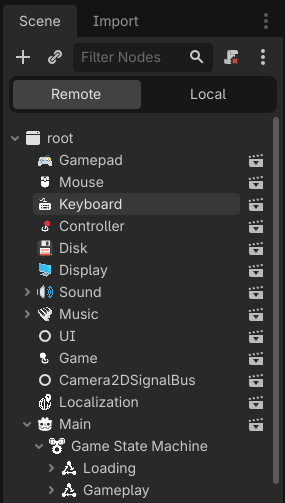
The other possibility is a memory leak due to nodes that don’t get deleted. Have you looked at the Remote view while running your game?

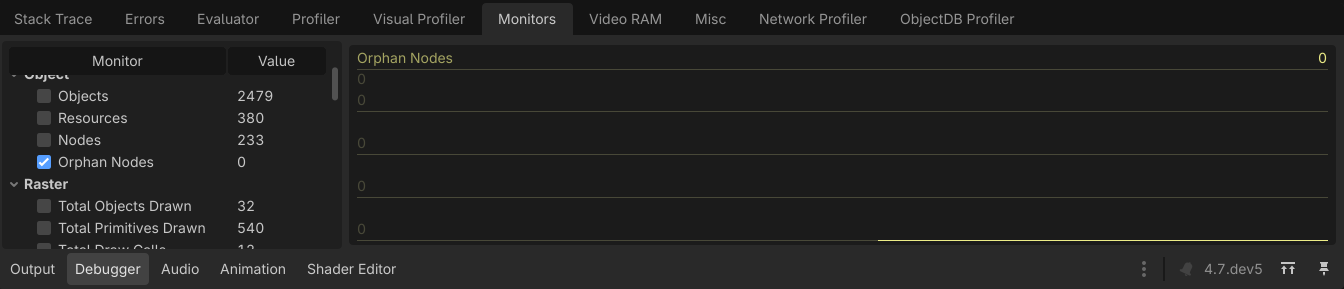
You can also use the Monitor tab in the Debugger to monitor Orphan Nodes. Orphan nodes could also cause a memory leak.

You can also monitor all sorts of other things there.

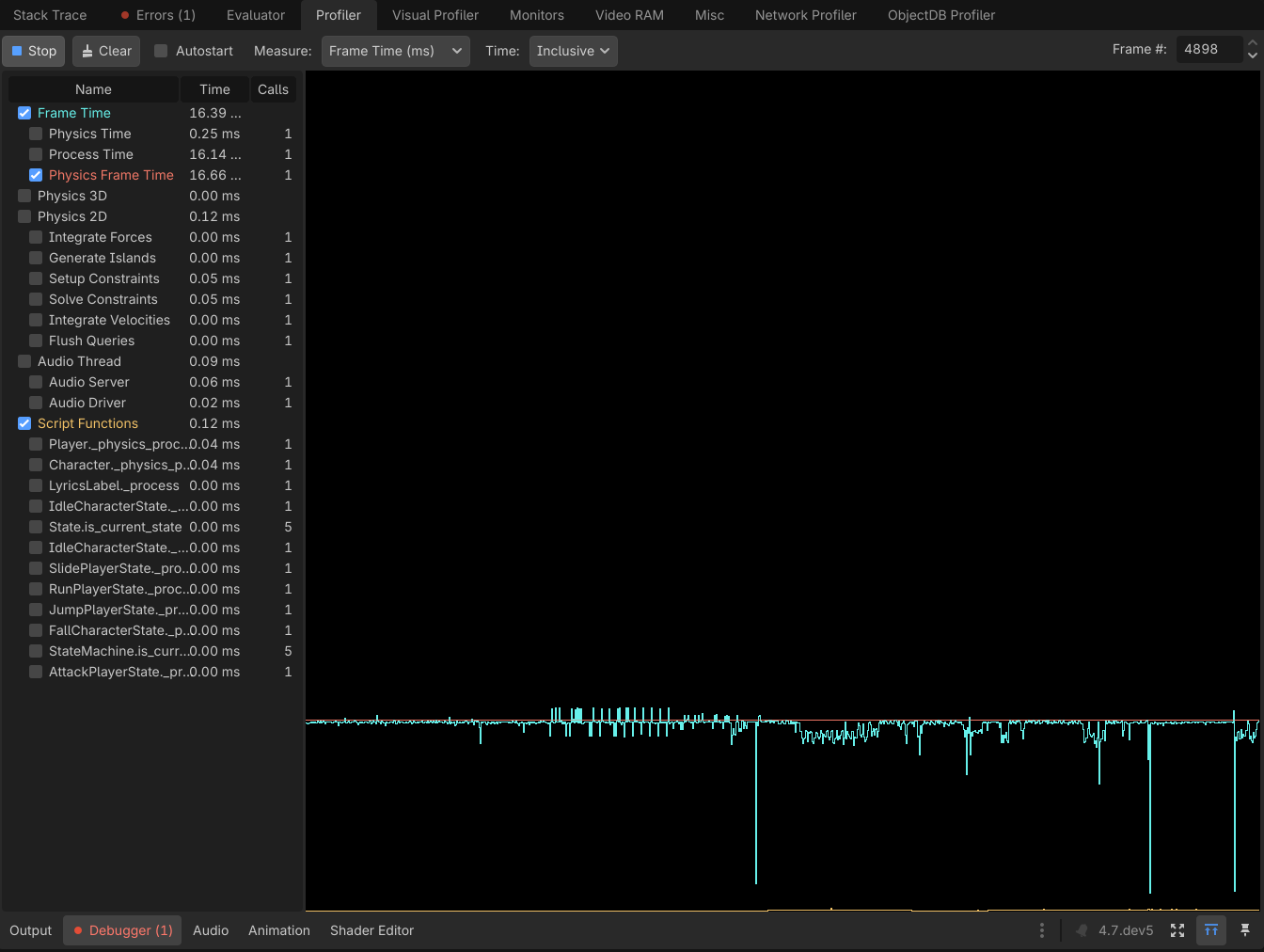
I think what you’re looking for is the Profiler in the Debugger. You can to start your game, then press Start once the game is running (or set it to Autostart). Then you have to check Script Functions and then check any functions you want to track *which only appear in the list when they’re running. However, just having this running when your game hangs should show you what scripts to look at.

I have updated the topic, please check to see if it makes sense. At the moment, I have solved the problem by removing the broken links from the array, but I am not sure if this is the intended behavior.

Post the code.

1 Like

Based on your description, you are using Arrays in an unsupported way. Specifically this caution from the documentation:

Note: Erasing elements while iterating over arrays is not supported and will result in unpredictable behavior.

Which is pretty standard in most languages. If you want to do something like that you’ll need to make your own linked list class.

You can detect whether a Node has been queued for being freed, or if it has been freed BTW, so you could fix it that way - but again, you should not be deleting elements while iterating over it.

Instead you should iterate over the Array and add the elements to be deleted to a list. Then iterate backwards through that list to successfully delete them all. Then you can iterate again.

Updated

I’m not sure if I’m trying to remove objects from an array while iterating over it. Am I just checking the objects? Although I might not understand something because Gdscript is the only language I know, and I don’t have much experience. Anyway, I’ve included the code

This is just too much for my stomach.

  • double line spacing
  • weakrefs
  • awaits
  • managers
  • abstracted abstract names (thing, instance, instance.thing (or is it thing.instance?), object_list_holder, object_pool…)

And then you get stuck on iterating an array.

My crystal ball tells me, at some point in the near future this project will require a complete teardown and rebuild from scratch.

@dragonforge-dev you have the podium.

1 Like

I’m very glad that you found the opportunity to compete with me in terms of code and all these religious things, but this doesn’t really answer my question.

Nothing “religious” about it. You stated yourself that you don’t have much experience, so it’s not really your call to judge what’s “religious”. Your code is problematic on multiple accounts, and that’s the reason you painted yourself into this buggy corner.

There’s really no “question” here. You’re publicly asking for somebody else to debug your messy code without the ability to run it.

1 Like

You should know that code, no matter how bad it is, is not capable of affecting all parts by all parts. Having a single abstraction or messy composition cannot cause the program to freeze forever when trying to check an object is null, as these are completely different areas - null checking is a fundamental and basic memory access operation. I have specifically described the problem to you, but instead, out of boredom, you have chosen to focus on everything else (including the mention of double lines that I have simply copied from VsCode, as the formatting is obviously different). Go in peace

Use print statements and debugger breakpoints to track where your program is going, what it is doing there and what are the values of relevant variables along the way. Debugging 101.

If print statements could return the value of a program that was freeze in an infinite recutstion, I wouldn’t be here. I rarely ask for help here

Prints can print values of variables (both the iterator and the iterable) inside that “infinite loop”, giving you the clue whether is really infinite and what is actually happening in there. So do use them. They are your first and in most cases the best line of defense.

1 Like

The problem is that I don’t have any infinite loops in my code (I don’t use while at all). The freeze occurs within Godot C++ itself, somewhere at the level of checking for null, and I have no idea where - it’s simply beyond my control, so I was wondering what the reason might be. I mean, I just don’t have anywhere to write print.

I can write it at the beginning before the freeze occurs, and it will print something. If I write it after the freeze occurs, it will never be called because this part of the code is not called at all - its freeze

Oh but you do - in every place you suspect that problematic null check is taking place. Since you’re using awaits there’s also a good chance one of them is sending your execution flow into oblivion. Hard to tell without the ability to run the thing.

If the problem was in await, it would happen every time, wouldn’t it? But the problem only happens when I do “if obj == null” which shouldn’t be a problem at all because I’m just checking the null object. I mean… it’s such a basic operation

awaits can produce a really tricky mess that appears to defy all logic. I’m not saying they are the cause, just that there’s a possibility. Whatever it is, if you want to catch it start by printing stuff out so you can form a correct mental model of what the program is actually doing.

1 Like

First, I don’t disagree with anything @normalized said, he just comes off as blunt. You said GDScript is the only language you know. It might be helpful to take a breath and know that I have 30 years of professional software development experience, and @normalized has a similar amount. We are trying to help you.

A few general thoughts before we break down your code.

  1. Using VSCode as you code editor is going to complicate everything you do. That may be a decision worth revisiting. If you really don’t like the Godot script editor, you might consider using JetBrains Rider. In this case, specifically because it’s a lot easier to configure Rider to set breakpoints than VSCode.
  2. Settings breakpoints is a great way to see what’s going on inside your editor. It’s just a single click in the gutter for the Godot Editor. Otherwise you’ll have to look up config instructions for an external editor. Breakpoints are a great alternative to print statements if you want to dig into what variables look like when your code is failing.
  3. Names are important. Names like Thing and ThingBody are not descriptive and make your code harder to read, increasing cognitive complexity. Same with EntityBody, entity, thing, objects_pool, ref, n_obj_button, and obj_list_holder. This will become a problem for future you, but also makes it a lot harder when you want someone (like us here on the forum) to look at your code and help you debug it.
  4. Context is important. You have provided snippets of code and referenced variables and objects that are not declared in the code you have provided. You have also declared variables without strict typing, so we cannot see what they are. Reading the code you have presented is, to an experienced programmer, like being presented the cliff notes version of a novel and then asked to correct the grammar and spelling of the original novel.
  5. The word “Manager” is an Anti-Pattern. Going back to “names are important”, when the word Manager shows up in code, it shows an architectural choice that causes problems because the word itself causes thinking errors when implementing the "manager "object. You have location_manager in your code. While this code will work, it tells us a lot of things about where you are in your coding journey.
  6. WekRef is the devil Bobby Bushay. I’ve never seen a solution on this forum that required a weakref. It can only make your problem worse.

Having said all that, we either need you to explain all of those variables I mentioned above, what type they are and what they do, or we need you to give us the full files you think are affected by this code. Because you do not have the knowledge necessary to know what we do and do not need to see to help you.

        for obj in tile.objects_pool:

This is the line where you are iterating over an Array.

I do not see how #3 and #4 connect.

We need more information to help you.

Thank you for that response. I can provide more context, but at the moment the problem is solved, so I’m not sure if it’s necessary. The problem is definitely at the C++ level, and although you might think that I can’t identify it (because I have the wrong naming, use managers and etc.) - I’m sure of it and some people I’ve talked to confirm this.

I honestly can’t understand why you have trouble understanding this problem, because its description is very simple.

  1. You have an array that contains links to Sprite2D objects, some of which were released via queue_free(). like →
    var object_pool : Array[Sprite2D] = []
  2. If you try to check such a Sprite2D link (obj in the example) at null - for example, using is_instance_valid(obj) or if obj == null - the game is frozen (Program does not respond - Windows). That’s all.

Stopping the game via (Stack Trace - Break) shows that the current point where the game stopped is is_instance_valid(obj) check, where obj is null and is_instance_valid(obj) never goes past the line of is_instance_valid(obj) code. This also indicates that object_pool contains one null object.

I claim that this is probably a bug or an error, because the preliminary removal of this ‘broken’ link to Sprite2D from the array completely eliminates this problem. That is, you just need to preliminarily do object_pool.erase(obj)

I assume you think that there is not enough context because this problem might be caused by some specific property of my architecture or the object itself? I thought so too, because I have never encountered this problem before, even though I always use is_instance_valid(), but in this case I am not doing anything unusual - just what is described.

If you think that my architecture is problematic, that is your right, although I do not agree with you, but in this case the architecture does not relate to the problem described above—or its influence is so unobvious that even God would not figure it out. I am talking about this because null checking is the most basic function of the engine, and its logic is separate from everything else.

I would also appreciate your advice on code architecture and error submission format if they were relevant here. However, to me this does not look like an attempt to understand from your side, but rather as an attempt to point out where I am wrong and why I cannot be helped. However, the error itself has never been discussed in this topic - only the fact that I am providing wrong information that is also wrong with this information. In that case, it would be easier for me to sort things out myself than to write here at all, and I probably will never write here again.

And yes, I could provide more context in the form of code, but then I would have to send entire scripts (about 2k lines of code for this part or more). The game that I’m working on is very complex - it has a lot of simulation mechanics, a lot of code binding, because Things do many different actions with world and with Entity. Same goes for the name Thing - it’s a standard name for interactive objects in Oldschool Rogue games - I know you might not like it, but it makes sense, like Entity, which is a standard for some solutions such as ECS (I only implement EC).

I don’t want to seem negative, but I was really upset by your response, because basically you are asking me to show you half of the entire project to identify a problem that occurs in two lines of code and is a basic operation