Godot Version
4.7
Question
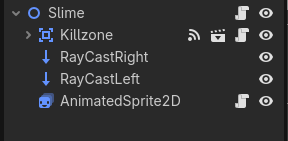
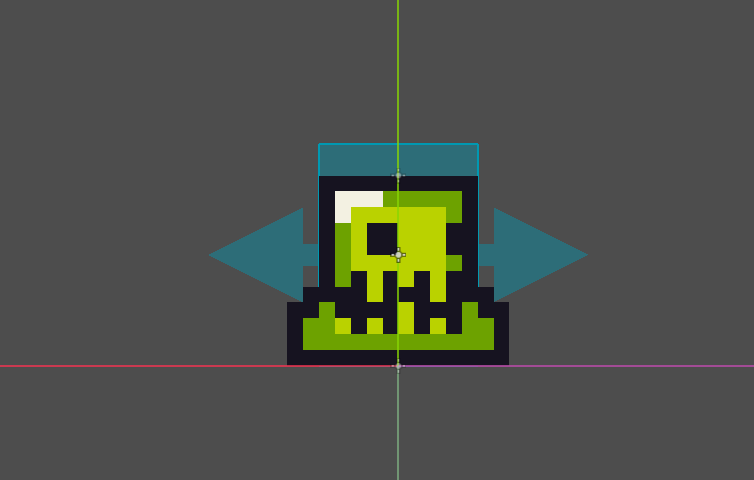
Hey, I was following Brackeys Godot tutorial from two years ago and when I got to the part where you make an enemy I was having trouble with the raycasts and colliders. It looks like the Raycasts and colliders are lagging behind the Node2D and the AnimatedSprite2D, this causes the enemy to move into the wall before turning around and have a hitbox that trails behind it. I would upload a video to this but unfortunately wont let me, I hope my description is good enough.
Thanks
extends Node2D

const speed = 30

var direction = 1
@onready var ray_cast_right: RayCast2D = $RayCastRight
@onready var ray_cast_left: RayCast2D = $RayCastLeft
@onready var animated_sprite: AnimatedSprite2D = $AnimatedSprite2D


# Called every frame. 'delta' is the elapsed time since the previous frame.
func _process(delta: float) -> void:
	if ray_cast_right.is_colliding():
		direction = -1
		animated_sprite.flip_h = true
	if ray_cast_left.is_colliding():
		direction = 1
		animated_sprite.flip_h = false
	position.x += direction * speed * delta
Raycast is cast every physics frame so that may be why it is lagging behind.
Add force_raycast_update() right below the _process() function to force raycasts to update every frame instead.
It should look like this:
func _process(delta: float) -> void:
    ray_cast_right.force_raycast_update()
    ray_cast_left.force_raycast_update()
    if ray_cast_right.is_colliding():
    …
Hope it fixes the issue.
I tried this and the issue is still present, I also tried switching process to physics_process but that also didn’t work.
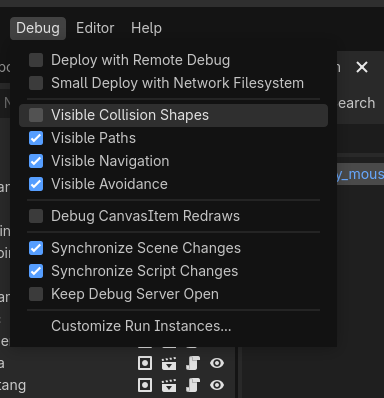
Could you enable Visible Collision Shapes and run the project? Does the raycast lag behind the Slime visually too?
The raycasts and colliders are actually moving properly back and forth but the AnimatedSprite2D is moving too much in each direction
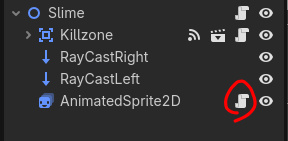
What’s the script attached to the sprite2d?
There is no script attached to the AnimatedSprite2D, its attached to the Node2D, here is that script
extends Node2D

const speed = 30

var direction = 1
@onready var ray_cast_right: RayCast2D = $RayCastRight
@onready var ray_cast_left: RayCast2D = $RayCastLeft
@onready var animated_sprite: AnimatedSprite2D = $AnimatedSprite2D


# Called every frame. 'delta' is the elapsed time since the previous frame.
func _process(delta: float) -> void:
	ray_cast_right.force_raycast_update()
	ray_cast_left.force_raycast_update()
	if ray_cast_right.is_colliding():
		direction = -1
		animated_sprite.flip_h = true
	if ray_cast_left.is_colliding():
		direction = 1
		animated_sprite.flip_h = false
	position.x += direction * speed * delta
I ended up fixing it, all I had to do was divide the AnimatedSprite2D’s position in half and it matched up with the colliders. I have no clue what caused this but I’m glad its fixed, Thanks for everyone’s help!
Here’s the finished script if useful:
extends Node2D

const speed = 60

var direction = 1
@onready var ray_cast_right: RayCast2D = $RayCastRight
@onready var ray_cast_left: RayCast2D = $RayCastLeft
@onready var animated_sprite: AnimatedSprite2D = $AnimatedSprite2D


# Called every frame. 'delta' is the elapsed time since the previous frame.
func _process(delta: float) -> void:
	ray_cast_right.force_raycast_update()
	ray_cast_left.force_raycast_update()
	if ray_cast_right.is_colliding():
		direction = -1
		animated_sprite.flip_h = true
	if ray_cast_left.is_colliding():
		direction = 1
		animated_sprite.flip_h = false
	position.x += direction * speed * delta
	animated_sprite.position.x = animated_sprite.position.x / 2
This icon should mean there’s a script attached, if there’s code in there changing the sprite’s position, then it would be added on top of the movement of the root node. The line you added is cutting the sprite’s position in half every frame, so it’s likely just approaching zero and cancelling out whatever was causing the problem in the first place.
Yeah I figured that but I wasn’t sure where it was coming from, I might have accidently left it in or something