Godot Version
4.4.1
Question
I am making a simple game. My pause menu and inventory viewing menu are somehow either interfering each other or
stopping my input reading entirely. I tried a solution which was to move the player movement into the _input() function instead of _unhandled_input()
and I think it partly worked. I added a button in the inventory that lets you go back to the pause menu and for some reason it isn’t reacting at all.
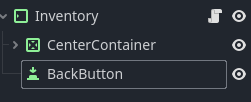
(Inventory scene hierarchy)
(Inventory code in relation to the pause menu)
func _ready() → void:
get_viewport().gui_release_focus()
back_button.pressed.connect(go_to_pause_menu)
print_debug(back_button.disabled)

func go_to_pause_menu() → void:
mouse_filter = Control.MOUSE_FILTER_IGNORE
self.hide()
pause_menu.show()
The pause menu works fine and when I press to switch to the inventory it works.
I identified one problem while writing this which is that, for some reason, my Inventory isn’t running the _ready() function at all.
Does anyone know why that might be?
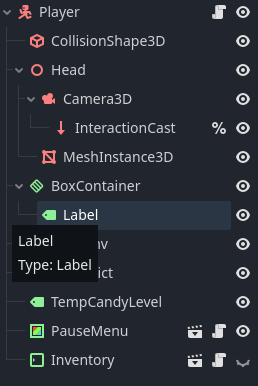
(Inventory as child of player)
(And before anyone asks, yes, the inventory main node’s process mode is set to always and the button’s is set to inherit, which should inherit the always from the main node.)
how did you deduct to this?
Did you check if this part in ready is printed in console?
That and the fact that the button I’m connecting doesn’t do anything when pressed. It does look frozen tho, it doesn’t even play that “built in press animation“ it usually does so it could be something else, but so far I think there’s something up with the initializing of the inventory.
I can think of two reasons:
1- The node is not added to scene tree so ready function is not called.
2- You have an extended class that is attached to Inventory, but this function below is on the main class. And you don’t call it with super() in the extended class
I didn’t use classes for this. I’m not sure about the first one. It should be added to the scene tree with the player, so it doesn’t make any sense (I added another print function and that one doesn’t run either, I added it as first thing in _ready()). I’ll keep looking, maybe I tweaked something in the inspector 
It’s extemely unlikely that _ready is not called.
When you run the project, did you check the remote scene to see if the Inventory node is actually in the scene tree?
So, yes, it was in the remote scene tree. After I checked, the _ready() randomly started working, but I still have the exact same issue: The button is completely unresponsive and doesn’t do anything
there may be another ‘invisible’ control node on top of the Button so that it doesn’t work.
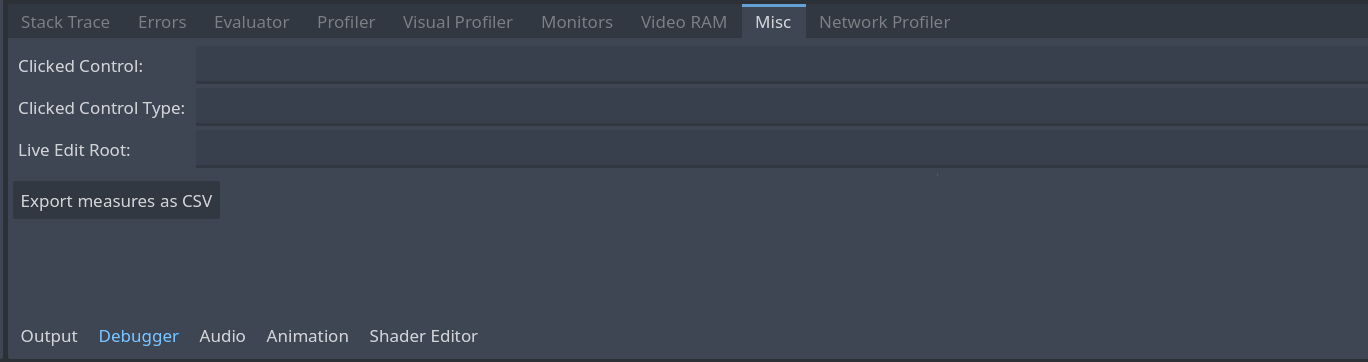
When you run the project, try to click on the button, and check which control node is clicked from debugger:
1 Like
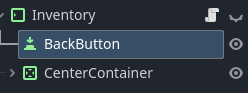
It was the fact that the button was before the CenterContainer in the hierarchy
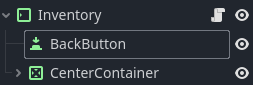
and not:
1 Like