Hi, New to Godot here. Trying to understand the best practices for building UI.
Here’s my concern:
-
Since Godot is a game engine, the screen is constantly redrawn each frame.
-
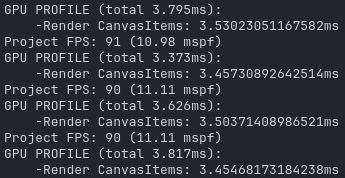
However, even static UI elements (for example, a logo in the main menu) appear to consume render time in Render CanvasItems every frame.
-
This feels inefficient, because these elements don’t change and theoretically shouldn’t need to be redrawn every time.
My question is: What is the proper way to handle static UI in Godot?
-
Should I cache them into a texture (e.g. using a SubViewport or something similar)?
-
Or is it expected behavior, and the cost of redrawing a simple TextureRect is negligible in practice?
What confuses me is that, if the cost is supposed to be negligible, I don’t understand why in a simple blank screen with nothing but an extremely simple logo, the profiler shows around 3 ms spent in Render CanvasItems (see images below)
Important to notice that low processor mode is not enabled.
Also, the texture is a .png 809 x 512 px.
More generally, what techniques or patterns are recommended to optimize static UI that doesn’t change between frames?
Thanks in advance.
Option B.
You are worrying about something that isn’t a problem.
If you want the kind of control you’re describing, you should be rolling your own engine.
Yes, that’s probably it. I would love to see how much Render CanvasItems takes for a complete project though. Could you tell me how long your Render CanvasItems takes in one of your projects? I’m curious to compare, because maybe it’s just some bad configuration on my side.
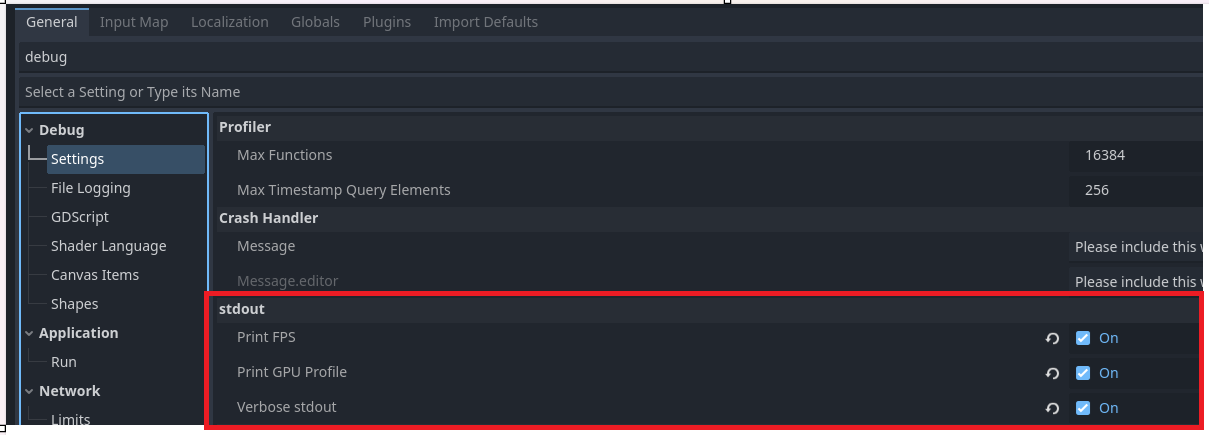
Sure, just tell me how you got that because I’m not seeing that anywhere in the Debugger.
Project settings → Debug → Settings → stdout
Also, you can see it on the
Debugger → Visual Profiler
Printing fps in debugger is pure evil!
Lol
Just use a label in game
To me is the same  I guess i like evil
So I watched it while running my splash screens, and then when the main menu loaded. It ranged from 0.25 ms to 3 ms. It only got three at the end of the third splash screen. Once the main menu came up it dropped to about .4 ms.
I’m gonna go with still don’t worry about it.
P.S. I had tried the visual profiler, and all I got was graph from it. I couldn’t see the numbers.
There is a “low processor mode” under project settings as application/run/low_processor_mode which prevents the screen from refreshing if there is no visual change. However, this is only helpful if you are making a GUI application that can sit still for minutes at a time, rather than a game that does update frame by frame. Enabling this on a game project would perform worse.