Please format your code correctly following the guidelines in this post:
Otherwise we have to re-typed your code to edit it.
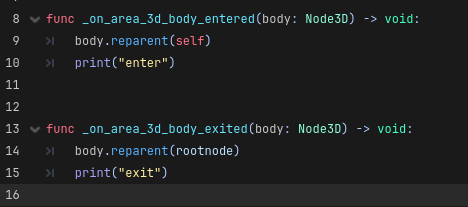
The problem is likely that the body exit call is never getting triggered. In which case, the problem is that your Player is part of the platform object and is no longer being detected as a separate body anymore.
Personally, I’d recommend not reparenting the Player. Then tell us why you are doing that - what problem does it solve? And let’s find a solution to that problem. Because fixing the problem you have now is going to be complicated and hacky.
For re-parenting the player is for making movable platfrom that stick player or entity on it. (it can be use for ship, car and all movable thing)
It is the easy way to do this is using the graph-scene approach. It’s work well in Unity, Unreal engine and all graph-scene base app.
I think most of your problems arise from the fact you’re reparenting player, i think reparenting is one of the worst thing in game dev cuz you’re changing internal structure
I’d propose you assign player variable to platform, or platform variable to player, and then assign player to this variable as he leaves, enters the area
For the case where player spawns inside area, you may run querry to detect all areas & bodies inside your platform’s area and check if they’re player (maybe add group to them or tag them smh) and if player is inside, add him to the variable
Sorry for the small amount of details…
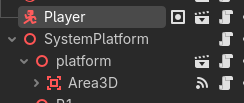
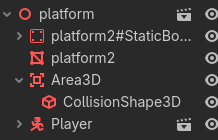
The platform is not a body but an scene witch contain a body and the detection area is a child of the platform.
here the screen capture of scene after the reparent of the player. The platform is a simple Node3D parent of the all system. so the player is not in the body but it is a sibling.
I don’t understand why it does not work in this case. And if I put the player on the platform at start it work only one time.
maybe it is not the good way to do this but it work in all scan graph tool I have use before. So I think I have miss something
By the way thanks for your answer !
Probably your problem would already be fixed if you just changed the type of platform2#StaticBo... to AnimatableBody3D - without ever reparenting the Player.
The problem is not the animation of my platform.
I prefer use an other way to do this with node to control the position. I have a very good level in software programming (My job is tool programming) and I prefer use code to make useful tools for quick development. But thank I will take a look to see if AnimatedBody is better or not has static body.
But in my case the problem is probably in the way I have done my scene graph
I have made a test it is not perfect but maybe with an other scene graph and some movement adjustment it will work.
Thanks !
I let you know if it work or not