Godot Version
4.6
Question
TL;DR - I’m able to successfully save data in a custom Resource using ResourceSaver.save(), but when I try and load it again using ResourceSaver.load(), the data are gone. What am I missing?
I have created a system to save nested data about the states and variables of my game world. Whenever data about a Node or Scene needs to be saved, it creates a SceneData Resource and copies its data into that Resource.
class_name SceneData extends Resource

@export var saved_data : Dictionary # Contains all saved data for a single Scene
The exact data to be saved is defined in a class’s on_save() method. Below is the method used for my Actor class (the parent class of anything that needs to be physically placed in the game world). It takes a Dictionary as a parameter; collects all the data to be saved into a SceneData Resource; then adds that SceneData to the specified target_game_data Dictionary.
class_name Actor extends CharacterBody3D

var actor_data # Arbitrary example data

## Save Scene data to a specified Dictionary (i.e., SaveGame.save_game_data)
func on_save(target_game_data : Dictionary[String, SceneData]) -> void:
	var scene_data = SceneData.new() # create new SceneData Resource
	var data_to_save = scene_data.saved_data
	data_to_save.global_position = self.global_position # Save global position
	data_to_save.actor_data = self.actor_data # Save all other actor information
	target_game_data[self.name] = scene_data.duplicate() # Add to the list of saved data using Node name as the key
Once all Scenes have added their data to the target_game_data Dictionary, it’s stored in another custom Resource, SaveGame. In theory this should contain all saved data for all Scenes that have an on_save() method.
class_name SaveGame extends Resource

var save_game_data : Dictionary[String, SceneData] # Contains all saved data for all Scenes
The target_game_data Dictionary is provided by my global Autoload class for saving and loading. When I need to save the game, it creates the save_game_data Dictionary, calls every Node’s on_save() method, adds the results to the save_game_data, and then adds save_game_data to the SaveGame Resource.
## Global autoload that handles saving and loading all components of the game.
extends Node

func save_game() -> void:
	## The single save file to be created
	var new_save = SaveGame.new()

	## Save each individual Scene or Node that requires saving
	var all_data : Dictionary[String, SceneData] # holds all Node data to be saved
	get_tree().call_group("Save", "on_save", all_data) # Call the on_save method for all Nodes
	new_save.save_game_data = all_data.duplicate() # Add the Node data to the SaveGame Resource

	## Save the SaveGame to disk
	ResourceSaver.save(new_save, "user://savegame.res")
	print("File saved to " + ProjectSettings.globalize_path("user://savegame.res"))
Everything I just described works as expected - I can see all of the entries in SaveGame.save_game_data in the inspector, and the file successfully writes to disk.
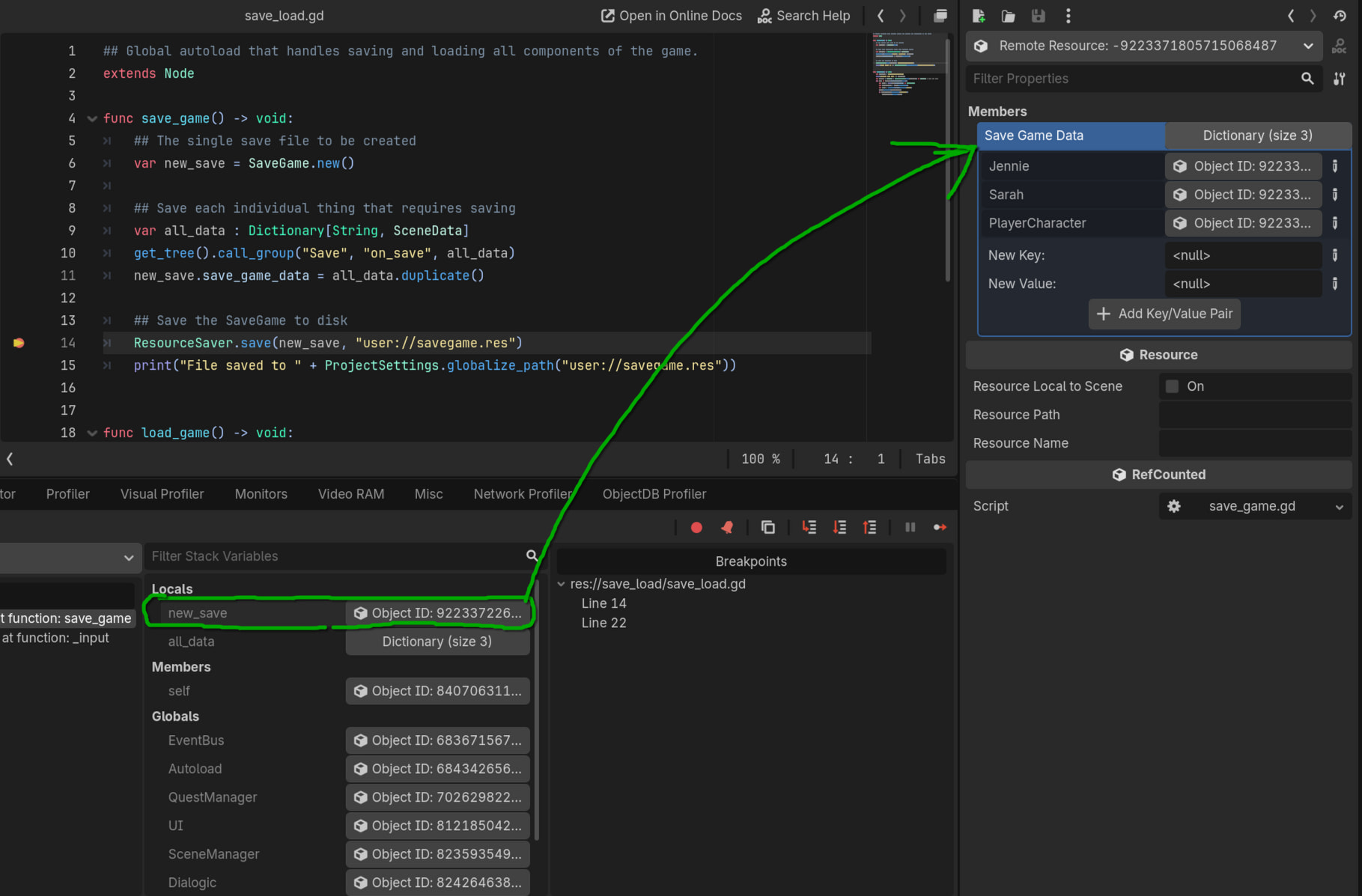
What doesn’t work is trying to load the SaveGame afterwards.
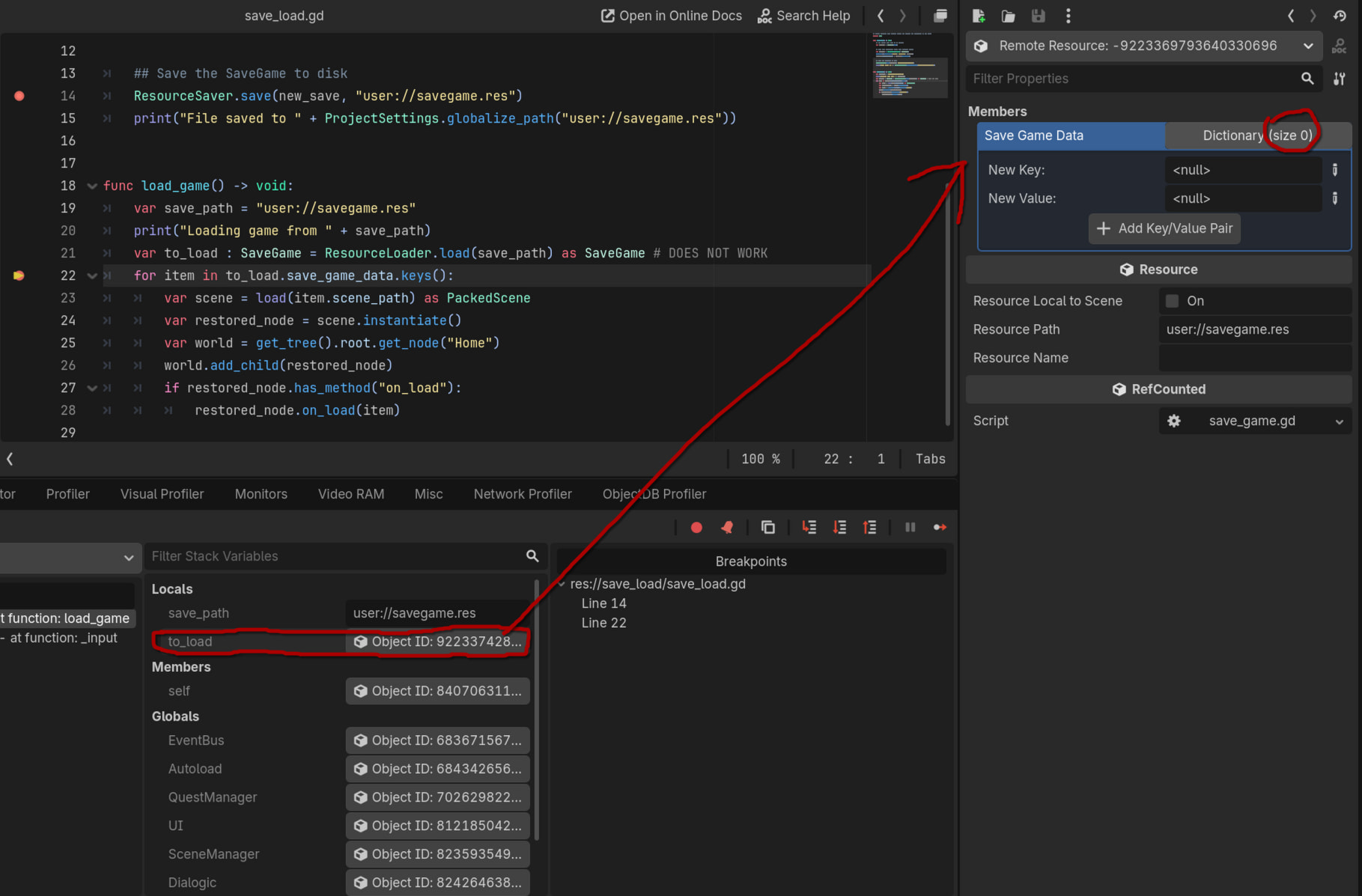
Here is my load_game() function, which should read the SaveGame Resource and iterate through its contents to load the data for each Scene. The SaveGame Resource gets loaded, but the save_game_data Dictionary is empty.
func load_game(save_path : String) -> void:
	print("Loading game from " + save_path)
	var to_load : SaveGame = ResourceLoader.load(save_path) as SaveGame #

    ## Additional code to load the data will go here
Am I missing something? Why is save_game_data empty?
Thank you in advance!