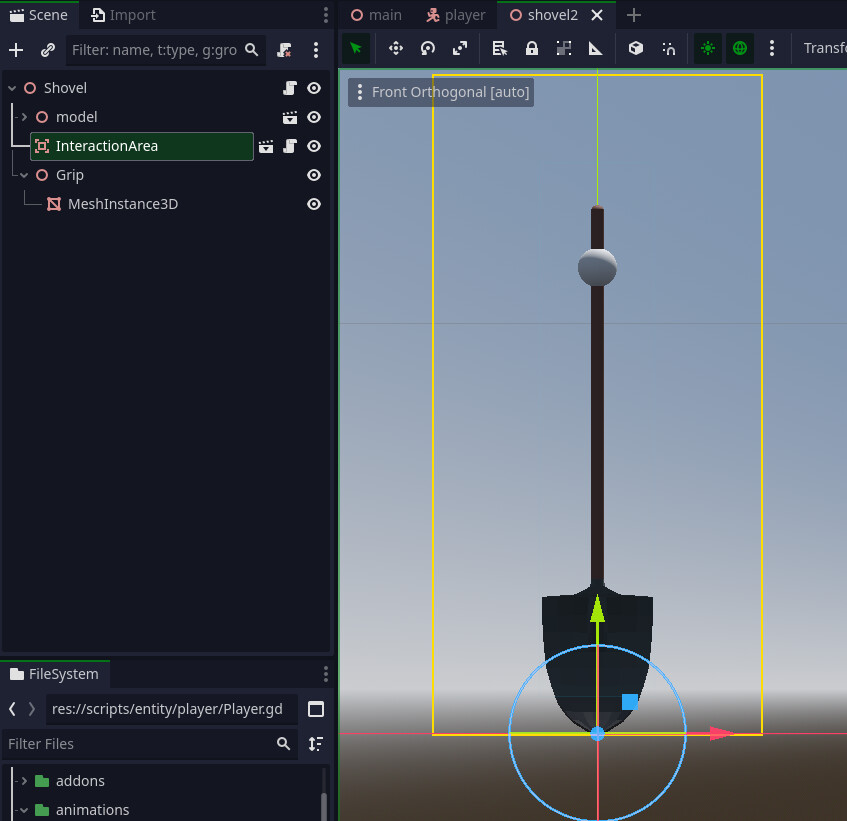
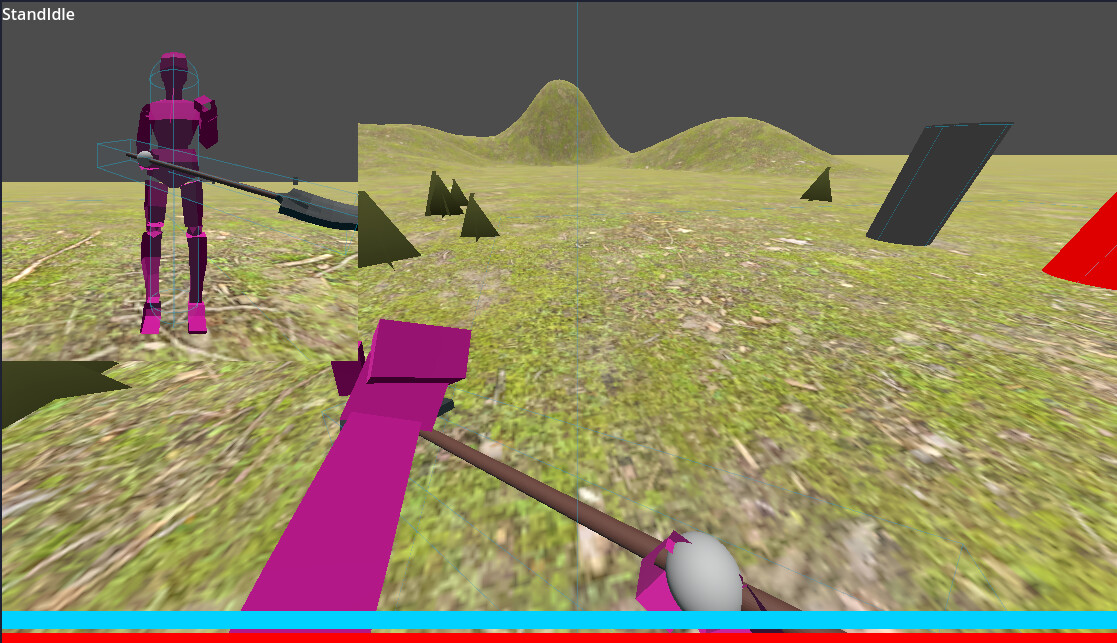
I’m trying to get my player to pick up this shovel and have it rotate so that it’s properly aligned with both the player’s hands. Here’s what I’m working with:
The shovel (with a sphere mesh where I want the hand to grip)
The function that is called by Player when Shovel is picked up:
func pick_up(object: HoldableObject) -> void:
	anim.hold(object.hands) # Sets the position of the arms to hold object
	object.reparent(hand_r_bone)
	object.rotation_degrees = Vector3.ZERO
	object.position = -(object.g1.position * object.scale)
With that function, I manage to get the shovel positioned in the right hand the way I want it. Now the challenge is getting it to rotate so that it’s also placed in the left hand.
Directly construct shovel’s global basis. Its y vector is known; it is the direction from character’s left hand to their right hand. You’d typically want basis x vector to be perpendicular to global up and to already known basis y. So it can be calculated as a cross product of those two vectors. Since this basis is orthogonal, the remaining z vector is simply a cross product of x and y vectors you just calculated.
This is basically an equivalent of a custom look_at() function. You need to use custom instead of built-in look_at() because the latter aims object’s z axis and you need to aim the y axis.
Thanks for the quick reply! I’m doing my best to apply what you’re describing but I’m not quite getting it as I’m pretty new to Transform3D stuff (I just learned what a basis is today and still trying to wrap my head around it). Would you mind explaining it more simply?
From what Normalized said i imagine you could also rotate the shovel mesh in the shovel scene to be aligned in the positive z direction, then give it the appropriate twist so that the y is correct too.
Then when you position the shovel in the world you just rotate it until it looks the same.
Hmm I suppose that could work, but the reason I want to do the rotation via script after the item is picked up is so that I can use the logic in a function that is called in _process() and have it always align with the hands, even when an animation plays (e.g. attack or dig animation)
For the sake of this discussion, the basis is a collection of 3 mutually perpendicular vectors. You can see them on your screenshot drawn as red, green and blue arrows. Directions of those 3 vectors unambiguously determine orientation of an object in 3D space. In other words, the basis represents the orientation of object’s local coordinate system. When you rotate an object using the rotation gizmo in the editor, you’re in fact re-orienting the basis, those 3 red/green/blue arrows.
So if you calculate desired directions of those 3 vectors and just directly assign them to global_basis.x, global_basis.y and global_basis.z - the object will magically pop into wanted orientation.
One of those vectors is immediately known - the green one aka basis y. It’s the direction from one hand to another. So that can be immediately assigned to global_basis.y
The remaining two must be calculated. The neat thing here is that those 3 vectors all need to be mutually perpendicular. We can exploit the vector cross product here as the cross product between any two vectors is always perpendicular to both of them.
Next we calculate the basis x. This, by our previous definition, needs to be perpendicular to our known basis y. We also want it horizontal so it needs to be perpendicular to global up vector as well. If we take the cross product of basis y and global up vector - we get our basis x.
Now we have two basis vectors; the green one (basis y) and the red one (basis x). Since the remaining blue one must be perpendicular to both of those, we simply take their (x and y) cross product and that’s our blue basis z.
The cross product doesn’t “preserve” lengths of the vectors so the final step is to normalize them i.e. make their length exactly 1. The Basis object has a function "orthonormalized()` that normalizes all 3 vectors at once. So calling that should be the last step in constructing the basis.
Hmm, i used to do a trick in GL/D3D … something like rotate the shovel in script relative to the root node, then take the matrix from the look at function and apply the transform to the root then unrotate the shovel.
It might make more sense to write a custom look at.
Awesome explanation. I haven’t managed to get it quite right yet but this really helped me better understand the concepts. I’m going to take a break to rest my brain a bit and then try again and hopefully report back with a working function.
Problem with shovels and objectslike that it that they often spin about the handle and thats not central to the object. The object origin kind of sets up another ‘translate’ SO3 matrix operation.