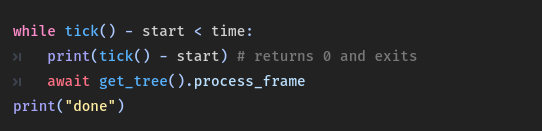
var commands = {
	"wait" : func(x: String):
		var time = x.to_float()
		var start = tick()
		while tick() - start < time:
			if skipping:
				break
			await get_tree().process_frame,
	...
}

...

func tick():
	return Time.get_ticks_msec()
traditionally I would just use an Instanced Timer (await get_tree().create_timer().timeout). But I have a feature to Skip the dialogue’s typewriter effect so I opted to just ‘stall’ the Thread, however, using .call( … ) makes it run separately - I cannot directly access it and kill the coroutine; nor do I have any Idea of killing the coroutine/thread.
Furthermore, the reason I can’t simply call it, is because Godot’s Syntax refuses to do so,
So would I’ve been thinking, would It be possible to some how put these “threads” into an array and some how kill/halt them?
Let the coroutine periodically check some control flag and let it exit if that flag is not set.
var run := true

var f = func():
	while run:
		await get_tree().create_timer(.3).timeout
		print(randf())

func _ready():
	f.call()

func _process(delta):
	if Input.is_action_just_pressed("ui_accept"):
		run = false
It does precisely what you’ve asked. The point is to have a messaging mechanism through which you can tell the coroutine to exit. How exactly will that exit be implemented inside coroutine code is up to you.
I found the problem anyway, nothing was wrong with my code, and it did run synchronously, I switched the tick function to this, and it worked, I think It failed to work with bigger numbers, but thanks for your help.
Well that would entirely depend on what you pass as an x argument, which is information you didn’t supply in your question. If you pass time in seconds there and compare to time in milliseconds, then of course the thing would exit almost immediately.