Selective Silhouette Shader?

Godot Version

Godot_v4.5.1-stable_linux.x86_64

Question

I’m trying to accomplish a 2D shader that will render a silhouette of characters(Sprite2Ds) over foreground elements on layers above the characters, but not on foreground elements on the same layer as the characters. My proposed solution was to use BackBufferCopy (or hint_screen_texture) to get a snapshot of the character sprite behind the foreground, then render a fully red copy of the sprite one z-index above, and finally a third sprite well above all other z-layers with a screen reading shader. If the pixel is full red, render the BackBufferCopy. If not, render the silhouette. Please see attached image below if my explanation is confusing.

No matter what I try, I am unable to attain a snapshot of the sprite after the same-layer foreground is rendered, or before the full red sprite is. Is there a way to accomplish this? Is my approach complete bunk? Please let me know, and thank you for your time.

Render characters into a subviewport and then composite that with the rest of the scene - once normally and once as a silhouette.

Thank you for your reply. Unfortunately, I’m not really sure how to accomplish this. A few questions:

  • Do I render the SubViewport as a ViewportTexture in a Sprite2D? Or is there something else I should be doing?
  • You mentioned compositing, do I need to use the WorldEnvironment compositor?
  • Something that I was a bit unclear about in my original post is that characters would be on multiple layers. Would this still work? Do I need a SubViewport for each layer?

In general I’m feeling a bit lost. Can I get more of a step-by-step guide to implementing this? Possibly with code examples? Thank you again.

You render all of the characters that will have this effect into a full-screen subviewport (the same size as your main viewport). You don’t need to use the compositor. By compositing I meant running a shader that mixes the foreground and the viewport texture to render the silhouettes. I don’t know what you mean by “multiple layers”.

The optimal way would be to render the background normally, render all characters into a transparent subviewport, and then render all foreground elements under a CanvasGroup node. Run the compositing shader on the canvas group node. Start by the basic shader code you can find in CanvasGroup class reference, plug the viewport texture and mix in the silhouette color using viewport texture alpha as a mask.

Hi, I’m a collaborator working with OP on this game. Chiming in a bit during their downtime to clarify some things so they don’t have to do all the heavy lifting in communication on top of working on all the code.

Clarification:

What they meant by “multiple layers”:

We’re working on a game that is 2D & sprite based, but has a structure that imitates a Z-layer; think like 2D Zelda games like Link to the Past, where you can jump down ledges or walk down stairs, and the player is moved to another layer that has its own collision map so you can walk under bridges on the upper layer, things like that.

The way we have structured this is, each layer is an individual Node2D with multiple objects attached to it. This includes, among other things, an arbitrary number of “ground” TileMapLayers in each Node2D layer group; these all go underneathe the entities present on the layer, but it’s useful to be able to have multiple tilemaplayers so we can layer tile graphics over each other without needing to redraw a bunch of unique variants (e.g., imagine you have a bunch of ground tiles and you have a table you want to put on top of them but still see parts of the ground. We use multiple tilemaplayers for this.)

Above these tilemaplayers (well, below in the editor basically; but being lower in the editor makes it “above” them visually because of how Godot sorting works) we have a special tilemaplayer currently called PlayerLayer, but we’ll be renaming it to something like EntityLayer because we have been working on unifying our entity system, so I’ll be referringto it as that. This layer is also a child of the aforementioned Node2D. Currently, the purpose of this layer is to let us easily put tiles in the map that we want entities to be able to go behind it has Y-Sorting enabled, and entities are all children to the EntityLayer in each layer group so they interact with the Y-sort (additionally, this helps us make sure when moving an object from layer group to layer group, they can be paired to something that is consistently above the “ground” tilemaplayers)

Current Status & Problem:

This brings us to where we’re at right now and what we’re actually trying to accomplish here, versus the issue present:

As it stands, everything in the layer system functions just fine as we want it for motion (entities can move from higher layers to lower layers etc, and individual entities will correctly appear “behind” anything on EntityLayer if they are higher than that object y-positionally)

The issue is how this interacts with the shader. We do not want the entity to silhouette from standing behind, say, a short fence or a table or something on the same layer that they’re obscured by using the EntityLayer Y-Sorting. What we do want is to be able to grab information from the layers that are “above” the entities; i.e., if you’re in the “layer 3” Node2D group, you’d want to silhouette behind the combined tiles of the upper layer 2 and layer 1; walking under a bridge on an upper layer, for example, should show the entity as a shadow of itself, and we should be able to do this pixel-by-pixel so they can be partially silhouetted for the parts covered, etc.

We want the object to silhouette under things that are “always above” it-- i.e. on a higher layer-- but we also want them to simply get obscured by things on the same layer in EntityLayer without silhouetting. At present it works if everything they can be behind silhouettes them, but we don’t like the way that this looks with the Y-sort, so we want to be more restrictive.

The problem is that, we could really use some guidance on, basically:

  • How to make the shader look at the the graphics drawn by tilemaplayers only on Node2D layers above the Node2D layers that the entities we’re trying to shade are on
  • Some examples of functions, possible godot tools we’re overlooking, any abstract code examples that could help with this
  • Any information about godot’s rendering engine that may be relevant to this, since it is largely a cosmetic effect we don’t want interfering with what’s in place
  • How to make certain this works correctly with entities on a variety of layers without it becoming too system intensive, since we need to make sure it looks correct without having to iterate it for a billion cycles.
  • Ideally, if the solution is possible without having to rewrite our layer system, since the way it works is built largely into how the game operates at present.

We’re not always certain how to “just draw” things displayed from several different tilemaplayers (nor how to grab the entities for their own buffer that can be compared against it) onto a single buffer that the shader can reference, so any specific advice on rendering functions is very welcome.

Sorry for the extra long post, but I hope this gives the detail necessary to get us where we’re going! Thank you for your help!
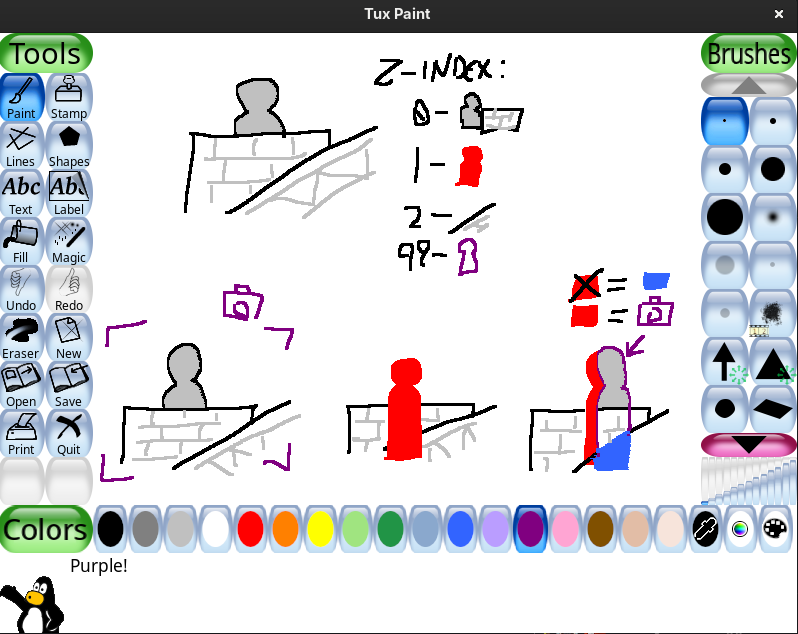
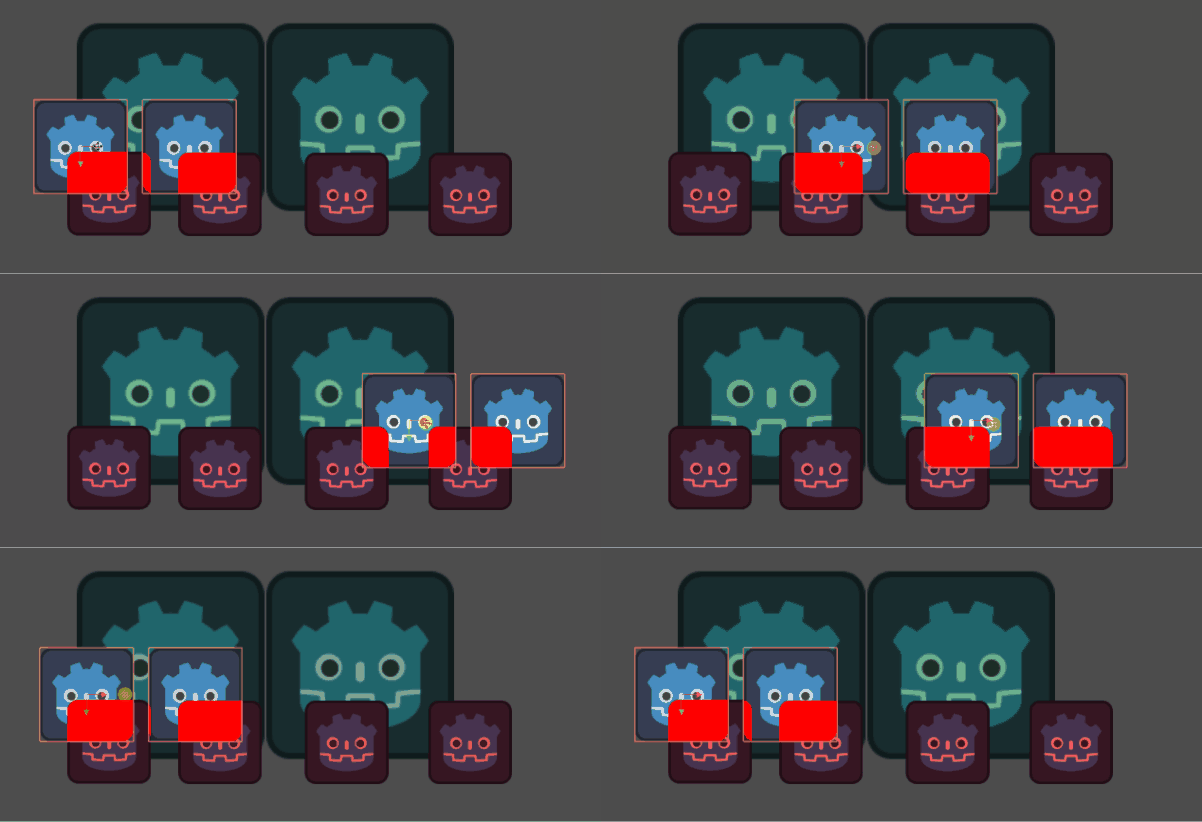
The principle would be the same as I described. You need to group everything that represents the foreground (onto which the effect is drawn) under a canvas group, render relevant entities into a transparent subviewport and do the compositing in the canvas group shader. Actual z ordering might not play much of a role in this.

There may be some more finesse and additional viewports involved if you have some complex layered structure but the approach would be the same.

For more specific suggestions you’d have to provide a visual mockup.

layersxray

@tool
extends Node2D

func _process(_dt):
	%vp.world_2d = get_viewport().world_2d
	if Engine.is_editor_hint():
		%vp.size = EditorInterface.get_editor_viewport_2d().size
		%vp.global_canvas_transform = EditorInterface.get_editor_viewport_2d().global_canvas_transform
	else:
		%vp.size = get_viewport().size
		%vp_cam.transform = get_viewport().get_camera_2d().transform
		%vp_cam.zoom = get_viewport().get_camera_2d().zoom
		%vp_cam.ignore_rotation = get_viewport().get_camera_2d().ignore_rotation
shader_type canvas_item;
render_mode unshaded;

uniform sampler2D screen_texture : hint_screen_texture, repeat_disable, filter_nearest;
uniform sampler2D characters: repeat_disable, filter_nearest;

void fragment() {
	vec4 c = textureLod(screen_texture, SCREEN_UV, 0.0);

	if (c.a > 0.0001) {
		c.rgb /= c.a;
	}
	COLOR *= c;
	float mask = texture(characters, SCREEN_UV).a;
	COLOR = mix(COLOR, vec4(1.0, 0.0, 0.0, 1.0), mask * COLOR.a);
}

I think I’m getting it now. One last problem, I don’t know how to render characters to the SubViewport without just parenting the Sprite2Ds to it. How would I accomplish that?

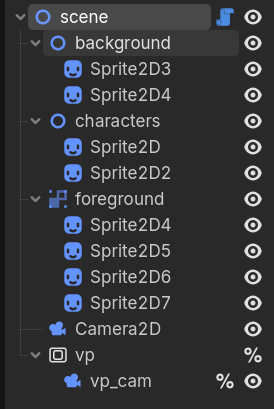
The viewport camera needs to share the World2D with the main camera, as shown in the example code and you have to set up visibility layers for characters and canvas cull mask for the subviewport so that only character nodes are seen by the subviewport. That way you don’t need to parent anything to the subviewport, except its camera.

In my example:

scene - visibility: 1,2
characters - visibility: 2
everything else - visibility: 1

vp - canvas cull maks: 2

Got it all working, thank you so much for your help!

One final question: The game is running with viewport stretch mode. The silhouette renders correctly at native resolution, but not if the window size gets changed. Is there a way to account for this in the shader?

Use get_viewport().get_visible_rect().size instead of get_viewport().size to get the original size of the unstretched main viewport. Then set subviewport size to that.