Singletons without Autoloads?

Godot Version

v4.6.1.stable.mono.official [14d19694e]

Question

I’m looking over the docs for singleton classes in Godot (and in C# in general), and I don’t see a way in the Godot docs to implement the singleton pattern without using the autoload feature.

I’m trying to use this declaration from the C# site, but then I’m unable to set Instance = this; in the _Ready function of the object, since the “Property or indexer ‘OwCamera.Instance’ cannot be assigned to – it is read only.”

private static readonly Lazy<OwCamera> lazy = new(() => new OwCamera());

public static OwCamera Instance { get { return lazy.Value; } }

Is there a way to do this? I’d prefer not to be required to autoload ever object I’d like to be a singleton, and unless I’m misunderstanding, there’s nothing in the autoload process detailed in the Godot docs that will actually prevent a second instance of the class from being created.

Do you really need it lazy? Implement the simple version first, as shown in the page you linked.

2 Likes

Yes, you can create a singleton without making it an Autoload. The Singleton Pattern is quite simple in any language. You make everything in the class static and create a private constructor so that the constructor cannot be called from outside the class.

As for preventing a second version of an Autoload from being created. Yes there is. You cannot assign a class_name to an Autoload script. So, the only two ways for you to have multiple copies are the same class are to A) attach the script to a Node; B) manually create another Autoload in the Project Settings with a different name.

In both cases, this can be easily avoided by not doing those things. Since it has no class_name, you cannot accidentally instantiate another one through code. Also, in either case, you will be creating a new version of the class, which is something you could easily do in any other language by duplicating the singleton code. There are always ways to make more than one Singleton. In other words, there’s never a way to prevent a second instance of a singleton from being created, but regardless of whether you use GDScript, C#, or another language - you’d have to give it a new name.

Why You Should Use an Autoload

The problem with using a Singleton Pattern instead of an Autoload is you will sooner or later run up against a few problems. You will not be able to use Signals in your Singleton or @export variables. You need an Autoload for that. Also, Autoloads are guaranteed to load before all other Nodes in your game. This means that you will not run into race conditions.

Ultimately, when making an Autoload, it is best to create an Autoload Scene. That’s a scene with a normal Node, with the script attached.

Finally, I think it’s important to revisit this statement.

How come? Whether you use an Autoload or a Singleton, it takes up the same amount of room in RAM. What benefits do you think a Singleton has over an Autoload?

1 Like

This is all very interesting info, thank you!

I didn’t know this! I assumed that autoloads are always stored within RAM from the moment the game boots, and that non-autoloaded singletons aren’t; for the object OwCamera (the camera used in the overworld) it seemed wasteful and more importantly like a potential source of complication to have it in memory at all times.

I’m not sure I understand what the purpose of a singleton is then. I certainly can just not create further instances of the class in question, but I was hoping there would be an easy way to safeguard against doing so.

No. A Singleton has to exist in RAM to be called at any time.

Why would you create a Camera2D/3D as an Autoload? Just make it part of the scene it’s used for. Also, Godot only allows you to have one active camera at a time, so having multiple is never a conflict.

Then you definitely shouldn’t be using them.

I don’t think you understood my explanation. Basically it comes down to: A project cannot have more than one Singleton or Autoload of a specific name. You can have more than one by renaming them. Like making OwCamera and then making OwCamera2. But then, you’d know that you’re doing that because you would have to physically copy and rename it. The code cannot keep you from copying and renaming files. You have to stop yourself from doing that.

Taking a Step Back

Your post made it sound like you knew what a Singleton was, because you have experience programming and have made them in other languages. That does not seem to be the case. If that is not the case, I recommend you back up and tell us what problem you think you are solving by hacking the way Godot works to cram a Singleton Pattern into it. We can probably help you find a simpler solution.

I now suspect that you have been chatting with an LLM which led you down this path. So I’m going to give you two pieces of advice.

  1. Do not use LLMs to learn. That goes quadruple for Godot. Godot changes so frequently (a new version every 4 months over the last few years) that LLMs regurgitate the wrong answers to problems all the time. They will give you the wrong answer about 80% of the time. LLMs make up things that don’t exist and solve problems with code when there are simple Godot Editor solutions. An LLM is only useful if you can call it on its bullsh*t - and even then studies show they slow workers down by a huge amount.
  2. Do not use C# in Godot unless you have a very, very good reason. Which should include a number of years of professional experience using C#, and a refusal to learn new languages bordering on the obtuse. (I.E. you like making things harder for yourself than they have to be.) I do not recommend learning C# while learning to use Godot.

There is no purpose to singletons. It’s a fancy OOP speak for a bunch of static data in a world where everything must be a class. A singleton is a class that can only be instantiated once i.e. a class that represents its single instance. If you abandon the dogma that everything must be a class, then the concept of a singleton is no longer needed, in fact it becomes meaningless.

1 Like

…outside of Object-Oriented Programming.

They can also contain static functions.

Stop attacking my religion, yo.

1 Like

A specific flavor of object oriented programming :slight_smile:

2 Likes

I believe that flavor is called “Good”. :smiley:

1 Like

Hey… I’m perfectly capable of arriving at the wrong solution for a problem the old-fashioned way. :relieved_face:

I do actually have a year or more of experience with Java* from tinkering with it in my spare time at work two years ago or so. I must have gotten pretty rusty though if I’m coming across as this inexperienced.

That said, I’ve been getting along pretty well with C#: I’ve found the Godot documentation to be sufficient for figuring out how to do GDScript functions in C#. Although I can’t say you’re wrong about my reason being obtuse; it’s about 49% wanting to learn a transferable skill for my day job and 51% because using indents instead of curly braces weirds me out.

* I also played around with Game Maker 1.49999 around 2020-2023, but found it was only very tangentially helpful as a springboard for learning Java.

I have two objects of interest right now: the camera and the player. It occurred to me that if there were a simple way to make sure only one of each of those could be spawned at a time (because the player references the camera), I should implement that. But since there may not be a simple way, and you’re right that I can just make the game in a way that prevents that, I’ve settled on just doing it like this:

public partial class OwCamera : Camera3D
{
    public static OwCamera Instance { get; private set; }

    public override void _Ready()
    {
        Instance = this;
    }
}
public partial class Player_ChaBody : CharacterBody3D
{
    private OwCamera myCamera;

    public override void _Ready()
    {
        myCamera = OwCamera.Instance;
    }

    //...

    private Vector3 ConvertInputToDirection()
    {
        Vector3 returnMe = Vector3.Zero;

        if (Input.IsActionPressed("char_move_forward") ^ Input.IsActionPressed("char_move_backward"))
        {
            if (Input.IsActionPressed("char_move_forward")) {returnMe -= myCamera.relativeForward;}

            //...

        return returnMe;
    }
}

(And I know that it would be simpler for this application to make OwCamera an autoload and reference the relative direction variables statically, but this method would require less extensive reconfiguration if I ever decide down the line that I want to have two or more cameras the player can switch between.)

So this is why I thought you were consulting an LLM. Because an LLM will give you a code solution when you should be using a Godot Editor solution. In this case, this:

image

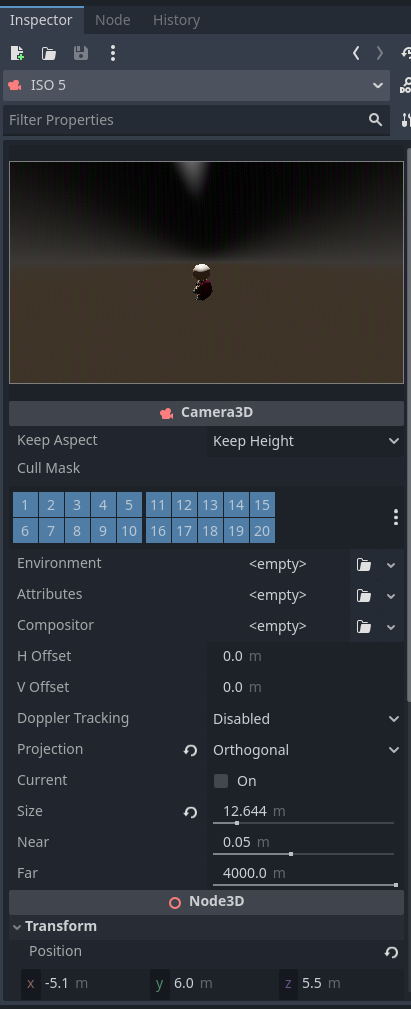
Just add the camera to the player in the scene. Do not add it through code. There are so many benefits to this. Just look at all the options in the Inspector. Not to mention, you can see what the player is going to see in the game.

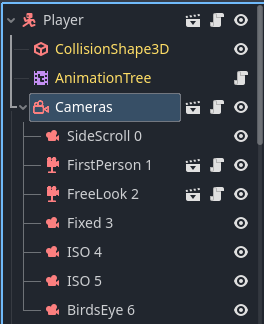
A Camera3D is just an generic Node. It doesn’t need to be unique or globally accessible. In my game Skele-Tom, I use SEVEN cameras - just on the player.

As for the Player, it’s again, just an object. It does not need to be a Singleton. All Nodes are passed by Reference. (See below.) Furthermore, they are attached to the Scene Tree. so just keep track of the Player and if you want to move it between level scenes, just reparent it. What you can do is make an Autoload to store the Player so it doesn’t get orphaned. But to @normalized’s point, you can also just pass the reference through functions and then there’s no need for an Autoload or Singleton.

If you don’t know, pass by reference means that if you have this:

var player: Player = Player.new()
var bob: Player = player

bob is just pointing to the original player. (Same goes for if you use C#.)

I’ve used both Java and C# professionally for years. I’ve also used GDScript for years (professionally for about a year now). And I can tell you that you will learn more from using GDScript than you will with C# because it is different than Java. C# is literally a Microsoft clone of Java made because they didn’t want to pay Sun to use Java. The biggest difference between C# and Java is the package managers.

If you are applying for a job or promotion using C#, then you might be better served doing something other than Godot altogether because there’s a lot of weird gotchas in Godot that you don’t need to worry about professionally.

As for the tabs thing - get over it. Once you get used to it, you’ll hate semicolons and love tabbed languages. They are much easier to read because you don’t have to follow curly braces and since indentation affects execution it’s a lot easier to tell what function or loop you’re in.

But still you do you. Just keep in mind while there are a handful of people on here who know how to use C#, we really only have one Godot C# expert. (It’s not me.) The pool of knowledge about GDScript on here is much larger.

1 Like

More like “Java” :rofl:

1 Like

I like Java better than C# these days. Ha!

1 Like

We may as well just have all our code in one great big class then, just like the good old days. :rofl:

I disagree, regardless of the programming paradigm being used, you will always want to have static data that is unchanged, and you will always want to globally reference it. Thats true from Assembler all the way up to C#. C# just gives it a fancy name and put some restrictions on it.

1 Like

You’re spending too much time with C# :smiley:

The absence of classes doesn’t mean that it’s all “one big class”. It means the absence of classes. Including that big one. This is precisely what I was referring to. OO brainwashed you into believing that a class is the quintessential organizational principle and that the world will fall apart if you don’t organize with and by them.

1 Like

Considering I seem to be spending most of my time trying to work out where code should go, you are probably right.

To be fair I like to organise, so I dont really have any issues with it.

Again, you seem to be implying that classes are synonymous with organization. Take a look at some recent pieces of software written in C, like Python or Git. See how they organize without classes.

The only thing I am implying is that regardless of the language being used code is still best when organised.

That organisation is still encapsulated data structures, which is what a class is anyway.
Its just not forced on you like it is in C#, and OOP can lead you down some merry lanes, I wont deny that.

For example I could (I wont) write Asteroids in Assembler, somewhere in that code I will have a data structure for an Asteroid object, and at some point I will create copies of them. How is that in reality any different to a class?

No one here said it isn’t. Why would anyone want to write unorganized code?