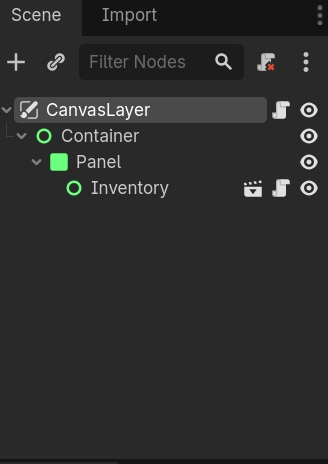
Im following this tutorial on how to make an inventory, How To Create an Inventory System In Godot 4.2 In 20 minutes
and its been really good so far! But at 21:51, he pulls up the inventory through a button he didn’t teach us how to set up. How would one bring up the inventory like that? Is it just a pause menu and a button node to get to the inventory? How would I connect the inventory to it?
Following a tutorial is good. For this scope I would only recommend learning and probably
making your own dictionary with resource scripts u can pull from and assign to slots
that you spawn when game starts from empty slots… then moving through the index with
keys and having some sort of display cursor for the current slot your on.
I made my own inventory and storage containers all with save like the old resident evil games.
I could always provided script and run down if there was enough demand for it.
The video is on my youtube.
Good luck
I`m making my next video a inventory system.
Starting with UI grid setup and resource and using item and picking up.
I have a roadmap from starting, picking up, stacking items, tooltip to equip or use.
Then saving and loading and storage boxes… hope it will help.
Okay Ive got it half working!! (Im very proud of it, at least now ive got a prototype!!)
Now, when i go into my game, it shows up automatically and i cant click out of it. My mouse isnt showing up though, either, and the inventory button isnt working?
At 7:41 there is some input. … in the code. There he switches the “Container” to the state of the pause. So if pause is true, than the “Container” is visible.
And i got this code (which has worked before on a different thing ^^)
And its still not working, still showing up onto the screen and not closing when i press the button. I tried putting this code in both the inventory script itself and the player script in which its parented to, and ive also made sure i spelt the input name name right, but i still cant open and close it, it still is open by defualt, and i still cat see my mouse.
Although i do only have one quiestion after this (put i gotta get this working first ^^)
Most of the time you don’t check such flags. You just flip them. bool_value = !bool_value that assigns the opposit of itself to the variable. Like visible = !visible. And if you want to compare more than two values I would use && an ||(AND and OR).
That’s because you are checking for is_action_pressed. It’s better to check for down or up.
Default in Godot is on up. But I prefer on down, it’s snappier. is_action_just_pressed or is_action_just_released