Godot Version
4.3
Question
Hi all,
Making some progress with the barebones game albeit very, very, slowly. My question today revolves aound spawning in a projectile. I have a tank that moves around the screen with a joystick “left analog”. It moves, ok, there are some problems I would like to sort out in the future. But what I want and what I can sort of approximate are very separate things.
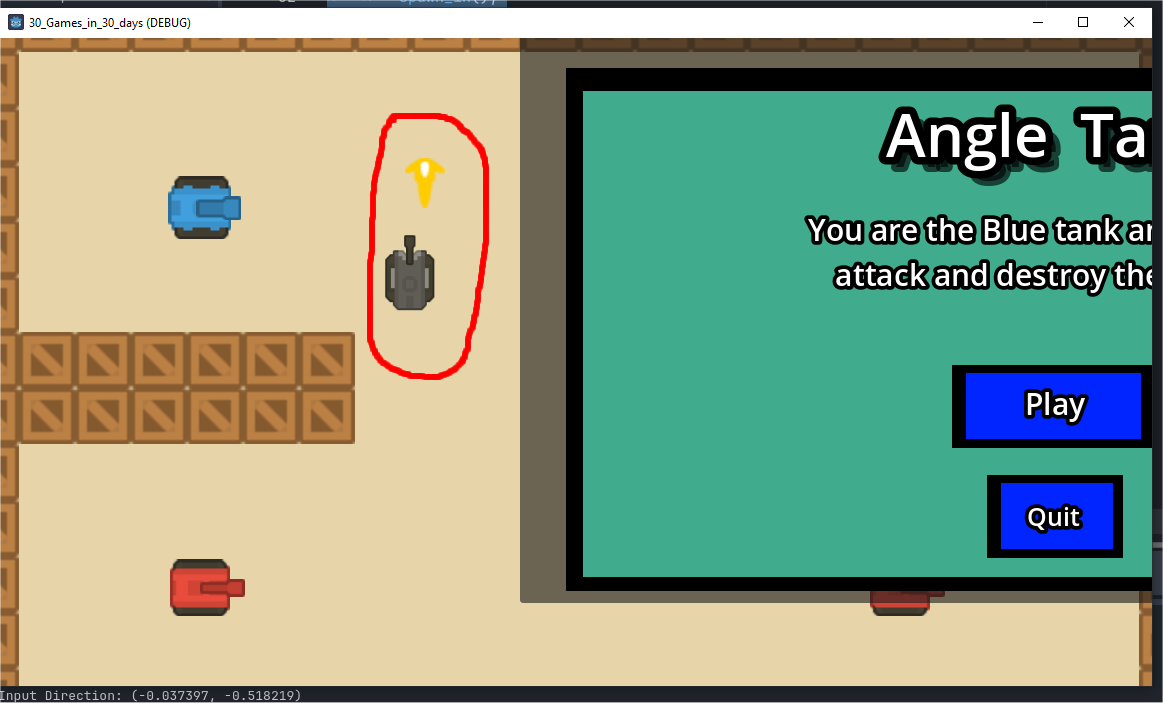
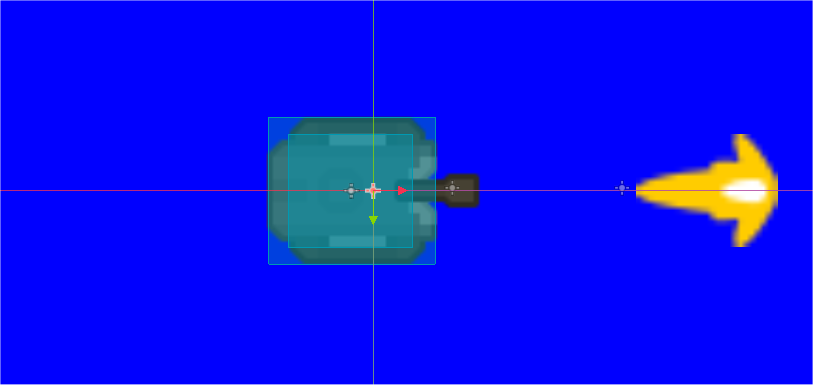
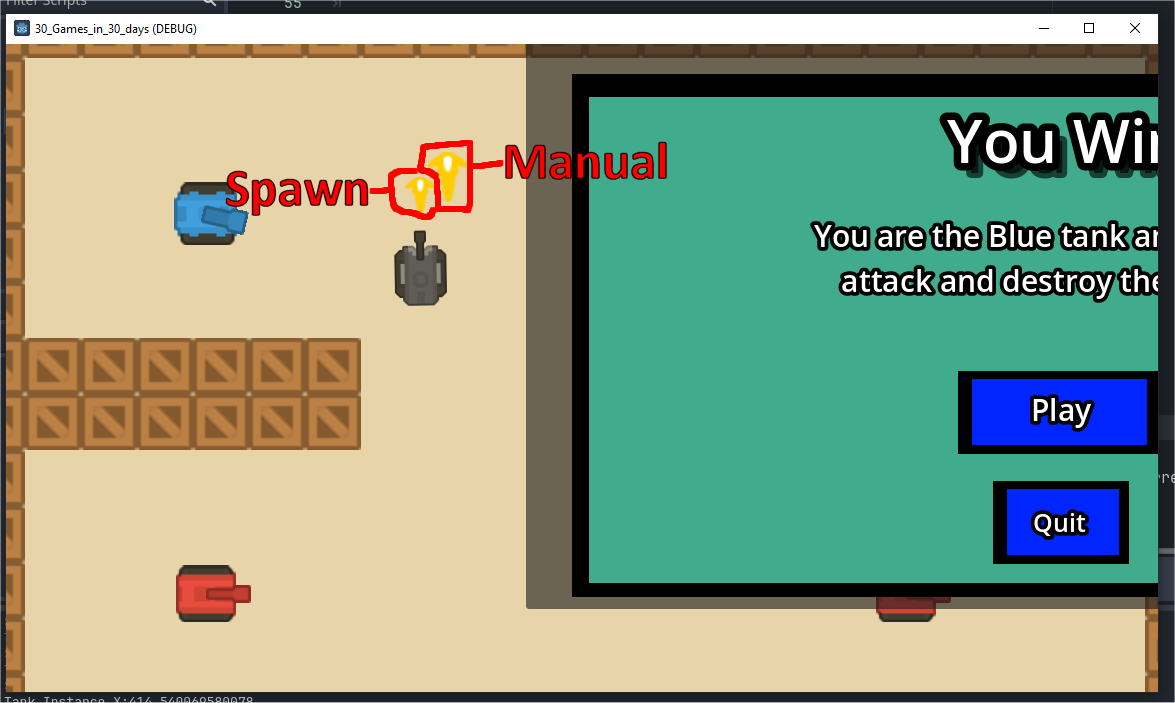
The problem is I need to get the projectile spawning in at the correct spot and it currently isn’t. What I have done is manually insert a sprite showing where the spawn point is and the rotation and you can see the result, it is definitely off-centre:
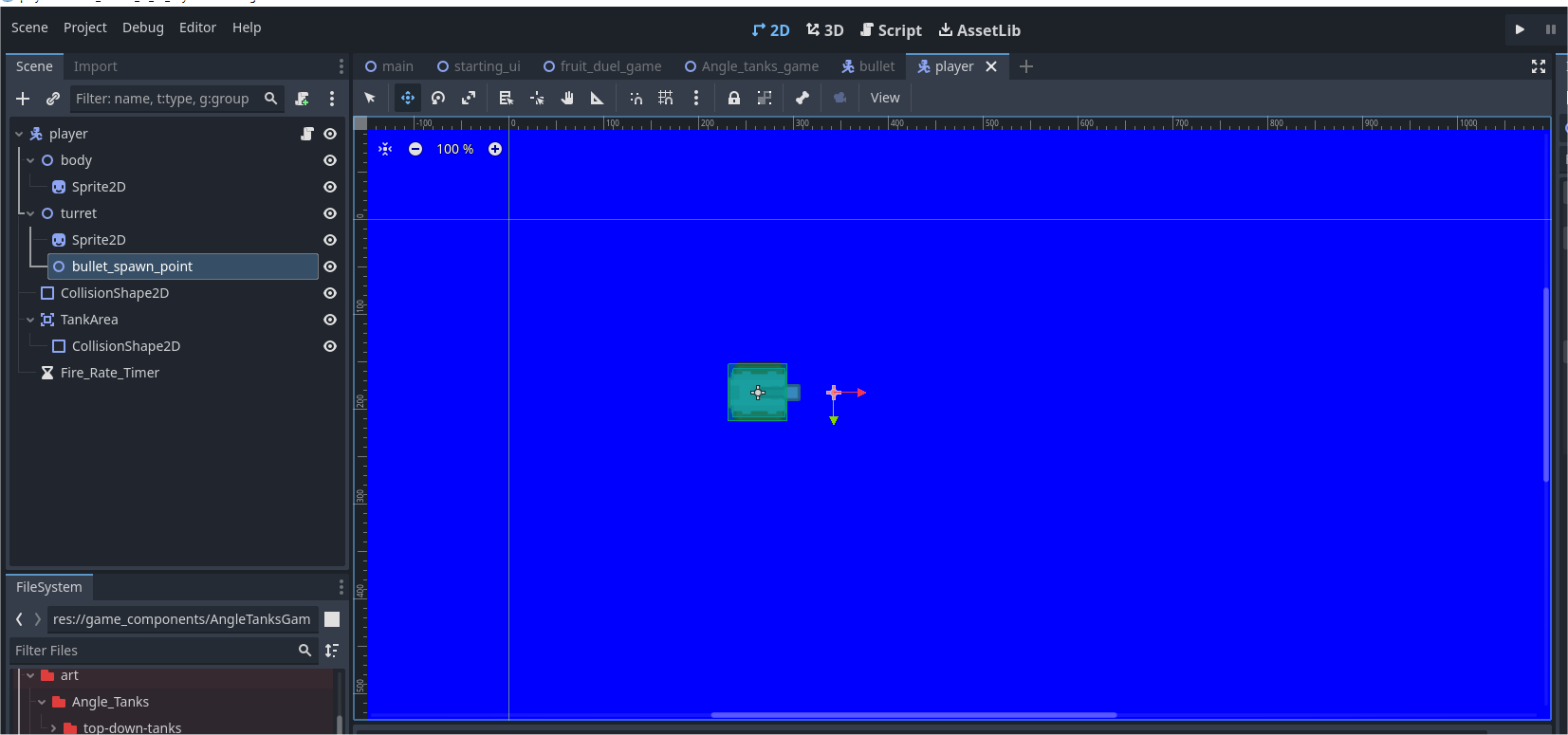
It is not in the right spot. If I were to press the fire button the the spawned object come is just below the larger sprite. You can see that the spawn point is dead-centre and this is not what is occurring:
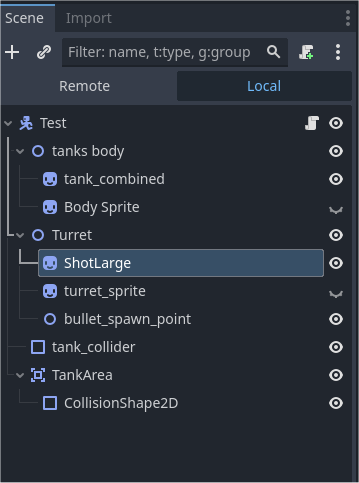
This is the scene tree:
Here is all the code for what I am testing, mind you, there is a lot of code commented out that I used for testing and may need in the future for reference:
extends CharacterBody2D

@export var speed: 			float = 100.0;
@export var tank_offset:	float = 90.0
@export var turret_offset:	float = 270.0

@onready var tank_sprite: 	Sprite2D = $"tanks body/Body Sprite"
@onready var turret_sprite: Sprite2D = $Turret/turret_sprite
#-------------------------------------------------------------------
@onready var tank_combined: Sprite2D = $"tanks body/tank_combined"
var set_bullet_correct_rotation:	float = -90.0;	#wth
#-------------------------------------------------------------------

@onready var turret: Node2D = $Turret

@onready var bullet_spawn_point: Node2D = $Turret/bullet_spawn_point

@export var spawn_icon: PackedScene;

func _ready() -> void:
	pass
	#end


func get_input():
	var input_direction = Input.get_vector("c_left","c_right","c_up","c_down");

	velocity = input_direction * speed;

	if (input_direction):
		print("Input Direction: " + str(input_direction)) ;
		#turret.rotation = tank_sprite.rotation - deg_to_rad(90);
		#turret.rotation = tank_sprite.rotation - deg_to_rad(90);
		#tank_sprite.rotation 	= input_direction.angle() + deg_to_rad(tank_offset);
		#turret_sprite.rotation = input_direction.angle() + deg_to_rad(turret_offset);
		#turret.rotation = tank_sprite.rotation - deg_to_rad(90);

		tank_sprite.rotation 	= input_direction.angle() + deg_to_rad(tank_offset);
		turret.rotation 		= tank_sprite.rotation - deg_to_rad(90);
		turret_sprite.rotation	= -turret.rotation + input_direction.angle() + deg_to_rad(turret_offset)

		tank_combined.rotation 	= input_direction.angle() + deg_to_rad(tank_offset);
	#end if

	#end

func _process(delta: float) -> void:

	if(Input.is_action_just_pressed("Press Fire")):
		print("Fire button pressed");
		print("spawn point: " + str(bullet_spawn_point.global_position));
		spawn_in();
	#end


func spawn_in():
	var spawn_instance = spawn_icon.instantiate();
	##change this:
    #add_child(spawn_instance);
    get_tree().current_scene.add_child(spawn_instance);
	#turret.rotation = tank_sprite.rotation - deg_to_rad(90);

	spawn_instance.global_position = bullet_spawn_point.global_position;
	#spawn_instance.global_rotation = tank_sprite.rotation + deg_to_rad(0);
	spawn_instance.global_rotation = tank_combined.rotation - deg_to_rad(tank_offset);
	pass;
	#end


func _physics_process(delta: float) -> void:
	get_input();
	move_and_slide();
	#end
If you can help it is very much appreciated.
Regards.
You’re Player scene is rather off-center from the origin 0, 0. what does your bullet scene look like? Is it’s origin point at 0, 0?
2 Likes
Going off of Gertkenos response, are you sure the sprite you’re using to show the bullet spawn position is centered correctly? That the origin is in the center, and not the top left of the sprite?
In your _process function, I’d make sure to print the position of your tank to see its position relative to the projectile spawn point. Facing up, both should have the exact same X position. Make sure the tank is centered on the scene properly, and that any projectiles or other things are also centered properly.
Great, I’ll try that and see what happens!
Okay, tried what you suggested creating the object at 0,0 (or as close as possible) and this is what the result was:
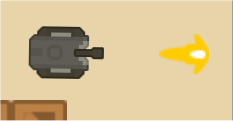
Facing East:
Directly in front, so good,
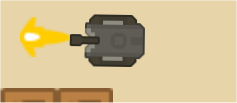
Facing West:
again directly in front but it really should have been a bigger gap, not sure why it isn’t.
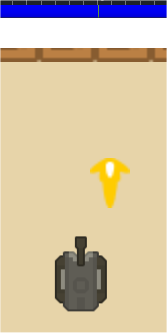
Facing Up:
way off-centre, not good.
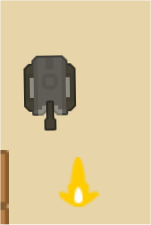
Facing Down:
again way off-centre.
So … does anyone have any suggestions as to what to try. I thought getting the bullets to shoot would be the easy part after getting the “whole” to turn,
As always here is a big thanks to anyone who is in a position to help.
Regards and thankyou.
Ok, I’ll try that tomorrow and get back to you.
Cheers.
In a shocking twist of fate … the x coord was NOT, repeat NOT the same and I can’t understand why. All, I did was rotate the tank around and then rotated the spawn point with it and blammo a 29 pixel difference on the X. Twenty-nine pixels  . The manual sprite I made to show the spawn point, still remains wrong, but, if I subtract the 29 pixels on the x co-ord, the bullet seemed to spawn in the correct spot
  .
.
Again can’t explain why (pun intended). Haven’t gotten any further than that it’s getting late here in Australia and it’s none too cool either.
Thanks greatly for your suggestion.
Is your tank scaled in any way? Try resetting the scale of all nodes, if you need to, only scale the Sprite2D, no parent nodes.
Can you show how your Bullet Scene is set up? Is the bullet/spawn_icon centered at origin 0, 0?
I am doing something very similar in the game I am working on. Here is the code I use:
func setup_weapon() -> void:
	weapon_strike = weapon_scene.instantiate()
	root_scene.add_child(weapon_strike)

	weapon_strike.global_position = spawn_point.global_position
	weapon_strike.rotation_degrees = rotation_degrees - 90


	if (weapon_strike.rotation_degrees) > 90: weapon_strike.flip_v(true)
The main difference I see between our implementations is I am working in degrees, not radians - but that should not cause the behavior you are seeing.
What this makes me suspect is the problem is in spawn_icon. Can you confirm that the sprite is centered in that scene?
Rightio,
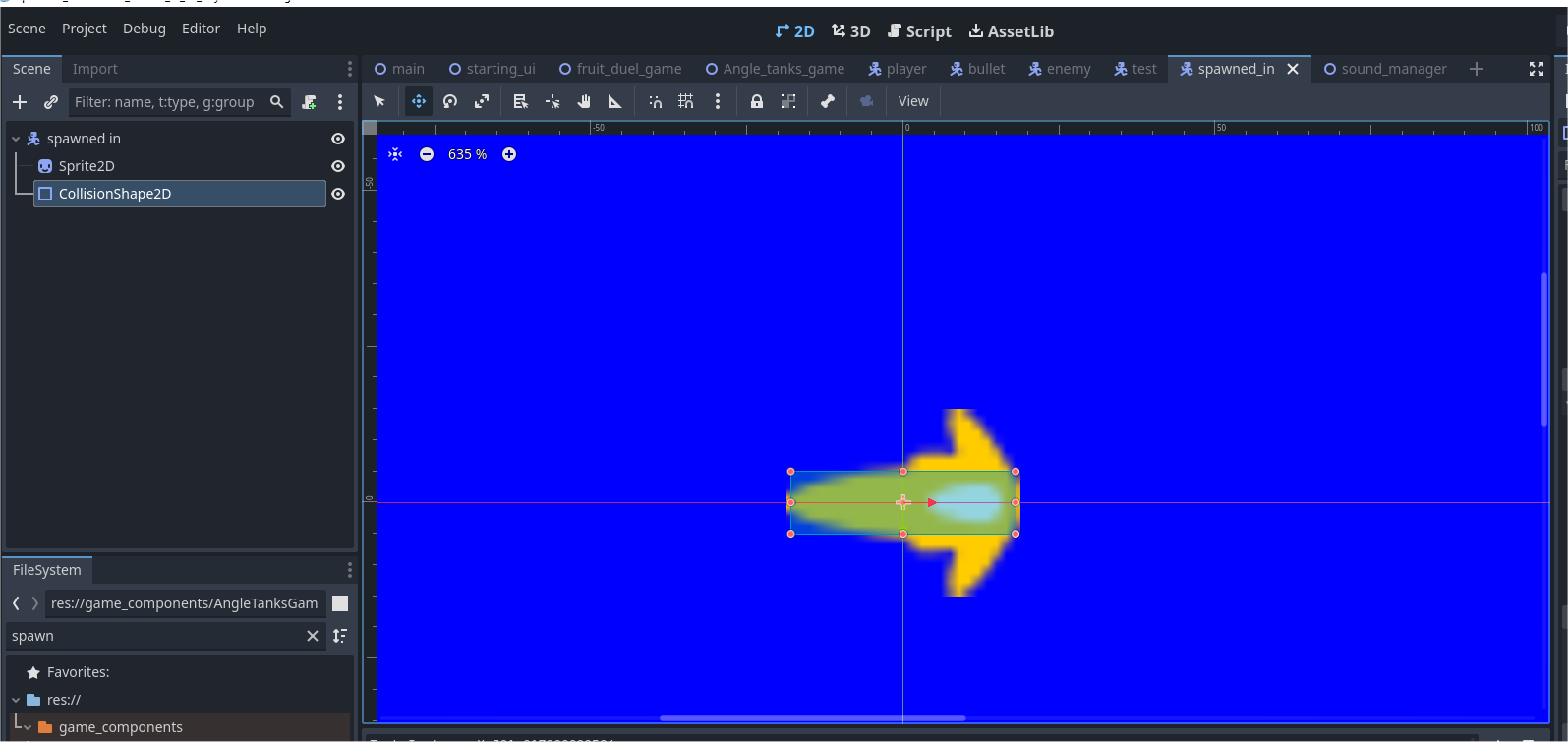
The the spawn element has this set up:
So, it’s centered around 0,0, pretty standard fare. This graphic has been set up with 1.5 scale both ways because the graphic is very small. To get it spawning in the correct spot I had to use the line:
spawn_instance.global_position.x -= 27;
otherwise it was out to the same degree as the manually placed graphic.
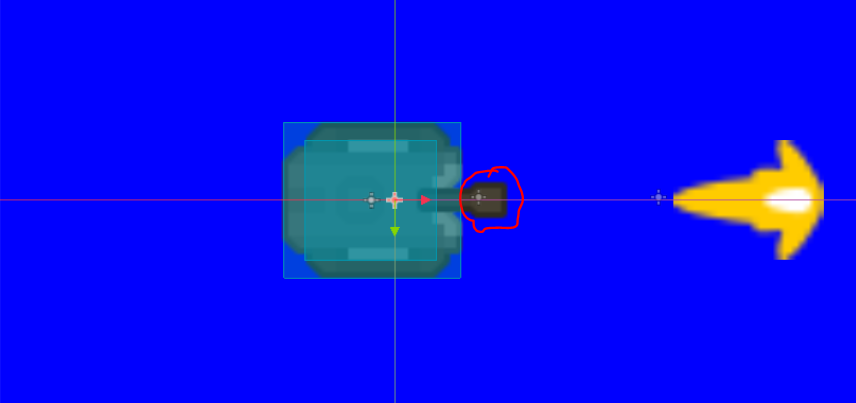
Whose pivot is this?
If that’s Turret, then spawn point is parented to this.
In get_input() you don’t rotate the whole character body but instead you separately rotate Turret and tanks body. Since their positions are horizontally offset (by what appears to be precisely those 27 pixels), the spawn position will also be offset to the right in respect to body, at every rotation except the initial right facing.
Either put those two things on the same position so they apparently rotate around the same pivot or parent the spawn point to the body.
3 Likes
How did you manage to figure that out?
Elementary my dear Watson!
I could’ve been staring at that all day and not have seen it. That why it so good to have fresh eyes to look at the problem. Of course that was the reason for the offest.
Thankyou so much! I owe you a frosty.
Domo arigato gozaimashita  .
.
1 Like
It is indeed quite elementary 
As you can see from other’s responses they already concluded that it must be something related to your node transforms. By the time I looked at the thread, there was just enough information to see what exactly it is.
2 Likes