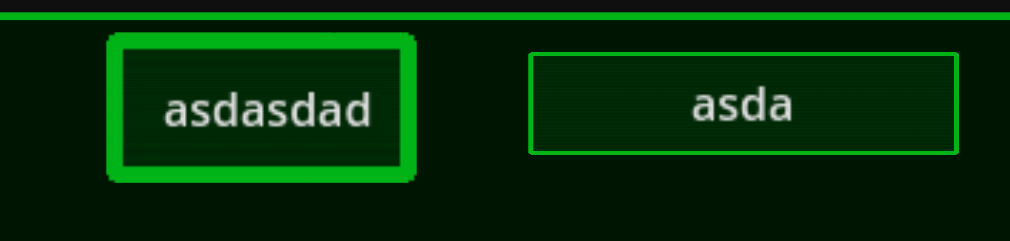
For one reason or another, the Sprite I am using for the choice selection button is not working properly inside the containers such as GridContainer or HBoxContainer. As such, lines end up being too thick compared to how theya re supposed to be
On the left, a button that is currently the children to GridContainer. To the right, a standalone button using the same texture.
How can I fix this?
An additional question I want is the following.
I am making a text adventure game in which the grid of 15 buttons becomes different commands depending on what the situation needs. For example, north-south-west-east buttons for map navigation, attack, defend and inventory buttons inside of combat, dialogue selection when talking to NPCs or in story events.
How do I make this possible? I am very new to Godot in general.
How are you doing your buttons? Are they entirely texture, or are you using text as well? Do you have a theme defined?
For your changeable buttons, you have several options:
you could define a button for every individual function and use .show() and .hide() on the individual buttons – this will work best if your ordering requirements aren’t too rigid
you could make the buttons generic in code, and touch up the look of the buttons at runtime to match whatever command the button should be showing
For the latter case, Godot has Callable, which are basically function pointers. You could do something like:
The one on the left looks an awful lot like a button with the focus highlight on it.
You are overriding the style themes no doubt? Try shutting off the one for focus and see if that goes back to normal.