Hi there! Can someone please help me understand strange behaviour I’m seeing? Following the ‘start small’ maxim, I’m making a simple Asteroids game. How I have it set up:
I have scenes for ‘game’, ‘player’, ‘asteroid’, and ‘laser’. The game instantiates a player and an asteroid. The asteroid’s Ready function uses a match statement with a randi_rangeto pick one of four different sprites I have for the Asteroids - so there’s a bit of visual variety. The player responds to Input to spawn laser instances firing outwards. The laser emits a signal when it hits an asteroid which makes the asteroid explode. Pretty simple.
The weird behaviour crept in when I changed the way asteroids are spawned. I added a Timer node to the scene tree, and connected its Timeout signal to a ‘spawn_asteroid’ function in the game script. This picks a random position and instantiates a new copy of the asteroid packed scene. What I’m seeing is that the timer is also making all of the asteroid objects on screen change their sprite to one of the variations. So now that I’m using the timer, all of the asteroids change shape every second (the configured wait time). They keep their location and motion, but just flick between shapes. It looks very strange! I know it’s the Timer causing it, because if I configure an Input to stop the Timer during gameplay, the sprite changing stops when the Timer is stopped.
The Timer was just added manually as a child node, with Autostart set to true and a 1.0s wait time. I connected its timeout signal, but that’s it. The function it calls is below.
Thanks for reading!
func spawn_asteroid():
	var viewport_size = get_viewport_rect().size
	var spawn_coords : Vector2
	match (randi_range(0,3)):
		0: spawn_coords.x = randf_range(0,viewport_size.x); spawn_coords.y = -100
		1: spawn_coords.x = randf_range(0,viewport_size.x); spawn_coords.y = (viewport_size.y + 100)
		2: spawn_coords.x = -100 ; spawn_coords.y = randf_range(0,viewport_size.y)
		3: spawn_coords.x = (viewport_size.x + 100); spawn_coords.y = randf_range(0,viewport_size.y)
	var new_asteroid = big_asteroid_scene.instantiate() #Reference to packed scene
	new_asteroid.position = spawn_coords
	new_asteroid.look_at(player.position) #Rotate towards player
	asteroid_collection.add_child(new_asteroid) #Add to root node for asteroids
I don’t think the problem is in that piece of code.
Can we see the asteroid code? Or/And the timer signal code? Need to follow the path from timer emits signal through to the asteroids. I am guessing that either you are updating a shared image with the new texture, causing them all to change, or you are using a group reference somewhere and changing textures of all the asteroids by mistake. This might be hidden if your asteroids use a base class for instance and are referencing a common variable.
Anyway these are all guesses, nothing seems wrong in the code you have shared.
Thanks for your reply! I didn’t want to just paste in all my code and make the post really long. I was kind of hoping there was a simple “gotcha” somewhere that I’ve missed when connecting Timers.
The Timer object I created in the scene tree, and connected the timeoutsignal to the spawn_asteroid function shown above. So I don’t suppose it has any other code.
My asteroid script is below. I only set the sprite texture in ready so didn’t think that could be called more than once.
The signal big_asteroid_has_exploded is connected to the game script to spawn small asteroids at that location (though I haven’t implemented that part yet.)
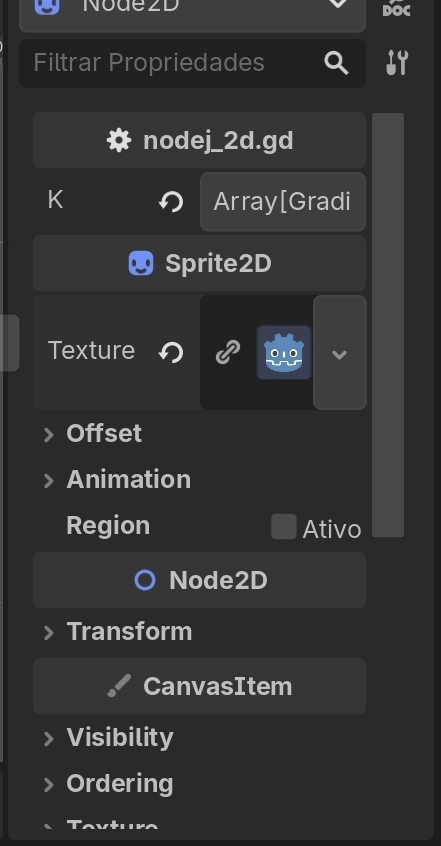
Thank you very much! This is very interesting to learn. So when I instantiate a resource, it shares its properties with the other resources in that tree unless I set ‘local to scene’? That makes sense and I am slightly surprised I haven’t seen this mentioned in tutorials up to this point. But it’s really good to understand. I’m reading up on the docs - and would welcome any suggestions for in-depth explanations. I do note that you can achieve similar results by using duplicate() in code:
Yeah, more or less. Usually resources are shared unless you specifically tell it not to share, e.g. by setting it local to scene, duplicating it, or making it unique in the inspector. So if you ever see that changing one thing also changes another thing - there’s a good chance that you are changing a shared resource.
That’s correct, you’d achieve the same effect by duplicating your resource in code. But the local to scene solution seems to me to be easier to do and to understand. Unless you’re creating the resource in code, then it might be easier to duplicate it in code.
I know in godot 4.6 dev4 there is a feature being added that will show a little chain symbol if it is shared so in 4.6 it will be easier to find out why this is happening.