Godot Version
Godot 4.5.1
Question
Hi everyone,
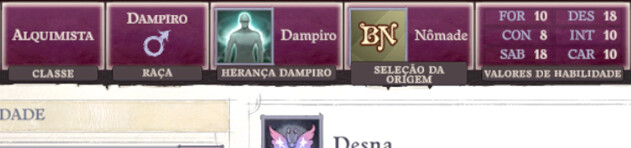
I was exploring and experimenting with using the “TabContainer” node, trying to replicate the UI of the game Pathfinder WotR (Image ref 1).
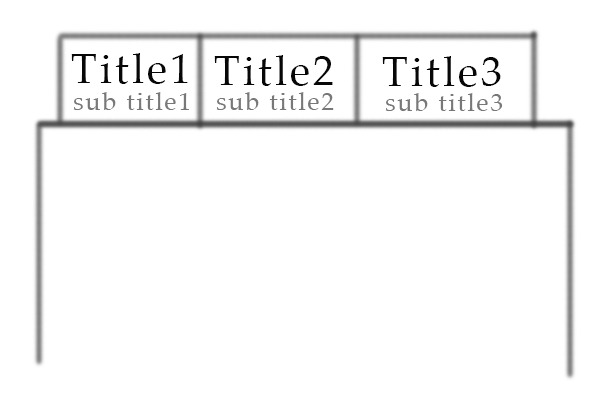
I noticed that it’s possible to change the title of each tab without any problem, but I can’t find a way to add a subtitle (Image ref 2). Is it possible to do this with TabContainer, or would I need to create a tab system from scratch?
Thank you in advance for your help and attention.
I don’t think there’s a native way of doing it but..
Maybe you can inject the extra Control node for the subtitles on runtime in a ready function by using get_tab_control(tab_idx: int) method of tabcontainer.
Thanks for the reply lastbender.
I’ll try applying what you said and I’ll come back here to share the result.
Good News:
I managed to get it working within the current TabContainers system.
Bad News:
It was a little more difficult than I expected.
First thing:
The final result looks like this!
How I did it:
The nodes that will be the subtitles (in my case, they were simple Label nodes) cannot be inside the tabs, since every time the tab changes, it hides the contents of the others.
I ended up creating a subtitle manager to be the parent of all subtitle nodes (remember to make it ignore the mouse) and made it a sibling of the Tab container (Image 1).
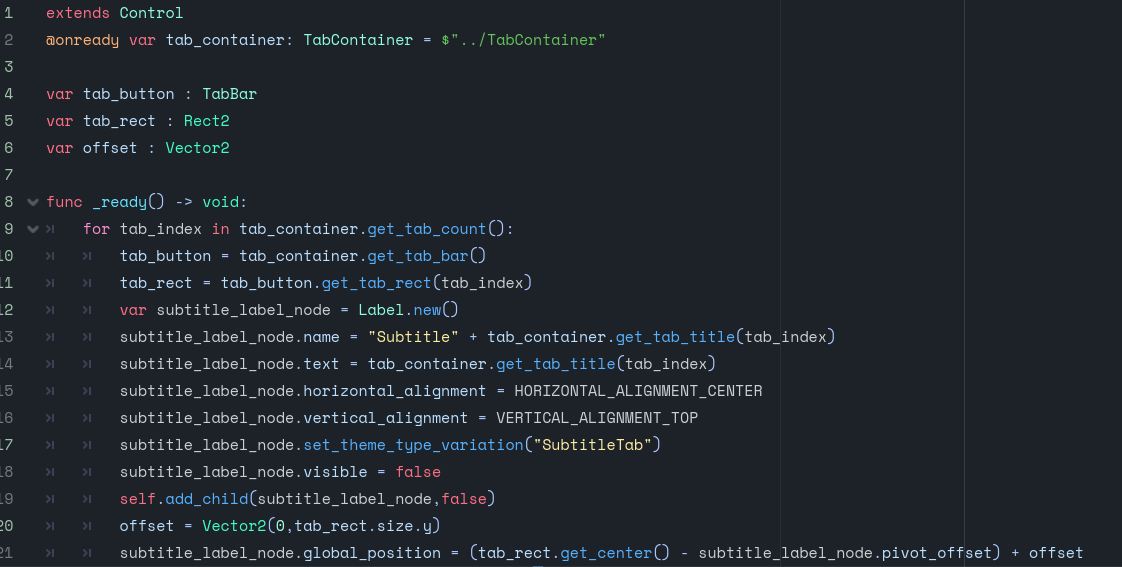
Since I don’t know the final number of tabs my project will have, I decided to create the Labels through code (Image 2).
Regarding positioning, I found a function within the TabBar kit that provides the interactive area of each button, called “get_tab_rect()”.
With the rect, you can find its center and from there add or remove offsets to reach the position you want.
Attention: take into account the point that the Editor uses to calculate the node’s position!!!
In my case, I needed to place the pivot point in the center of the node and subtract the difference from the center of the rect.
I hope this helps someone who encounters the same problem in the future.