Godot Version
v4.5.stable.official [876b29033]
Question
Kia ora all, I’m working on a seamless 2D portal effect where portal A sends a Camera2D (inside a SubViewport) to portal B and uses this texture to display a seamless portal effect. I’m having issues correctly positioning the camera/viewport texture and am trying to get rid of a ‘streaking’ effect where the view through the portal is stretched into a blur of pixels.
The code at the time of writing this is here: actual portal question commit · kit-solent/refrigerate@70e3e9c · GitHub
And can be obtained with: git clone https://github.com/kit-solent/refrigerate.git && cd refrigerate && git reset --hard 70e3e9c
This is how my portal scene is structured.
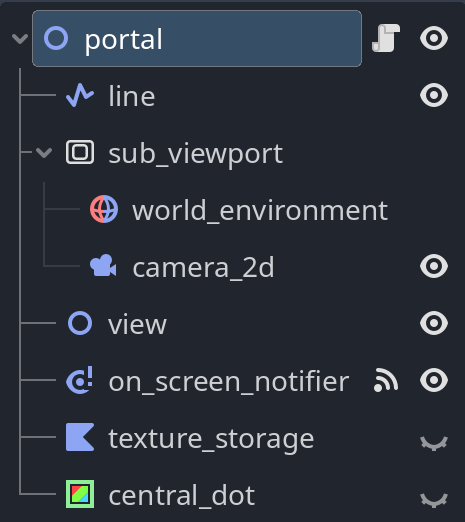
And these are the relavent parts of my portal script.
extends Node2D

@export var pair:Node2D
@onready var target:Node = Core.main.get_player()

func _ready():
	$sub_viewport.world_2d = get_viewport().world_2d

func _process(_delta:float):
	# every frame we delete all the polygons (if any).
	# this prevents polygons from lingering after the portal
	# has left the screen. These can be picked up by other
	# portals which looks bad.
	if polygons_in_view:
		clear_view()

	# the portal is only drawn if on the local screen. This works with multiplayer, only showing the portal to those who can see it.
	# the portal should also only be drawn if it's target is within a certain distance of the portal.
	if pair:
		# Move our camera to the pair portal. Global coordinates must be used because the
		# camera is inside a viewport and so doesn't have coordinates local to the pair (I think).
		$sub_viewport/camera_2d.global_position = pair.global_position + Vector2(256.3478, 254.47421)

		# update the view
		if $on_screen_notifier.is_on_screen():
			set_view(target)

	# TODO: This hack gives the below positions.
	# adding the difference to the camera position
	# gives the right position but the "magic vector"
	# is only as accurate as the visual mouse calibration.

	# DEBUG
	#if Input.is_action_just_pressed("debug key"): # The ` key (backtick)
	#	print("Portal: "+name)
	#	print("  Global Position: "+str(global_position))
	#	print("  Mouse  Position: "+str(get_global_mouse_position()))

	# portal                 Vector2(246.0, -625.0)
	# mouse/target portal    Vector2(502.3478, -370.5258)
	# mouse - portal = vector from us to target
	# = Vector2(256.3478, 254.47421)

# keeps trask of if there are currently polygons displayed in the view
var polygons_in_view:bool = false

@warning_ignore("shadowed_variable")
func set_view(target:Node):
	# add new polygons
	var polygons = Core.tools.cast_polygons(to_local(target.global_position), $line.points, get_local_bounds())

	for i in polygons:
		var new = Polygon2D.new()
		new.polygon = i

		# Copy the viewport texture over from the storage node to the new polygon.
		new.texture = $texture_storage.texture

		# add a border for debugging
		var border = Line2D.new()
		border.default_color = Color.RED
		border.width = 4.0
		border.points = new.polygon # use the polygon border to make the line
		border.add_point(new.polygon.get(0)) # and connect it up with the last point again
		new.add_child(border)

		$view.add_child(new)

	# record the fact that there are polygons in the view that need to
	# be cleared if this portal leaves the screen.
	polygons_in_view = true


func clear_view():
	"""
	Clears the portal view by deleting all view polygons.
	"""
	for i in $view.get_children():
		$view.remove_child(i)
		i.queue_free()

	polygons_in_view = false
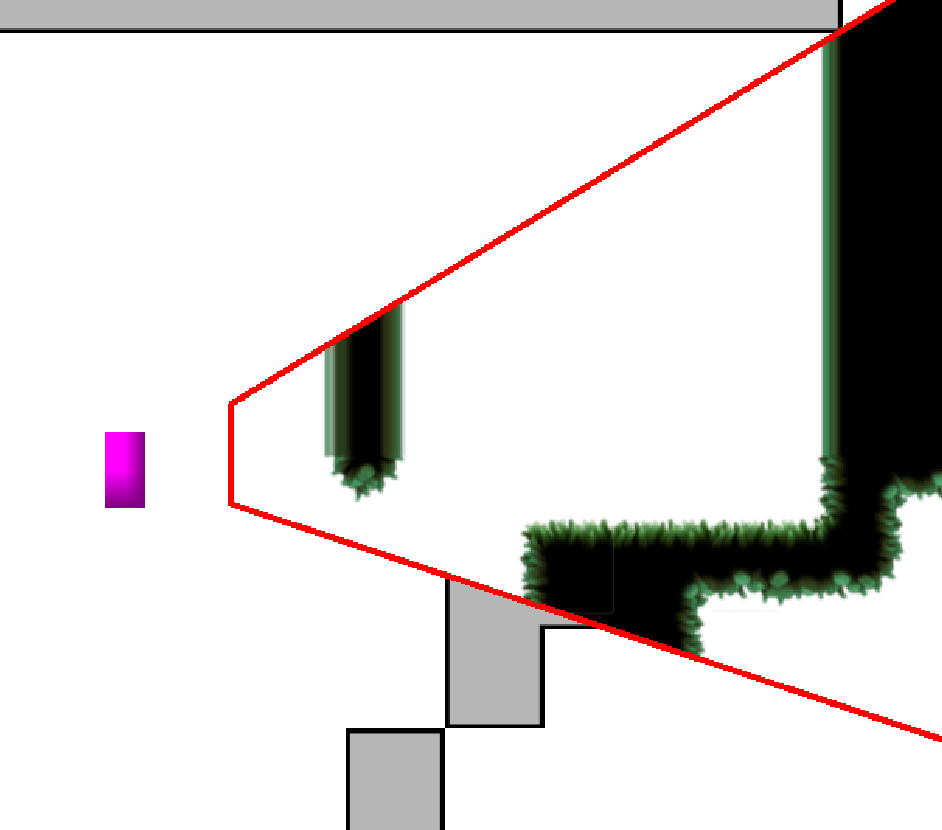
The streaking/stretching issue can be seen by running the game and moving to the portal located just off screen above the player spawn point. Standing to the left of the portal and looking through it to the right shows a view onto the map around the 2nd portal (located elsewhere on the map). You can see in the below image that pixels below some line (middle of the portal maybe) are shown clearly but those above are stretched into blurry lines streaking upwards.
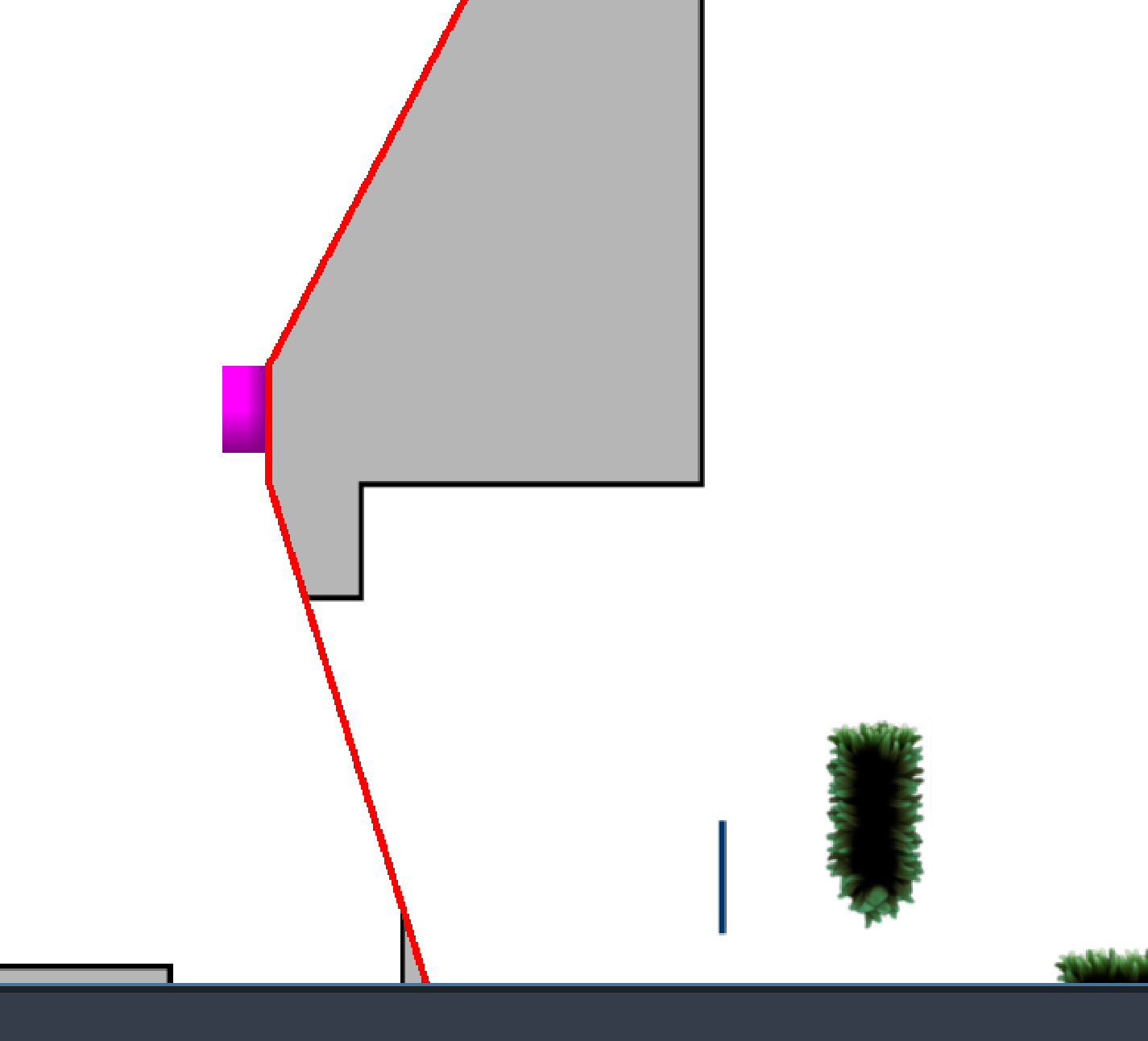
My other question was about the positioning of the portal texture/camera. I used an approximation calculated from the global mouse position to work out how far off the texture was and move it to roughly the right place. I have no idea why it doesn’t work without this and if a function like get_global_transform() or something would give me the same shift but to more accuracy (and cleaner code). The below image shows what it looks like without the calculated shift applied. The “view” should be “looking out of” the 2nd portal (the vertical blue line).
The portal scene is at res://features/portals/portal.(tscn/gd).
I asked this question previously here but havn’t got any responses and figured a new question with my slightly updated Godot version and what progress I’ve made since then would be clearer than writing updates in a comment on the old question.
Thanks so much in advance for any help with this/insignts as to whats going on and sorry for the huge paragraph of confusion. 