I followed the instructions to the letter, but the start button isn’t functional and the texts “Dodge the Creeps!” & “Get Ready” don’t disappear. All 3 stay on screen depending on if I either put in ‘new_game()’ or ‘pass’ underneath ‘func _ready():’ in ‘main’, with “Get Ready” appearing with ‘new_game’()’ & “Dodge the Creeps” w/ ‘pass’. Everything else works fine, except for what I just mentioned. I’ve tried looking through the documentation again & again, and I just don’t know what I’m doing wrong.
Here’s my ‘main.gd’, followed by my ‘HUD.gd’.
extends Node

@export var mob_scene: PackedScene
var score

func game_over():
	$ScoreTimer.stop()
	$MobTimer.stop()
	$HUD.show_game_over()
	$Music.stop()
	$DeathSound.play()

func new_game():
	score = 0
	$Player.start($StartPosition.position)
	$StartTimer.start()
	$HUD.update_score(score)
	$HUD.show_message("Get Ready")
	get_tree().call_group("mobs", "queue_free")
	$Music.play()

func _ready():
	new_game()

func _on_mob_timer_timeout():
	var mob = mob_scene.instantiate()

	var mob_spawn_location = $MobPath/MobSpawnLocation
	mob_spawn_location.progress_ratio = randf()

	mob.position = mob_spawn_location.position

	var direction = mob_spawn_location.rotation + PI / 2

	direction += randf_range(-PI / 4, PI / 4)
	mob.rotation = direction

	var velocity = Vector2(randf_range(150.0, 250.0), 0.0)
	mob.linear_velocity = velocity.rotated(direction)

	add_child(mob)


func _on_score_timer_timeout():
	score += 1
	$HUD.update_score(score)

func _on_start_timer_timeout():
	$MobTimer.start()
	$ScoreTimer.start()
Can you check the “$StartButton” properties in the Inspector, is “disabled” property on?
The code also looks fine as well, also the same as when I did this.
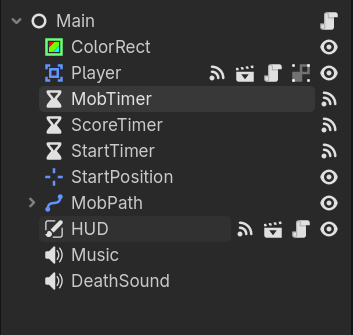
From Google: A container node inside the CanvasLayer may be blocking input.
Solution: Ensure that your button is below the container in the scene tree (lower in the list = drawn on top) or ensure the parent containers are set to Mouse > Filter = Ignore.
Sometimes mouse inputs get blocked by layers of controls above the button. Since you said you didn’t get a print message, your button likely not being “clicked” because of layers blocking it.
After thinking about this for a moment, I realized that I’ve been getting really tripped up about the Documentation warning about remembering to remove the call to “new_game()” from “_ready():”. But without the “new_game()” and replacing it with “pass” the player doesn’t appear and the “start” button doesn’t work.
It is not a change that you are looking for.
Print statements are used in debugging because if the logic flow gets to a print line, that print will certainly execute.
So what you are looking for is console output.
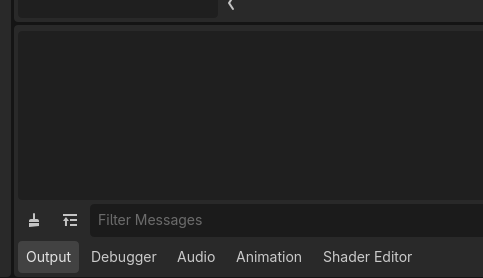
Bottom of the editor is where Godot prints output:
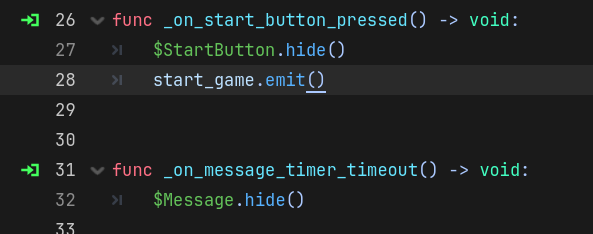
If nothing at all is being printed then _on_start_button_pressed() is not connected.
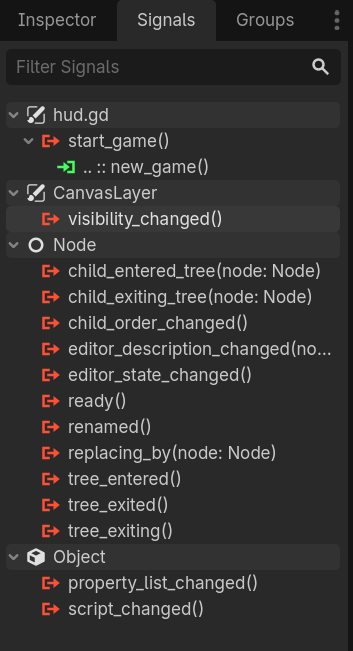
If so then you will need to select the button in the editor, select "Signals" in the inspector (top right) and click on the pressed to add a connection.
You can also connect by code, but the tutorial is telling you to do this through the editor. This is the step you likely missed.