Godot Version
4.4.1
Question
The whole world is moving with my character, and I’m not sure why.
So I’ve created a small game for my first Gamejam. It’s a game where you play as a worm, moving upward on the screen to collect fruit and avoid obstacles.
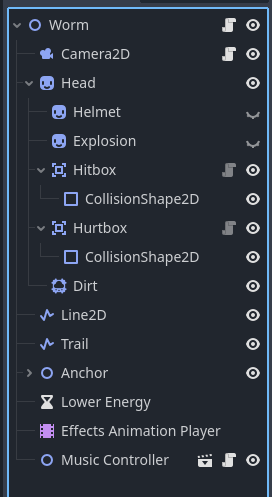
Near the beginning of my project, I noticed something was oddly out of sync, and the worm wasn’t moving in line with the background or anything else. (The worm is a Node2D that I’m moving manually, rather than a Character2D, though when I recreated it as a Character2D it seemed to have the same issue, so it’s not even a physics thing as far as I can tell) I ‘fixed’ this by just… attaching all the important things to the worm directly.
But now, I’m finding that the more I add the harder and harder it is to keep it consistent (especially with particle effects), and I’d like to understand where it went wrong and how it’s out of sync in order to make it work correctly.
It’s important to note that it’s not completely moving as one big object. When it first went wrong, I noticed the worm was moving like… 10% too fast compared to everything else, which made it look like it was sliding around wrong. Now, everything else is moving at about 10% of the worm’s speed so it can keep up and make it look like it’s all moving at the correct speed.
As far as I can tell, this is my only code for making the worm move:
func move(delta):
direction = Input.get_axis(“Left”, “Right”)
position.y -= speed * delta
head.rotation_degrees = move_toward(head.rotation_degrees, head_tilt * direction, speed * 10 * delta)
position.x = move_toward(position.x, position.x + (speed * direction / 50), delta * speed)
if position.x > 260:
position.x = 260
head.rotation_degrees = 0
if position.x < -260:
position.x = -260
head.rotation_degrees = 0
Everything else–the fruit and obstacle spawners, the camera, it’s all just attached to the worm, moving with it that 10% that I can’t figure out where it’s coming from to keep it in sync.
It also doesn’t matter whether I use global_position or just position, it doesn’t seem to change anything.
It feels as if there are two movements for the worm–one movement that is how I want it to move, an an extra 10% of movement that’s just tacked on for no apparent reason that affects everything, and I’m not sure why.
Let me know if there’s anything else I can share or add to make this easier to diagnose! I can attach or share a zip file of the game somehow, if that helps. I’ve been struggling with this all morning, and I’d really love to have it figured out so I can move on to other things.
Thank you!