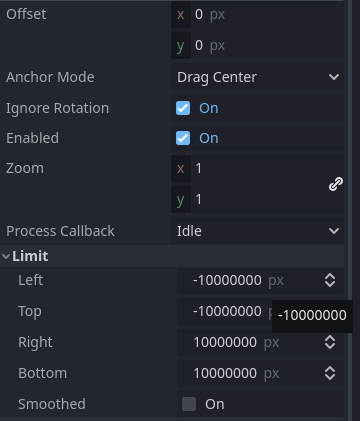
Hi, I´m completly new to programming making my first steps with Godot.
Sorry to bother with something super basic, but it’s puzzling me and i just want to know what it’s happening.
I’m setting up a Camera2D that you can move with the WASD keys. I set up the limits in the inspector, and while the view stops at the limit the node keeps moving beyond, so i thought about changing the position of the camera when it goes beyond the limit, so that there is no delay turning back.
It works perfectly on the X axis, but when implementing the same on the Y axis, it doesn’t work and i can’t figure it out.
func _process(delta):
	Input.get_vector("Left","Right","Up","Down")

	if Input.is_action_pressed("Up"):
			position+=Vector2(0,-500)*delta
	if Input.is_action_pressed("Down"):
			position+=Vector2(0,500)*delta
	if Input.is_action_pressed("Left"):
			position+=Vector2(-500,0)*delta
	if Input.is_action_pressed("Right"):
			position+=Vector2(500,0)*delta
	if position < Vector2(187,0):
		position.x = (187)
	if position > Vector2(953,0):
		position.x = (953)
         if position <  Vector2(0,107):
		position.y = (107)
	if position > Vector2(0,530):
		position.y = (530)
The camera position starts at (576, 324).
Why the position.x lines work as intended, but the position.y doesn’t? The last lines even lock the y at 530, unable to move it.
I thought maybe i should use global_position, but its the same.
Thanks for your help.
Yes, i did set those limits, and while they work with the view of the camera, they do not work with the actual Camera2D node that i’m moving with the input keys.
For example, if i move the camera to the left and keep pressing left, the camera will stop at the the limit but the position of the camera node will keep traveling left. If i then start pressing right, the camera will not move until the position of the node reaches inside the limit and only then it start moving right.
It’s that delay that i’m trying to fix with respawning the postion back at the limit. And i works perfectly on the X axis, but not on the Y for some reason.
extends Camera2D

@export var player_node:Node

const CAMERA_MOVE_SPEED=100
const MAX_POS=50.0
const MIN_POS=-50.0

var current_pivot_position
var is_camera_moving:bool=false
var input=Vector2.ZERO

func get_input():
	input.x=int(Input.is_action_pressed("Right"))-int(Input.is_action_pressed("Left"))
	input.y=int(Input.is_action_pressed("Down"))-int(Input.is_action_pressed("Up"))
	return input.normalized()

func _process(delta):
	input=get_input()
	if input==Vector2.ZERO and not Input.is_action_pressed("Right") and not Input.is_action_pressed("Down"):
		is_camera_moving=false
		current_pivot_position=Vector2.ZERO
		position=current_pivot_position
	else:
		if not is_camera_moving:
			is_camera_moving=true
			current_pivot_position=position
		current_pivot_position.x=clamp(position.x+input.x*CAMERA_MOVE_SPEED*delta,MIN_POS,MAX_POS)
		current_pivot_position.y=clamp(position.y+input.y*CAMERA_MOVE_SPEED*delta,MIN_POS,MAX_POS)
		position=current_pivot_position
remember to assign the player node
also put this camera as a child of the player
Also check this out, moving camera with middle mouse button grab:
Thanks for yor reply, i 'll check it out, but there is no player, or playercharacter. It’s just the invisible camera node movement with the WASD keys. If i could assign the camera to a player i could also work with collisions, but i can’t.
Even if i could find a solution for the camera limits, i would still like to know why my inital code doesn’t work, or more specifically how it works on one axis and not on the other. Where is the mistake?