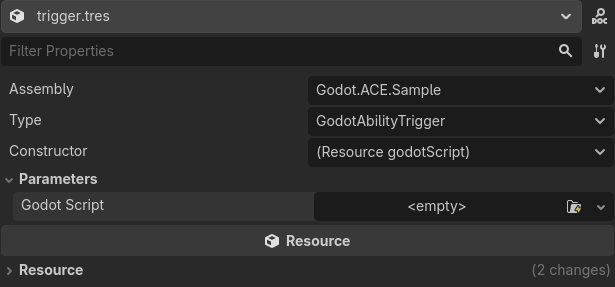
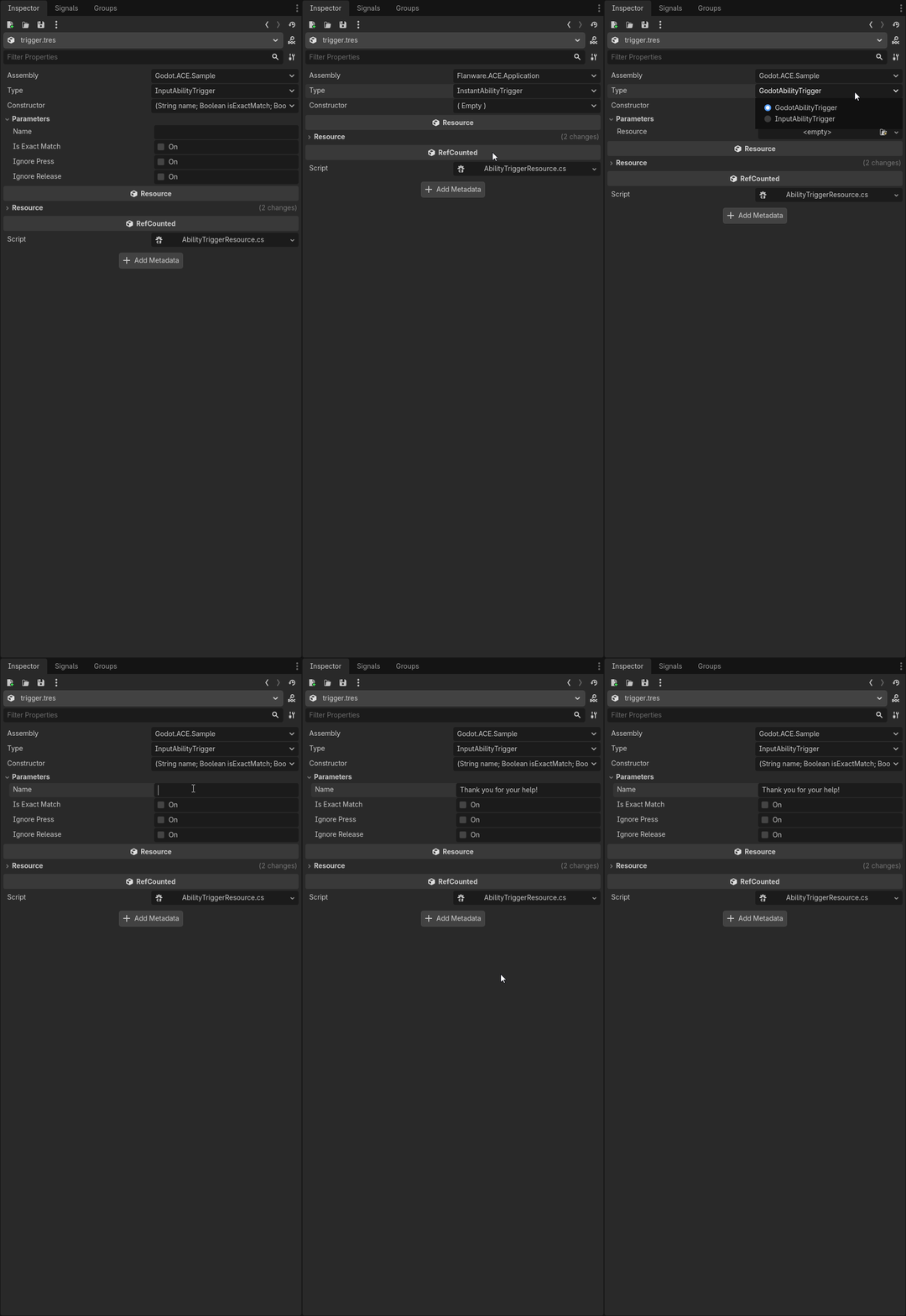
Well! This took way longer than expected, but at a point I am pretty happy with it. May make a post elsewhere in case someone else would like to nab this system. Anyways, here’s some key points:
Reflection Resource
Our resource now has a few helpers it calls to keep code more maintainable. Each of the helper’s TrySet() also checks if a property above has updated so that it can grab the default.
ReflectionResource
using Flantastico.Godot.ACE.Presenter.Core.Reflection;
using Godot;
using Godot.Collections;
using System;
namespace Flantastico.Godot.ACE.Presenter.Core.Reflection;
///
/// Abstract class that provides a flexible way to select a class type, its constructor,
/// and constructor parameters through the Godot editor.
///
[GlobalClass, Tool]
public abstract partial class ReflectionResource : Resource
{
public abstract Type BaseType { get; }
public string AssemblyName = string.Empty;
public string TypeName = string.Empty;
public int ConstructorIndex = 0;
public Array<Dictionary> ConstructorArray = [];
public Dictionary Parameters = [];

private readonly AssemblyPropertyHelper _assemblyPropertyHelper;
private readonly TypePropertyHelper _typePropertyHelper;
private readonly ConstructorPropertyHelper _constructorPropertyHelper;
private readonly ParameterPropertyHelper _parameterPropertyHelper;

public ReflectionResource()
{
    _assemblyPropertyHelper = new(this);
    _typePropertyHelper = new(this);
    _constructorPropertyHelper = new(this);
    _parameterPropertyHelper = new(this);
}

public override Array<Dictionary> _GetPropertyList()
{
    Array<Dictionary> properties = [];

    _assemblyPropertyHelper.AddToPropertyList(properties);
    _typePropertyHelper.AddToPropertyList(properties);
    _constructorPropertyHelper.AddToPropertyList(properties);
    _parameterPropertyHelper.AddToPropertyList(properties);

    return properties;
}

public override Variant _Get(StringName property)
{
    if (_assemblyPropertyHelper.TryGet(property, out Variant assemblyVariant))
    {
        return assemblyVariant;
    }
    else if (_typePropertyHelper.TryGet(property, out Variant typeVariant))
    {
        return typeVariant;
    }
    else if (_constructorPropertyHelper.TryGet(property, out Variant constructorVariant))
    {
        return constructorVariant;
    }
    else if (_parameterPropertyHelper.TryGet(property, out Variant parameterVariant))
    {
        return parameterVariant;
    }

    return default;
}

public override bool _Set(StringName property, Variant value)
{
    _assemblyPropertyHelper.TrySet(property, value, out bool isAssemblySet);
    _typePropertyHelper.TrySet(property, value, out bool isTypeSet);
    _constructorPropertyHelper.TrySet(property, value, out bool isConstructorSet);
    _parameterPropertyHelper.TrySet(property, value, out bool isParameterSet);

    return isAssemblySet || isTypeSet || isConstructorSet || isParameterSet;
}

// Instance Creation
protected object Create()
{
    return default;
}
}
Constructor Property Helper
Gonna skip assembly and type helpers since those are pretty simple and go straight for the constructor. @export_storage was the key! Now I use an index for saving which constructor we want, but we validate that the index still matches the expected constructor. This allows adding or removing constructors without fear of your resources breaking. The actual data of the constructor is serialized in a property marked with @export_storage to hide it.
ConstructorPrpertyHelper
using Godot;
using Godot.Collections;
using System;
using System.Linq;
using System.Reflection;


namespace Flantastico.Godot.ACE.Presenter.Core.Reflection;

internal class ConstructorPropertyHelper
{
    private readonly ReflectionResource _resource;

    public const string ArrayPropertyName = "ConstructorArray";
    public const string IndexPropertyName = "Constructor";

    private ConstructorDefinition[] _availableContructorDefinitionArray;

    public ConstructorPropertyHelper(ReflectionResource resource)
    {
        _resource = resource;
        _availableContructorDefinitionArray = GetAvailableConstructorDefinitions(resource);
    }

    internal bool TryGet(StringName property, out Variant variant)
    {
        if (property == IndexPropertyName)
        {
            if (!IsValidIndexForSelectedConstructor(_resource.ConstructorIndex))
            {
                _resource.ConstructorIndex = GetValidIndexForSelectedConstructor();
            }

            variant = _resource.ConstructorIndex;
            return true;
        }
        else if (property == ArrayPropertyName)
        {
            variant = _resource.ConstructorArray;
            return true;
        }

        variant = default;
        return false;
    }

    internal bool TrySet(StringName property, Variant value, out bool isSet)
    {
        if (property == AssemblyPropertyHelper.PropertyName)
        {
            _availableContructorDefinitionArray = GetAvailableConstructorDefinitions(_resource);
            _resource.ConstructorArray = GetDefaultConstructorArray(_resource);
            _resource.NotifyPropertyListChanged();
        }
        else if (property == TypePropertyHelper.PropertyName)
        {
            _availableContructorDefinitionArray = GetAvailableConstructorDefinitions(_resource);
            _resource.ConstructorArray = GetDefaultConstructorArray(_resource);
            _resource.NotifyPropertyListChanged();
        }
        else if (property == ConstructorPropertyHelper.IndexPropertyName)
        {
            _resource.ConstructorIndex = value.AsInt32();
            _resource.ConstructorArray = _availableContructorDefinitionArray[_resource.ConstructorIndex].AsConstructorArray();
            isSet = true;
            return true;
        }
        else if (property == ConstructorPropertyHelper.ArrayPropertyName)
        {
            _resource.ConstructorArray = value.AsGodotArray<Dictionary>();
            _resource.ConstructorIndex = GetValidIndexForSelectedConstructor();
            isSet = true;
            return true;
        }

        isSet = false;
        return false;
    }

    internal void AddToPropertyList(in Array<Dictionary> propertyList)
    {
        Assembly assembly = ReflectionObjectFinder.FindAssemblyByName(_resource.AssemblyName);
        Type type = ReflectionObjectFinder.GetTypeByName(_resource.TypeName, assembly);

        propertyList.Add(new Dictionary
        {
            { "name", IndexPropertyName },
            { "type", (int)Variant.Type.Int },
            { "hint", (int)PropertyHint.Enum },
            { "hint_string", GetConstructorHintString(type) },
        });

        propertyList.Add(new Dictionary
        {
            { "name", ArrayPropertyName },
            { "type", (int)Variant.Type.Array },
            { "hint", (int)PropertyHint.ArrayType },
            { "hint_string", "Dictionary" },
            { "usage", (int)PropertyUsageFlags.Storage }
        });
    }

    internal static Array<Dictionary> GetDefaultConstructorArray(ReflectionResource resource)
    {
        Assembly assembly = ReflectionObjectFinder.FindAssemblyByName(resource.AssemblyName);
        Type type = ReflectionObjectFinder.GetTypeByName(resource.TypeName, assembly);

        Array<Dictionary> constructorArray = new Array<Dictionary>();
        if (resource.BaseType.IsAssignableFrom(type) && !type.IsInterface && !type.IsAbstract)
        {
            ConstructorInfo constructorInfo = type.GetConstructors()[0];
            ParameterInfo[] parameterInfoArray = constructorInfo.GetParameters();
            for (int i = 0; i < parameterInfoArray.Length; ++i)
            {
                ParameterInfo parameterInfo = parameterInfoArray[i];
                ParameterDefinition argumentData = new(parameterInfo);
                constructorArray.Add(argumentData.AsDictionary());
            }
        }

        return constructorArray;
    }

    private static string GetConstructorHintString(Type type)
    {
        ConstructorInfo[] constructorArray = type.GetConstructors();
        System.Collections.Generic.List<string> constructorSignatureList = new();
        for (int i = 0; i < constructorArray.Length; ++i)
        {
            ParameterInfo[] parameterInfoArray = constructorArray[i].GetParameters();
            if (parameterInfoArray.Length > 0)
            {
                // Using semicolon (;) to separate parameters since hint string uses commas (,) to separate enum options.
                string parameterString = string.Join("; ", parameterInfoArray.Select(p => $"{p.ParameterType.Name} {p.Name}"));
                constructorSignatureList.Add($"({parameterString})");
            }
            else
            {
                constructorSignatureList.Add("( Empty )");
            }
        }

        return string.Join(",", constructorSignatureList);
    }

    private static ConstructorDefinition[] GetAvailableConstructorDefinitions(ReflectionResource resource)
    {
        Assembly assembly = ReflectionObjectFinder.FindAssemblyByName(resource.AssemblyName);
        Type type = ReflectionObjectFinder.GetTypeByName(resource.TypeName, assembly);
        if (type == null)
        {
            type = TypePropertyHelper.GetDefaultType(resource);
        }

        ConstructorInfo[] availableConstructorInfoArray = type.GetConstructors();
        ConstructorDefinition[] availableConstructorDefinitionArray = new ConstructorDefinition[availableConstructorInfoArray.Length];

        for (int i = 0; i < availableConstructorInfoArray.Length; ++i)
        {
            ConstructorDefinition constructorDefinition = new(availableConstructorInfoArray[i]);
            availableConstructorDefinitionArray[i] = constructorDefinition;
        }

        return availableConstructorDefinitionArray;
    }

    private bool IsValidIndexForSelectedConstructor(int index)
    {
        if (index >= _availableContructorDefinitionArray.Length)
        {
            return false;
        }

        return _availableContructorDefinitionArray[index].Equals(_resource.ConstructorArray);
    }

    private int GetValidIndexForSelectedConstructor()
    {
        _availableContructorDefinitionArray = GetAvailableConstructorDefinitions(_resource);
        for (int i = 0; i < _availableContructorDefinitionArray.Length; ++i)
        {
            if (_availableContructorDefinitionArray[i].Equals(_resource.ConstructorArray))
            {
                return i;
            }
        }

        return 0;
    }
}
Parameter Property Helper
Don’t know why the "hint_string” wasn’t working before, but I got it running. I’ll chalk it up to something erroneous I did. Which left me the question; how do I pipe the necessary data from the ParameterInfo to the "hint_string”. You see, the reason I was focusing so much on this is that while I wish to work mostly in C#, I want to keep a bridge open for others to expand the system in GDScript. So I created the bridge class and it works great, but there was now way to filter for the GDScript class from C# unless I use GD.Load(), which requires a hard set path. Thought about it for a while, but ended up deciding that this is a limitation and decided to just make a dummy class that has the exact same name as the GDScript, but isn’t a [GlobalClass]. I then just get the name of this type and use that as a filter and voila!
ParameterPropertyHelper.cs
using Godot;
using Godot.Collections;

namespace  Flantastico.Godot.ACE.Presenter.Core.Reflection;

internal class ParameterPropertyHelper
{
    private readonly ReflectionResource _resource;
    public const string PropertyName = "Parameters";

    public ParameterPropertyHelper(ReflectionResource resource)
    {
        _resource = resource;
    }

    internal bool TryGet(StringName property, out Variant variant)
    {
        string propertyName = property;
        if (propertyName.StartsWith($"{PropertyName}/"))
        {
            string parameterName = propertyName.Split("/")[1];
            if (_resource.Parameters.ContainsKey(parameterName))
            {
                variant = _resource.Parameters[parameterName];
            }
            else
            {
                variant = GetDefaultVariantForParameterName(parameterName);
                _resource.Parameters.Add(parameterName, variant);
            }

            return true;
        }

        variant = new Variant();
        return false;
    }

    internal bool TrySet(StringName property, Variant value, out bool isSet)
    {
        string propertyName = property.ToString();
        if (propertyName.StartsWith($"{PropertyName}/"))
        {
            string parameterName = propertyName.Split("/")[1];
            if (_resource.Parameters.ContainsKey(parameterName))
            {
                _resource.Parameters[parameterName] = value;
            }
            else
            {
                _resource.Parameters.Add(parameterName, value);
            }

            isSet = true;
            return true;
        }
        else if (property == AssemblyPropertyHelper.PropertyName)
        {
            _resource.Parameters.Clear();
            _resource.NotifyPropertyListChanged();
        }
        else if (property == TypePropertyHelper.PropertyName)
        {
            _resource.Parameters.Clear();
            _resource.NotifyPropertyListChanged();
        }
        else if (property == ConstructorPropertyHelper.IndexPropertyName)
        {
            _resource.Parameters.Clear();
            _resource.NotifyPropertyListChanged();
        }

        isSet = false;
        return false;
    }

    internal void AddToPropertyList(in Array<Dictionary> propertyList)
    {
        foreach (Dictionary parameterDictionary in _resource.ConstructorArray)
        {
            ParameterDefinition parameterDefinition = new(parameterDictionary);
            Dictionary propertyDictionary = new Dictionary
            {
                { "name", $"{PropertyName}/{parameterDefinition.Name}" },
                { "type", (int)parameterDefinition.VariantType },
            };

            PropertyUsageFlags usageFlags = PropertyUsageFlags.Editor;
            PropertyHint hint = PropertyHint.None;
            string hintString = string.Empty;

            if (parameterDefinition.VariantType == Variant.Type.Nil)
            {
                usageFlags |= PropertyUsageFlags.NilIsVariant;
            }
            else if (parameterDefinition.SystemType.IsAssignableTo(typeof(Resource)))
            {
                usageFlags = PropertyUsageFlags.Default;
                hint = PropertyHint.ResourceType;
                hintString = parameterDefinition.SystemType.Name;
            }

            propertyDictionary.Add("hint", (int)hint);
            propertyDictionary.Add("hint_string", hintString);
            propertyDictionary.Add("usage", (int)usageFlags);

            propertyList.Add(propertyDictionary);
        }
    }

    private Variant GetDefaultVariantForParameterName(string parameterName)
    {
        foreach (Dictionary constructorDictionary in _resource.ConstructorArray)
        {
            ParameterDefinition parameterDefinition = new(constructorDictionary);
            if (parameterDefinition.Name == parameterName)
            {
                return parameterDefinition.DefaultValue;
            }
        }

        return default;
    }
}
GodotAbilityTrigger.cs (GDScript Bridge Class)
using ACE.Godot.Scripts.ACE.Presenter.Core;
using Flantastico.Flanware.ACE.Application.Ability.Instance;
using Flantastico.Flanware.ACE.Application.Ability.Trigger;
using Flantastico.Flanware.ACE.Application.Core.Abstractions;
using Flantastico.Godot.ACE.Presenter.Ability.Trigger.Resources;
using Godot;
using System;

namespace Flantastico.Godot.ACE.Presenter.Ability.Trigger;

/// <summary>
/// Allows the implementation of <see cref="IAbilityTrigger"/> through a GD Script.
/// The GD Script must extend <see cref="Resource"/> and have an "on_trigger" signal,
/// an "activate" method, and a "deactivate" method. These will be enforced if inheriting
/// from "AbstractAbilityTrigger" as defined in "ability_trigger_resource.gd".
/// For an example, see "process_ability_trigger.gd".
/// </summary>
public class GodotAbilityTrigger : IAbilityTrigger
{
    private const string _onTriggerSignalName = "on_trigger";
    private const string _activateMethodName = "activate";
    private const string _deactivateMethodName = "deactivate";

    public event Action<IAbility> OnTrigger;

    private IAbility _ability = new Flanware.ACE.Application.Ability.Instance.Ability();
    private readonly Resource _godotScript;

    public GodotAbilityTrigger(GodotAbilityTriggerResource resource)
    {
        _godotScript = resource;
    }

    public void Activate(IAbility ability, IAceReferences references)
    {
        _ability = ability;
        AceReferencesVariant referencesVariant = new AceReferencesVariant(references);
        Variant referencesDictionary = referencesVariant.Get();

        _godotScript.Connect(_onTriggerSignalName, Callable.From(InvokeOnTriggerEvent));
        _godotScript.Call(_activateMethodName, referencesDictionary);
    }

    public void Deactivate()
    {
        _godotScript.Call(_deactivateMethodName);
        _godotScript.Disconnect(_onTriggerSignalName, Callable.From(InvokeOnTriggerEvent));
    }

    private void InvokeOnTriggerEvent()
    {
        OnTrigger?.Invoke(_ability);
    }
}
GodotAbilityTriggerResource.cs (Dummy Class)
using Godot;

namespace Flantastico.Godot.ACE.Presenter.Ability.Trigger.Resources
{
    public partial class GodotAbilityTriggerResource : Resource
    {

    }
}
godot_ability_trigger_resource.gd
@abstract
class_name GodotAbilityTriggerResource
extends Resource

signal on_trigger

@abstract func activate(references: Variant)
@abstract func deactivate()
Future Work
- Cacheing Assembly and Type searches to reduce Linq operations.
- Write up some comments.
- Bring back actually instantiating objects.
So yeah, thank you so much @mrcdk ! Gonna mark your post as the solution given that it’s the most straightforward solution. Gonna post this at some point in the forum though. Know which category would be best?
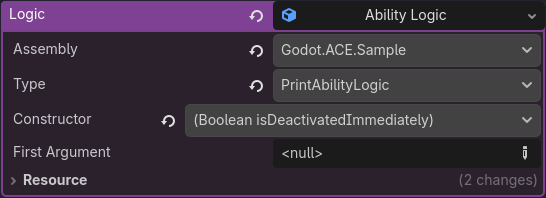

 I also see other replies so I’ll reply to those separately.