@onready var speed = 400 @onready var enemy = $EnemySprite @export var tilemap: TileMap
var specific_tile_coordinates = Vector2(0, 1)
func _physics_process(delta: float) → void:
var player = get_tree().get_nodes_in_group(“world”)[0]
var target = player.position
var direction = (target - position).normalized()
velocity = direction * speed
enemy.play()
if player.position.x < global_position.x:
	enemy.flip_h = true
else:
	enemy.flip_h = false

var player_tile_coordinates = tilemap.world_to_map(global_position)
if player_tile_coordinates == specific_tile_coordinates:
	queue_free(

move_and_slide()
For future reference it’s easier to help you when all the code is formatted correctly (``` at the start and end) And the more details you provide the easier it is to identify the problem.
I think i have a fix to your issue, although it’s hard to say when there isnt much information to go off of. I’m guessing you’re using a tilemap? if yes then I can help.
I have a small chunk of code that detects custom data thats assigned to specific tiles. I’m not a pro at using godot and there is probably a much smarter way to do this but this solution worked for me.
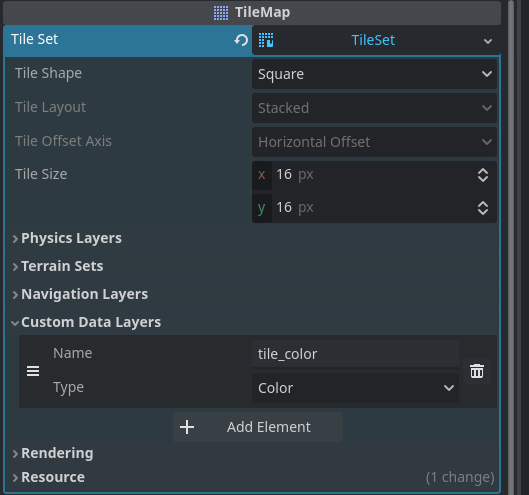
you can add custom data to your tileset. you do this by pressing the tileset and navigating to the custom data layers dropdown menu. Then you name the data layer and assign it a type (for this scenario I would pick Bool)
add a raycast to whatever entity thats supposed to die if it touches the tile.
set the target_position to (0,0) and set hit_from_inside and exclude_parent to true. Also set the collision mask of the raycast to 3 for both of them
Then you should add a new physics layer to your tilemap (this is the layer that the raycast will be detecting) and set the mask and layer to 3 also.
Paint all the tiles that are supposed to destroy your enemy with the new physics layer and also assign the new custom data to the same tiles. (you do this by selecting the tilemap node, then selecting the tileset, going to the paint menu and selecting the physics layer and then the custom data)
Add the following code to your enemy
	if raycast.get_collider() is TileMap: #raycast (0,0) collides with physics layer 1
		var atlas_coord = raycast.get_collider().get_coords_for_body_rid(raycast.get_collider_rid()) # atlas coords gets tile coordinates
		var tile_data = raycast.get_collider().get_cell_tile_data(0,atlas_coord) #gets all tiledata
		var custom_data_getter = tile_data.get_custom_data("custom data name") #gets specific custom data

        if custom_data_getter == true:
              #kill the enemy
Using this workaround is deprecated in 4.4 and theres an easier way to do this in 4.4. but I also use 4.2 and have found this to work
If you follow the steps this should work and if not feel free to ask.