Trying to get an EditorTranslationParserPlugin working

Godot Version

4.7.2

Question

Based on this documentation page I’ve been trying to get a custom parser working for translation strings.

I’ve implemented the basic functionality but when I try to load the language file I get the error: No loader found for [my file extension]

That error isn’t too surprising as in that document it says:

To use EditorTranslationParserPlugin, register it using the EditorPlugin.add_translation_parser_plugin() method first.

and I cannot figure out what that means, exactly. Where do I call that function, do I need to put it in a separate script? I’ve not written any plugins before. So I tried going through the Making Plugins tutorial in the hopes it would make things clearer but it has only left me more confused, as EditorTranslationParserPlugin does not inherit EditorPlugin and therefore can’t be enabled from the Plugins tab of project settings.

So I tried making a separate plugin file based on the making plugins tutorial, and had it instantiate a copy of my EditorTranslationParserPlugin and call AddTranslationParserPlugin with it as the parameter:

MyLangParser langParser = null;

public override void _EnterTree()
{
	langParser = new MyLangParser ();
	AddTranslationParserPlugin(langParser);
}

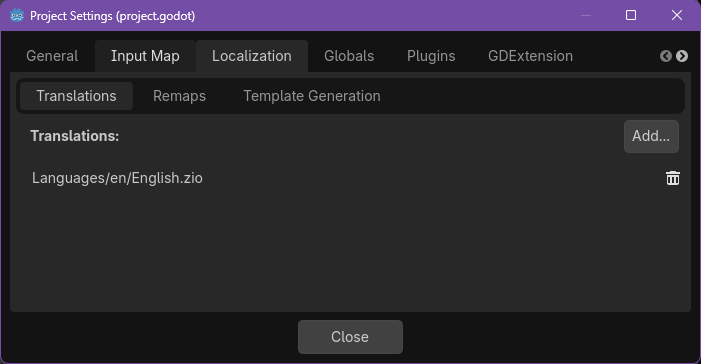
Then recompiled, turned it on in the plugins tab and tried loading my language file again but still the same error

image

What am I missing? Or does anyone know of a simple example of a custom EditorTranslationParserPlugin? I’ve tried googling it but havent come up with anything

Okay after some experimenting it turns out I was doing the right thing there. It’s that I gave my translation files my own file extension, .zio, and with that added to the EditorTranslationParserPlugin

public override string[] _GetRecognizedExtensions()
{
	return ["zio"];
}

I presumed that would be fine, but it just causes the importer to not even try to load it, or something. Changing the file extension to .txt and that function to accommodate that

public override string[] _GetRecognizedExtensions()
{
	return ["txt"];
}

seems to have worked.

This pushes my question forward to a new one though: Is there a way I can make Godot recognize my own file extensions? It’s not a big deal but it would be preferable. The files with my own extension don’t show up in Godot’s built in filesystem viewer either, I’ve noticed, but they can be opened with Godot’s file system stuff in code:

Godot.FileAccess.Open("res://Languages/English/Abilities.zio", Godot.FileAccess.ModeFlags.Read)

Is there some way to register a filetype with Godot and just tell it to treat it as a text file? Or an arbitrary binary blob, for that matter? And have it show up in the built in filesystem viewer and be able to work with things like EditorTranslationParserPlugin

The error you are having is that the file is not recognized as a resource. I’m guessing that in your plugin you are trying to open the file as if it were a resource (like using GD.Load()). If you want Godot to recognize your file as a resource you’ll need to write a ResourceFormatLoader and a ResourceFormatSaver if you intend to modify it within Godot. You’ll need to register them with ResourceLoader.add_resource_format_loader() and ResourceSaver.add_resource_format_saver()

Here’s an example:

Your setup looks mostly right. Make sure the EditorPlugin is actually enabled and its _EnterTree() runs, then register the parser there with AddTranslationParserPlugin(). Also verify that your parser explicitly supports the exact file extension you’re trying to load, as a mismatch can cause the “No loader found” error.

I was wrong here, Godot had just stopped throwing errors for some reason, it still wasn’t working.

I’m not using GD.Load, I’m solely trying to get it to work as a localization file, loaded through Godot here:

But maybe Godot is loading it that way internally. So I’ve tried implementing a ResourceFormatLoader, though I have no idea what I’d have to return in the _load function for it to work right, but either way it still doesn’t show up as a valid file extension when hitting “Add…” and if I force it to try by selecting the file anyway it throws the same “no loader found” error

I have found, after some more fiddling around, that it is working in the Template Generation tab. Which re-reading the EditorTranslationParserPlugin documentation is what it says it’s for. So it seems I’d just misunderstood as I thought it would let me load my own language files instead of po/csv and feed the strings to whatever internal language dictionary Godot’s using.

Okay, pretty much figured out what I actually wanted to accomplish now. To help anyone who winds up finding these posts at a future date:

EditorTranslationParserPlugin seems to only be for generating translation templates, a simple C# stub for getting it to work requires two classes that look something like:

using Godot;
using Godot.Collections;
using System.Collections.Generic;

[Tool]
public partial class LangParser : EditorTranslationParserPlugin
{
	public override Array<string[]> _ParseFile(string path)
	{
		string wholeFile = null;

		using(FileAccess file = FileAccess.Open(path, FileAccess.ModeFlags.Read))
		{
			wholeFile = file.GetAsText();
		}

		Array<string[]> ret = new Array<string[]>();

		AddToDictionary(wholeFile, ref ret);
		//AddToDictionary does the actual parsing of my language file, 
		//too long to include here but it fills ret with string arrays 
		//outlined as the EditorTranslationParserPlugin docs page instructs:
		//[msgid, msgctxt, msgid_plural, comment, source_line]
		//though typically with only the first two used
		//ie: {"Button1", "First Button"}
		//or: {"Button", "ボタン"}

		return ret;
	}

	public override string[] _GetRecognizedExtensions()
	{
		return ["zio"]; //or whatever your file extension is
	}
	public static void AddToDictionary(string s, ref Array<string[]> ret)
	{/* actually parse the file and fill ret */}
}

and

#if TOOLS
using Godot;

[Tool]
public partial class LanguagePlugin : EditorPlugin
{
	EditorTranslationParserPlugin langParser = new LangParser();
	public override void _EnterTree()
	{
		AddTranslationParserPlugin(langParser);
	}

	public override void _ExitTree()
	{
		RemoveTranslationParserPlugin(langParser);
	}
}
#endif

What I actually wanted, to load my strings directly into the Translation server looks like this:

using Godot;
using Godot.Collections;

public partial class Main : Control
{
	public override void _Ready()
	{
		base._Ready();

		GD.Print(Tr("Button1")); //prints Button1 

		Translation en = new Translation();
		en.Locale = "en";

		string wholeFile = null;

		string path = "res://Languages/en/English.zio";
		//English.zio translates "Button1" as "First Button"

		using(FileAccess file = FileAccess.Open(path, FileAccess.ModeFlags.Read))
		{
			wholeFile = file.GetAsText();
		}
		Array<string[]> ret = new Array<string[]>();

		LangParser.AddToDictionary(wholeFile, ref ret);
		//ret will now contain string arrays that match this layout:
		//[msgid, msgctxt, msgid_plural, comment, source_line]
		for(int iii = 0; iii < ret.Count; iii++)
		{
			en.AddMessage(ret[iii][0], ret[iii][1]);
		}

		TranslationServer.AddTranslation(en);
		TranslationServer.SetLocale("en");

		GD.Print(Tr("Button1")); //prints "First Button"
		//And a button in the scene that had the text "Button1" will have the text "First Button"
	}
}

This creates a Translation, fills it with strings from my file and tells Godot to use it. Which is what I was trying to accomplish.

I’m left with the very minor problem that my custom file types, .zio, don’t show up in Godot’s file explorer. I tried making a stub of a ResourceLoader in the hopes that it would make them show up, but that didn’t work. But I only wanted that so I could right-click on them and go “show in file explorer” or “copy path” so I can manage without it.