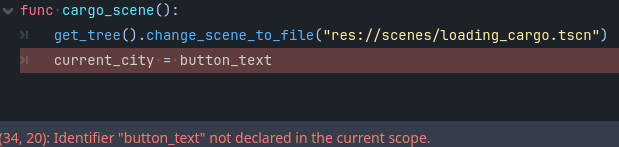
I need to calculate the distance between cities. Each city is indicated by a button on a World Map and each button is labeled in the city’s name. I currently have the gdscript written where a button is generated for each city and when that button is clicked, a “loading_cargo” screen is shown. I need to store the city name into a variable, so the “loading_cargo” can display the city name but also, so I can calculate distances between this city and others. Below is the code I have so far:
extends Node2D

var cities_array = [
	"Los Angeles",
	"San Fransisco",
	"San Diego"
]

var cities_location_array = [
	Vector2(1235, 2655),
	Vector2(1130, 2745),
	Vector2(1285, 2675)
]

const CITY = preload("res://sprites/city.png")

# Called when the node enters the scene tree for the first time.
func _ready():
	populate_cities()

func populate_cities():
	for i in cities_array.size():
		var btn = Button.new()
		btn.icon = CITY
		btn.text = str(cities_array[i])
		btn.flat = true
		btn.alignment = HORIZONTAL_ALIGNMENT_LEFT
		btn.position = cities_location_array[i]
		btn.pressed.connect(cargo_scene)
		add_child(btn)

func cargo_scene():
	get_tree().change_scene_to_file("res://scenes/loading_cargo.tscn")
Please let me know how I can store the name of the city in a variable when the button is pressed. If you have a better idea on how I can store the names and locations of a buch of cities, I’m all ears as well.
extends Node2D

const CITY = preload("res://sprites/city.png")

var cities_array = [
	"Los Angeles",
	"San Fransisco",
	"San Diego"
]
var cities_location_array = [
	Vector2(1235, 2655),
	Vector2(1130, 2745),
	Vector2(1285, 2675)
]
var current_ctiy: String


# Called when the node enters the scene tree for the first time.
func _ready():
	populate_cities()


func populate_cities():
	for i in cities_array.size():
		var btn = Button.new()
		btn.icon = CITY
		btn.text = str(cities_array[i])
		btn.flat = true
		btn.alignment = HORIZONTAL_ALIGNMENT_LEFT
		btn.position = cities_location_array[i]
		btn.pressed.connect(cargo_scene.bind(btn.text))
		add_child(btn)

func cargo_scene(button_text: String):
	get_tree().change_scene_to_file("res://scenes/loading_cargo.tscn")
	current_ctiy = button_text
Would be useful to look at Autoload Singletons, they’re nodes that get added to the root before your scene loads and stay alive indefinitely, even when scenes are switched.
Take a look at this, the wiki will explain it better than I ever could:
Like @Pararadox said, if you want it available, an Autoload singleton is the way to go.
Make a scene called game.tscn that’s just a plain Node.
Make a script called game.gd and attach it to the scene.
Add the following code to the script:
extends Node

var current_ctiy: String
Go to the menu Project → Project Settings…
Select the Globals tab.
Next to the Path textbox, click the folder icon.
Browse to your game.tscn file. (NOTyourgame.gdscript.)
Select the scene file.
Name the Node Game.
Click the Add+ button.
Change your script like so:
extends Node2D

const CITY = preload("res://sprites/city.png")

var cities_array = [
	"Los Angeles",
	"San Fransisco",
	"San Diego"
]
var cities_location_array = [
	Vector2(1235, 2655),
	Vector2(1130, 2745),
	Vector2(1285, 2675)
]
#Deleted the variable declaration here.


# Called when the node enters the scene tree for the first time.
func _ready():
	populate_cities()


func populate_cities():
	for i in cities_array.size():
		var btn = Button.new()
		btn.icon = CITY
		btn.text = str(cities_array[i])
		btn.flat = true
		btn.alignment = HORIZONTAL_ALIGNMENT_LEFT
		btn.position = cities_location_array[i]
		btn.pressed.connect(cargo_scene.bind(btn.text))
		add_child(btn)

func cargo_scene(button_text: String):
	get_tree().change_scene_to_file("res://scenes/loading_cargo.tscn")
	Game.current_ctiy = button_text #changed the variable being assigned here.
Game.current_city is a variable that will be available to every script in your game at any time. (There are some caveats, but they’re not important at this point.)