I have a platform game and most levels scroll left and right. Think its 3 that are vertical.
I need some help on adding movement buttons - left and right, plus, jump and fire. I’ve built 3 or 4 rows into the bottom of each level so that the buttons can be in the same place and out of the way of the player / enemies etc.
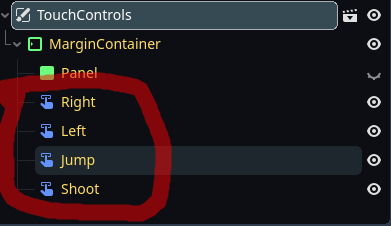
Show a screenshot of the UI scene tree and how it currently looks like in the 2D viewport + ideally a mockup version of how you’d want it to look like.
The VBoxContainer won’t work because the tilemap layer is a Node2d and not a Control node type.
I’ve attached images of the UI
I’d like the buttons to be near the bottom of the screen on all levels. Not all the levels are the same height.
This version of the level shows 2 black lines at the bottom of the level. I will add real tiles instead of these black lines so it looks better and want the buttons near the bottom.
Ah yes, the TouchScreenButton node. They are hard to work with not being a Control node, I’ve wrapped them in a Control node with a similar “Custom Minimum Size” set. When playing on mobile (specifically from the web) the icons would shrink for me, so I also made them much larger assuming they would take about half the size on-target.
You probably want a HBoxContainer, it’s a Node so you can add it to your scene like any other. Then add a Control node as a child of that, set it’s Custom Minimum Size and re-parent your TouchScreenButton to the sized Control.
They should be in the same place on the screen, unrelated to the level. Maybe you want to add the TouchControls as a global so it appears everywhere, or create a base level to inherit from each level with the touch controls.