Godot Version 4.6.2
How do tilemaplayer positions, local and global positions, and sprite rendering work together?
I’m currently trying to build an isometric tactical rpg like final fantasy tactics. Currently my scene structure is:
Tilemaplayer
- Cursor
- PlayerCharacter
In my tilemap script I use this code to set the initial placements of the children onto the grid
func _ready() → void:
var grid_objects := get_children()
for grid_object in grid_objects:
if grid_object is GridObject:
print(grid_object.grid_coordinates)
grid_object.position = map_to_local(grid_object.grid_coordinates)
however, despite setting my grid_objects (Cursor and PlayerCharacter) to have grid_coordinates of 0,0, the sprite of the cursor and the playercharacter are being rendered to the tile at (3,5)
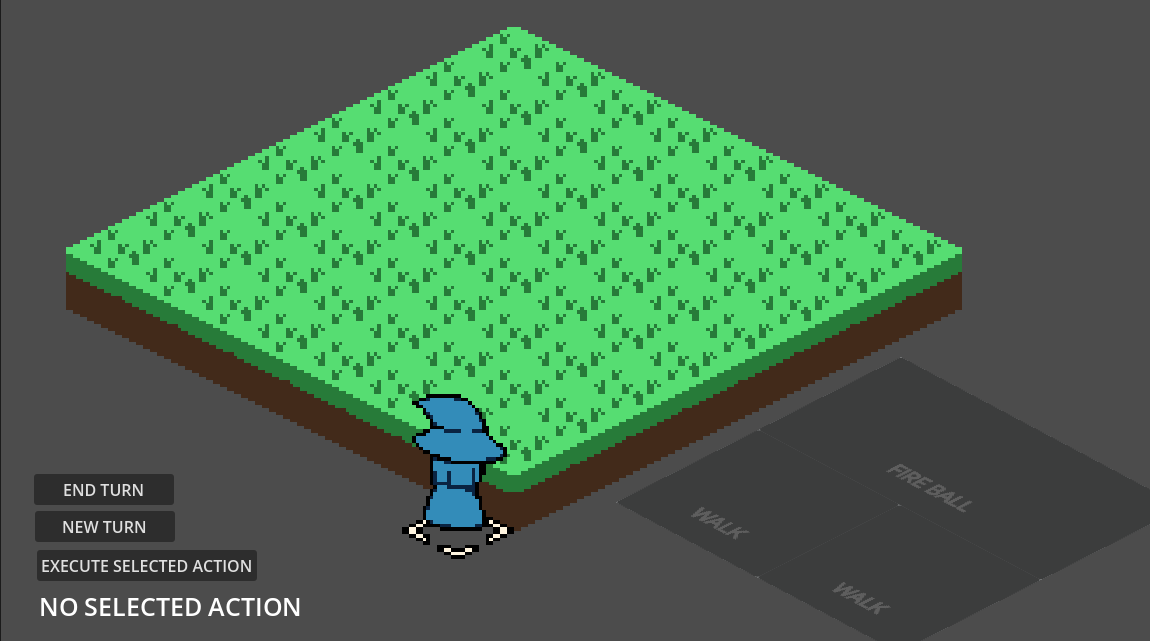
On top of that, the placeholder character sprite is not completely centered with the cursor, or any grass tile, since I’m not sure where I’d need to place the character sprite within it’s own scene to make sure it’s always centered on a tile. For context the isometric grid uses tiles of size 32*16. I’m not sure if there’s a way to programmatically center the player sprite onto a tile or if I just need to adjust it in the player scene’s sprite2d child.
Is there something that I’m just missing when it comes to local position, global position, map positions, and tilemaplayers?