Using Polymorphism with Scenes

Godot Version

4.5.1

Question

Ok so I need some help. I am just learning gdscript and it seems very intuitive so far and I don’t mind it. However I come from a C++ and C# background so I’m used to using object oriented programming, classes and polymorphism. I am moving my current game from Unity over to GODOT. I have looked and googled many times how to do this so please bare with me on me explaining the situation.

First my final product : I am making a enemy spawn point in my game. I have multiple enemies in the game to spawn. I want to be able to make a spawn point node and pass in another scene that can take which ever enemy I choose. So I would some type of chiefobject and all the enemies would derive from this. Then in the scene I would load in the chief object class and make it a variable and export it out to the scene so I can just drag and drop the chosen enemy into it’s place.

Where I am at:
So far I have learned how to make a class and child classes. I have learned about setters and getters and all the object oriented things. I read through the documentation on the site. Here is an example of what I have so far for my chief object. This is just a test so don’t judge to harshly.
This code is in it’s own gdscript called ChiefObject.

class_name ChiefObject extends Node2D

var m_isActivated : bool = true

var isActivated : bool :
	get:
		return m_isActivated
	set(value):
		m_isActivated = value

Next class : So I took this and want to derive a Destructables Class from this so this is what I made. Just basically a blank template for now. It is in its own gdscript file.

class_name DestructableObject extends ChiefObject

Current position :
So currently I am at this juncture. I have the spawn_point node2d scene and a node in that scene. Script wise I load in the chief object and export it out so it can be set when I choose the given enemy. Now the code in _ready was for testing purposes to see if I can actually access the class members. Which now looking at it I am not sure how private, public and protected members work, so I will have to look into that.

I now have another Node2D scene called roller which is an enemy. I derived that from DestructableObject. This is just a blank class set up with the roller scene.

extends Node2D


@export var CO = preload("res://Scripts/ChiefObject.gd")

func _ready() -> void:
	var test = CO.new()
	test.isActivated = false

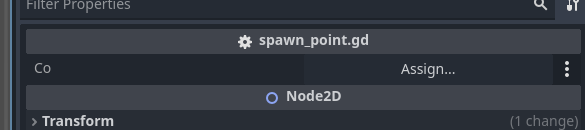
With this all said I added the spawn_point scene to the main scene where everything runs and tried to assign the ChiefObject var in the spawn_point scene with this roller scene but it does not let me set it.

With this I am believe I am thinking about this all wrong but am not sure how to continue. If anyone could be of any assistance that would be great. I am just looking for the best way to use this type of polymorphism in the game because I use it all the time in the unity project. I just hope I don’t have to go back to unity lol.
Scenes and script classes are not the same thing.

I’d recommend you go through “my first game” tutorial in the official docs to get familiar with engine’s basic concepts.

Also, having an “everything” base class is not a good idea.

1 Like

ok, this is a bit complicated.

this is correct, just a bit of waste. remember that gdscript is an object oriented language, a script is a class even if it doesn’t have a name, so all the class level variables are properties and all the functions are methods. you can even access the object variables by adding set or get to their names:

#it appears like this in the documentation
my_node.name
#does not appear in the documentation but works
my_node.get_name()
my_node.set_name("name")

setters and getters are intended for situations where they make usage easier or code cleaner, like if you have health and need to access and retrieve it, and if it goes below 0 something needs to happen. but using them for everything is not a good idea.
I think you are overcomplicating things.

also, check out the gdscript style guide, properties and method names should be in snake_case, and adding an underscore _ before it makes it private.
for example, _ready is a private method of Node that is overridden.

also, 4.5 added the abstract annotation @abstract for creating a base class such as this. the annotation prevents you from instantiating this class, and it needs to be extended instead, so you can use it to define your methods and override them in each inherited class.

@abstract
class_name ChiefObject
extends Node2D

there are none in gdscript. as I said, you can add an underscore before the property to make it “private”, otherwise is public. while the editor doesn’t discriminate and you can still access them, maybe in the future the intellisense can be made to detect them, hide them, and even warn about wrong usage. but it makes it easier to tell when you are not supposed to use them.

#public
var variable : bool
#private
var _variable : bool

this makes no sense.
when you set class_name on a script, that script gets registered in the editor, you can then use it anywhere and extend it.

when you instantiate a class you are creating a new object, and it has its own copy of properties and methods:

func _ready() -> void:
	var test : ChiefObject = DestructableObject.new()
	test.is_activated = false#this object has this property set to false

you can’t change the default values of a base class, maybe if you set them to static, but I haven’t had the need to test it.
try:


class_name ChiefObject
extends Node2D

static var is_activated = false

func _ready() -> void:
	ChiefObject.is_activated = true

that would in theory change a static variable on the base class. I don’t know why you would want to do it.


I don’t understand what you are trying to do.
as someone else pointed out, scenes and classes are different things.
a scene is a collection of nodes. a node is an instance of a class. when you set a script, you are changing the type of the node to that inherited class, so a node2D is converted to “DestructableObject”.

if you need to combine different classes, you can use different nodes. if you need different nodes to share the same behaviour, like being destructable, you can create a base class and inherit from that.
but if you need different enemies to be spawned, I would use an export and change the property in the instantiated scene to whatever enemy it needs to spawn. when spawning, you don’t need some shared custom class. everything that goes in the scenetree is a node, you only need to specify if you need to call some method on it.

@export var enemy_to_spawn : PackedScene#this is the scene class, but is used to spawn scene in the tree
func spawn_enemy():
	var tmp : Node2D = enemy_to_spawn.instantiate()
	add_child(tmp)

Ok so the code I showed you is code that I am using for testing purposes to wrap my head around aspects of gdscript. This will not be code in the final project.

I have a very hard time explaining these things so I will do my best.

Coming from Unity I was able to create a prefab. Then when I put that prefab in the game I could swap out what enemy I wanted and be able to change that enemies attributes. I could do this all by setting up a hierarchy of classes. I want to be able to do the same thing here. I want to be able to take an object (a scene if that’s considered an object in gdscript) and manipulate in another object through the inspector. This is all to be as dynamic as possible. I don’t want to have to drop in different enemies on a scene over and over again when I could just copy and paste and manipulate attributes as needed. The enemies are all going to be different in some way. So if I took the same enemy and put it in the scene lets say 4 times. I would setup that enemy with 4 different sets of attributes.

Hopefully that explains it. I did go through the tutorial of my first game but it is very high level and doesn’t take you through the niddy griddy that needs to be shown.

EDIT:

So I was just thinking about prefabs. Is the scenes in godot the prefab and if they are can I take one scene and derive from it?

You can, but it’s not the same thing as script class inheritance. Go into Scene menu and select New Inherited Scene.

gdscript is not that complicated, I learned it in a week coming from unity. But you need to read the docs:

I would not worry about understanding everything, only what you need to solve your immediate problem.


that happens to us all, it is a good skill to train.

yeah, forget about the unity ways, godot has the godot ways, things work differently. Godot is simpler and more powerful.
godot has a main scene that is loaded at start. In this scene your can instantiate other scenes. there are no prefabs, instead we create a scene and then instantiate it. the scene serves as a template of the nodes we want, with their properties set.
scenes can at the same time have scenes instantiated in them, allowing you to swap or switch them around. And, godot uses stringnames for reaching a child node, these are optimized through a dictionary, so you obtain a child node through something like:
@onready var my_node = $Weapon
which is equivalent to doing:
@onready var my_node = get_node("Weapon")
and as long as there is a node with that name, it will work.
so you can have two different scenes, but they both have a root node called Weapon, and instantiate a different weapon in each different enemy scene, or create an enemy scene and instantiate a weapon a as child in the main scene.
godot allows for all this modularity with the node and scene system.

It really depends on your game, but you are not constrained in the same way as with unity, there are many more ways of doing things that make a lot more sense and fit better into each situation.

in godot you can create a new scene for each enemy and then set what enemy to be spawned on the spawner. that is better design and art wise because they can have different animations and behaviours.
You can have a single scene with parts that change, or properties like health and damage. But there’s no need to inherit a class for this. If you do, you need to create a different scene for every enemy that uses a different class, because Nodes are objects. When you attach a script, what you are doing is changing the type of Node.
What you can do is have the Node instantiate a bunch of nodes on ready, then instead of instantiating a scene you would add a node. (all registered nodes appear for instantiation in the scene tree)

class_name Enemy
extends Destructable

var weapon : Weapon

func _ready() -> void:
	weapon = Weapon.new()
	weapon.sprite = load("sprites/whatever.png")

something like that. It is a purely programmatic way of doing things, I don’t know if it solves a lot of problems, but it can be done.

I told you how to do this already, it’s really that simple. If you want to use a dropdown, you can use an enum, and then spawn the pre-set scene corresponding to that enum, or do the changes in code:

enum Enemies {
	SOLDIER,
	TANK,
	MECH,
	}

@export var enemy : Enemies = Enemies.SOLDIER
var enemy_to_spawn : PackedScene

func _ready() -> void:
	match enemy:
		SOLDIER:
			enemy_to_spawn = load("scenes/enemies/soldier.tscn") as PackedScene
		TANK:
			enemy_to_spawn = load("scenes/enemies/tank.tscn") as PackedScene

func spawn_enemy() -> void:
	if enemy_to_spawn:
		var tmp : Enemy = enemy_to_spawn.instantiate() as Enemy
		add_child(tmp)

for dynamically spawning things, I tend to use an autoload (project settings->autoload, then create one). It is a node that is added outside the root of the scene, and works as a singleton. there you can create an array or dictionary with paths to your assets or scenes, or even preload/load them at start for something like a projectile, that needs to be spawned multiple times.

1 Like

Thanks everyone for your help I have figured out what I wanted. Like you were saying I created a class then derived a class from that. Threw the derived class into the script slot of the spawn object and boom there was everything I needed.

2 Likes