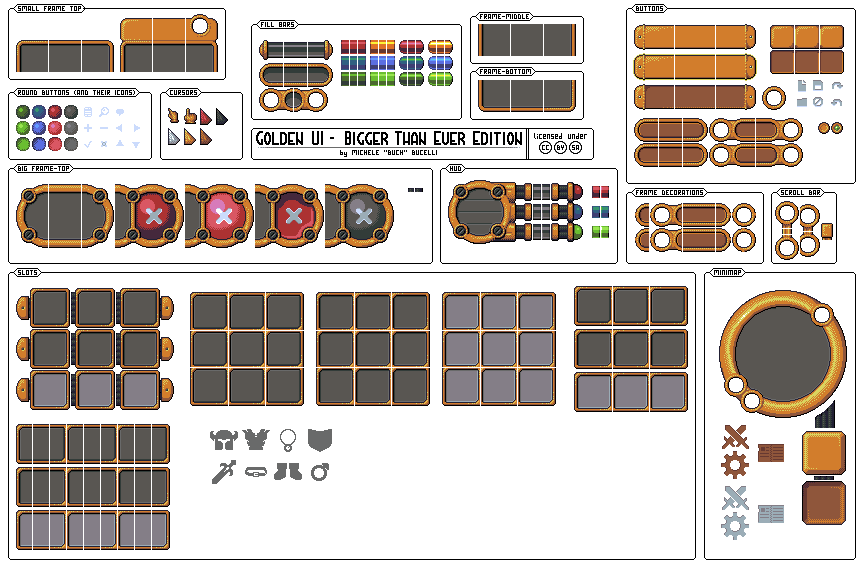
Godot Version
v4.4.1
Question
Hello!
I’m new to Godot and game development in general. I’m trying to develop a small top-down pixel art RPG. I downloaded this great SpriteSheet for the UI (From Buch on OpenGameArt), but I can’t figure out how to use it.
Specifically, I would like to create a frame using the ‘small frame top’, ‘frame - middle’ and ‘frame - bottom’ resources . I think I’ve pretty much grasped the principle of 9-slice, but I don’t understand how to use it properly, how to assemble top/middle/bottom together, or what to do with the 1px separations between the different areas (left, middle, right).
I don’t know if that’s very clear… Thanks to anyone who takes the time to help me.
This is a very cool set of UI images.
To make those three items usable as a NinePatchRect here is what I did:
-
Make a NinePatchRect as the root of a scene
-
Add three Sprite2D’s as children of the NinePatchRect. (add them as children of the NinePatchRect so you can see what you are doing)
-
Rename the Sprite2D’s to Top, Middle, Bottom
-
Disable centering on the Sprite2D’s
-
Add the image as the Texture property for all 3 sprites.
-
Select the Top Sprite2D and enable the region.
-
Edit that region so that it displays Frame Top. (x=17, y=41,w=96,h=32) w=97 if you want to include the black border
-
Repeat step 7 for each of the remaining 2 sprites:
middle x=579,y=24,w=96,h=32
bottom x=479,y=80,w=96,h=32
-
Line up the sprites so that they fit properly for a 96x96 frame
-
Add a SubViewport as a child of NinePatchRect
-
Reparent 3 sprites into the SubViewPort
-
Set the NinePatchRect texture to New Viewport Texture and select the SubViewport as its source
-
Change the patch margin to 32,32,32,32
Here is a look at it completed:
Most of the time in situations like this I prefer to create my own source image from a sprite sheet rather than do what I did above.
It is much easier to take your favourite graphics program and create the frame image to use as a texture for the NinePatch.
Also be careful about IP rights holders even when posting on the forum. Hopefully this one is free to use.
Edit: I found them on open game art. It is an artist Michelle Buch Bucelli.
*With any luck I didn’t miss a step
Thank you very much !!
And for the two one-pixel columns on the left and the right, can I do something ?
Without a shadow of doubt the easiest way to fix that is to colour it in with a graphics editor.
Otherwise you can create 3 nested SubViewport, cut the three sprite rows into 3 sprites, edit the regions a pixel smaller to eliminate the bar etc…(Total waste of time so just colour it in!)