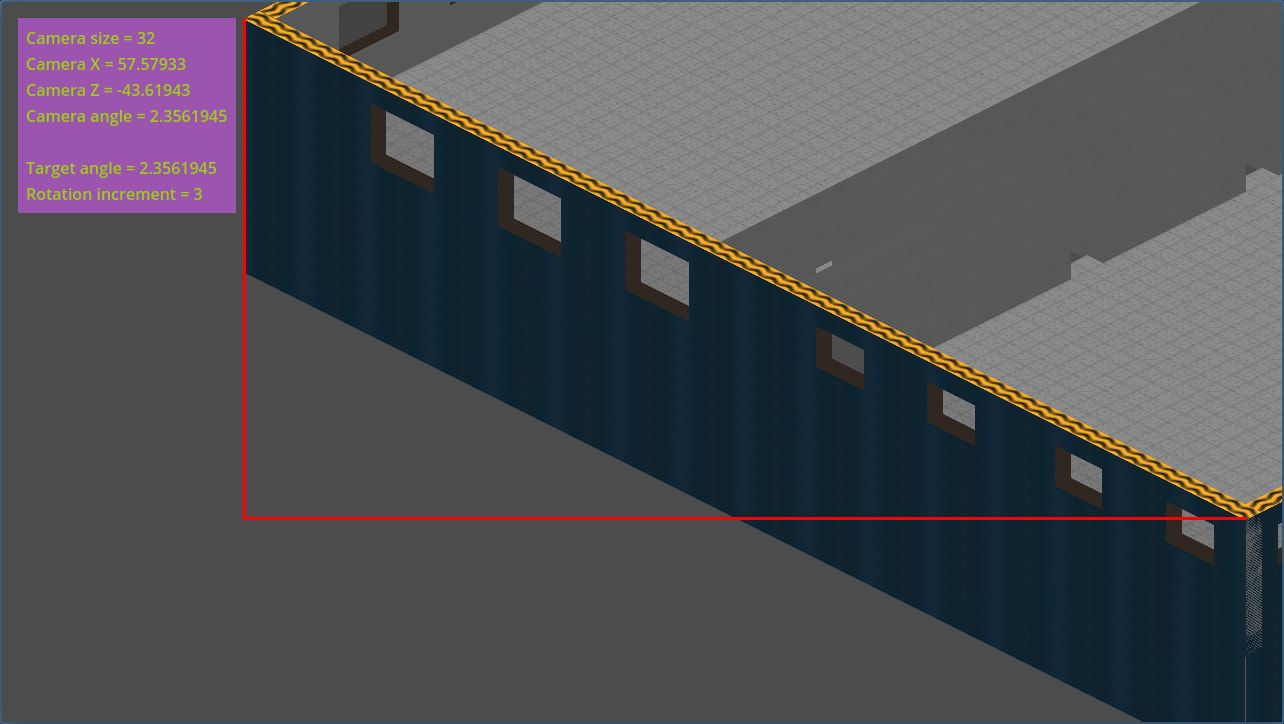
Haha, wow it’s been a little bit! 
I’ve been dealing with some real-life things, but now I’m settled enough to try dealing with this again. The code snippets above are outdated, it looks like; here is the current code, which is in a different form but has the same function…including the unintended behavior:
public partial class OwCamBound : VisibleOnScreenNotifier3D
{
    public static event Action<int, bool> ScreenEnterExit;
    private static readonly float[] angleKey = [0, -1.5707964f, -3.1415925f, 1.5707965f]; //[South, West, North, East]

    public override void _Ready()
    {
        ScreenEntered += WhichEnteredScreen;
        ScreenExited += WhichExitedScreen;
    }

    private void WhichEnteredScreen()
    {
        GD.Print(Array.FindIndex(angleKey, angle => angle == GlobalRotation.Y) + " entered");
        ScreenEnterExit?.Invoke(Array.FindIndex(angleKey, angle => angle == GlobalRotation.Y), true);
    }

    private void WhichExitedScreen()
    {
        GD.Print(Array.FindIndex(angleKey, angle => angle == GlobalRotation.Y) + " exited");
        ScreenEnterExit?.Invoke(Array.FindIndex(angleKey, angle => angle == GlobalRotation.Y), false);
    }
}
The above is everything from the object to which it’s tied. The below I trimmed a good chunk for legibility, but everything related to the camera’s movement in 3D space should be there. Some of the functions I’m pretty sure are unrelated to the problem, so I’ve put them at the end after a horizontal line.
public partial class OwCamera : Camera3D
{
    private Vector3 camVelocity;
    private Vector3 relativeForward;
    private Vector3 relativeLeft;
    private float[] camVelOverride = [0, 0];

    private bool[] directionsEnabled = [true, true, true, true];
    private bool[] boundsVisible = new bool[4];
    private int[] directionsMoving = new int[2];

    public override void _Ready()
    {
        OwCamDebuginfo.RequestDebugInfo += RequestDebugInfoEventHandler;
        OwCamBound.ScreenEnterExit += BoundEntryExit;
    }

    private void BoundEntryExit(int angle, bool entered)
    {
        //keep track of which bounds are on screen
        SetBoundVisAndMoveOverride(angle, entered, isRotatedIncrement);

        if (isRotatedIncrement % (Math.Pow(2, camRotPower) / 4) == 0)
        //enable and disable movement in cardinal directions
        {
            directionsEnabled[(angle + (isRotatedIncrement / (int) (Math.Pow(2, camRotPower) / 4))) % 4] = !entered;
        }
    }

    private void SetBoundVisAndMoveOverride(int angle, bool entered, int increment)
    {
        boundsVisible[angle] = entered;

        if (boundsVisible[2] && increment == 1 && angle == 2)
        //THIS NEEDS TO BE MADE SCALABLE/GENERIC AFTER FIRST CASE IS FINISHED
        {

            GD.Print("northwest override");

            //camVelOverride[0] = 3 * (float) Math.PI / 4;
            //camVelOverride[1] = 7 * (float) Math.PI / 4;
        }

        if (!entered) //for some reason there's no Array.FalseForAll() :/
        {
            bool allFalse = true;
            for (int i = 0; i < boundsVisible.Length; i ++)
            {
                if (boundsVisible[i])
                {
                    allFalse = false;
                    break;
                }
            }

            if (allFalse)
            {
                camVelOverride[0] = camVelOverride[1] = 0;
            }
        }
    }

    public override void _Process(double delta)
	{
        Moving((float) delta);
    }

    private void Moving(float delta)
	{
        SetRelativeDirections();
        directionsMoving = ConvertInputToDirection();

        //calculate movement vector from inputs
        //this isn't scaleable but it doesn't need to be
		if      (directionsMoving[0] == 2 && directionsEnabled[2]) {camVelocity -= relativeForward;}
        else if (directionsMoving[0] == 0 && directionsEnabled[0]) {camVelocity += relativeForward;}
        if      (directionsMoving[1] == 1 && directionsEnabled[1]) {camVelocity -= relativeLeft * camMoveHozRatio;}
        else if (directionsMoving[1] == 3 && directionsEnabled[3]) {camVelocity += relativeLeft * camMoveHozRatio;}

        camVelocity *= camMoveSpeed * delta;

        if (camVelocity != Vector3.Zero)
        //check for boundaries and then move camera after
        {
            if (camVelOverride[0] != 0)
            //override is zero unless a bound is on screen
            {
                //FOLLOWING SECTION IS SPECIFIC TO NW-FACING CAMERA SEEING N BOUND
                if (camVelOverride[0] == 3 * (float) Math.PI / 4)
                {
                    if (directionsMoving[0] == 2 || directionsMoving[1] == 3)
                    {
                        //convert above velocity into a vector of camVelOverride's direction and camVelocity's preexisting magnitude
                        //if there's a tie, don't move (it'd be a corner) (or maybe a cardinal direction..?)
                    }
                }
            }

            Position = new Vector3(Position.X + camVelocity.X, Position.Y, Position.Z + camVelocity.Z);
        }
	}

//______________________________________________________________________________

    private void SetRelativeDirections()
    {
        relativeForward = new Vector3(Transform.Basis.Z.X, 0, Transform.Basis.Z.Z);
        relativeLeft = new Vector3(Transform.Basis.X.X, 0, Transform.Basis.X.Z);
    }

    private int[] ConvertInputToDirection()
    //index 0 holds forward-backward, index 1 holds left-right
    //value of -1 means no movement
    {
        int[] returnMe = [-1, -1];

        if (Input.IsActionPressed("cam_move_forward") ^ Input.IsActionPressed("cam_move_backward"))
        {
            if (Input.IsActionPressed("cam_move_forward")) {returnMe[0] = 2;}
            else                                           {returnMe[0] = 0;}
        }
        if (Input.IsActionPressed("cam_move_left") ^ Input.IsActionPressed("cam_move_right"))
        {
            if (Input.IsActionPressed("cam_move_left")) {returnMe[1] = 1;}
            else                                        {returnMe[1] = 3;}
        }

        return returnMe;
    }
}
I should note, in case it isn’t apparent from this code, that none of the velocity override functionality has actually been implemented.
And another video demonstration:
As should hopefully be apparent from the debug logs, the entry and exit functions are being triggered either too early or too late. Some of them seem to be tied to the bottom of the wall, others to something I can’t figure out.