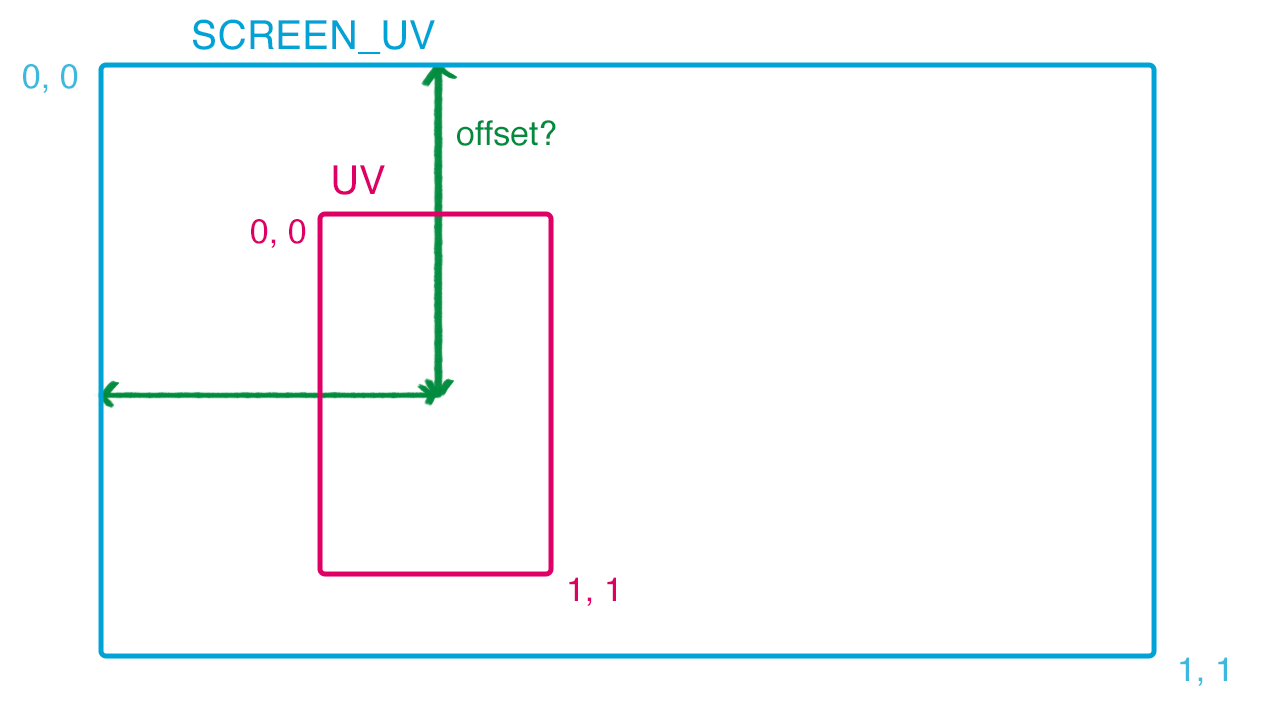
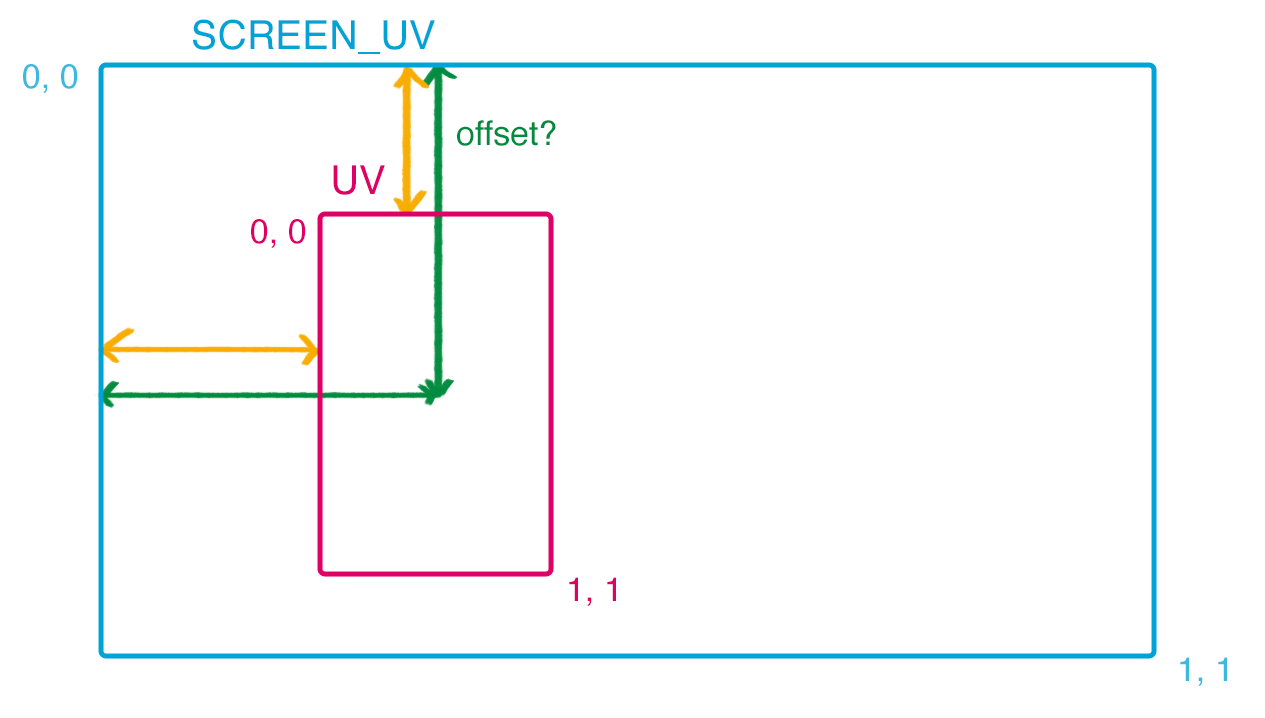
Is there a way to get or calculate the offset between UV and SCREEN_UV? I can calculate pixel sizes etc. with vertex positions and SCREEN_PIXEL_SIZE but I’ve so far failed to calculate the offset shown in the image. I would not want to calculate it in GDScript for the shader but have the shader be independent.
I’m using a CanvasGroup to draw a card using multiple sprites and labels. I would like to use this shader on the card but it’s not compatible with CanvasGroups.
This “offset” looks like a position of the card in screen uv space. If that’s it then just divide the position with screen size, assuming that world origin coincides with topleft point on the screen.
But where can I access that position using shader code? Without providing it with GDScript (which I would prefer not to rely on with the shader). I don’t know how to access the position in any coordinate system using shaders.
I realise I’m still unable to fetch the orange distances. Are they also inside the MODEL_MATRIX? I fail to find proper documentation about what it contains.
Maybe. Remember when I told you in your previous question that you’ll need to manually send card size to shader and you said that’s ok. Well, if you’re sending that size manually then just subtract half of it from the center position and you’ll get the corners.
Why I said maybe? MODEL_MATRIX can contain perceptual size but only if your object’s size is 1 and you bring it up to size using scaling, which I guess will not be the case with your object as the canvas group bounding quad size is adjusted in object space, i.e. directly with vertex position, not with model matrix scalling.
You may still get it from vertex positions in the vertex shader though but some gothcas may apply.
If you want to do fancy stuff with your card it may be better to render the card into a viewport and use viewport texture on a simple sprite. It can save you from some headache.
I do have manually set the original size of the CanvasGroup. Previously, the aspect ratio was enough, but for the new addition the visible size would also be required (which may be scaled using). I could manually set the scaling too, but I like that way less as it needs to be updated every frame it changes.
It’s pretty painful to work with CanvasGroups and shaders, but I still haven’t found a better way to apply a single ‘master’ shader to a parent node with multiple children. SubViewPorts are one solution, but based on our testing they are less performant if used in large numbers.
It could climb up to 50 or more when the player displays their deck.
Their information can be changed in runtime too, but not all the time. If you hover an attack card over and enemy with a vulnerability status, for example, the game will update the value on the card to match the actual damage you’d deal to said enemy.
I tried using SubViewPorts with the update setting set to ‘once’, but they still slowed the game down with a large number of cards.
It should be one viewport per card type not per individual card, pre-rendered into viewports. Exceptions can be made for live updated card(s).
Once rendered viewports shouldn’t cause any slowdowns per se. Make sure that they are not really rendering all the time. Check in visual profiler, it’ll show all rendered viewports in a frame.
If you describe exact requirements of your system in terms of visual updates and visual effect on cards, I may try to suggest you an optimal approach.
You could still get it with canvas groups I guess, if you’re willing to do some shader math, but there may be less tedious solutions if you define your constraints well.
Btw are canvas groups performing well with 50+ cards?
CanvasGroup versions of the identical cards perform really well. I’m doing some testing now to see if I had the proper settings for SubViewPorts and if they perform well when not kept updated all the time.
Requirements for the cards
Create the cards using nodes (sprites and labels mostly) instead of static bitmaps
Ability to assign a single shader to the card
Including destructive shaders that carve out parts of the card
A plus if that shader can use UV and TEXTURE instead of SCREEN_UV and SCREEN_TEXTURE
A plus if individual parts inside the card can even have their own shaders (CanvasGroups support this)
I want to have a parallax effect on the card art inside the card
Subviewports could also support this but only if they update always (might still be okay as we only do this for a handful of cards, not all of them all the time)
Performant with 200+ cards in the node tree, of which 100+ can be visible (in a scroll container where ~12 can be seen at once without scrolling)
The requirements aren’t simple, I know. CanvasGroups are our best bet so far, even if they include finagling with calculations with UVs.
Sorry. To move multiple sprite layers independent of each other, to achieve a ‘parallax effect’. It can be done with a vertex shader or with a simple fragment shader where different elements are moved at different pace. It could even be achieved by moving the node itself, but that can make it harder to crop the art at a very specific rectangle.
I’m trying to implement a particular shader linked in the first post. For that, I also need the relative size of the element or its distance from the top and left (the yellow arrows in my third post here). I need that to properly calculate the custom UV coordinates. I can get the pixel size before applying possible scaling factor, and I was wondering if I can get the actual visual size of the element in shader code without passing it from GCScript.
I fiddled with the SubViewPorts and seems like they are performant when render_target_update_mode is set to disabled. They just seem to really want to set that to always or similar, even if I set it to disabled in the editor. That’s what made them look really expensive before. Disabling it via code is reliable, though. I could then switch it back on whenever I need to update individual cards. Upsides of that would include not needing to customise shaders for CanvasGroups. Downsides would include the need to turn the render mode on and off as needed.
As for shader, you already have function/matrix that transforms from screen uv to card space, from your previous question. Use that transform to bring screen uv to card space, do your fake perspective deformation in card space, and then bring it back to screen uv space.
A simple alternative would be to just use skew on canvas group. If animated it may look adequate.
Here’s your scaffold. Use it wisely
You should be able to do all the things you asked so far with a canvas group; masking, destruction and non linear deformation of any kind in card space. It still depends on card size to be sent to the shader but if this is constant you can simply put it into a global uniform.
shader_type canvas_item;

uniform vec2 card_size = vec2(128.0, 128.0);
uniform sampler2D screen_texture: hint_screen_texture;
varying mat4 from_canvas_group_space;
varying mat4 to_canvas_group_space;

void vertex(){
	// matrices that transform between canvas group space and screen space
	from_canvas_group_space = CANVAS_MATRIX * MODEL_MATRIX;
	to_canvas_group_space = inverse(from_canvas_group_space);
}

void fragment() {
	// transform SCREEN_UV to card coordinate and to card uv
	vec2 card_coord = (to_canvas_group_space * vec4(SCREEN_UV / SCREEN_PIXEL_SIZE, 0.0, 1.0)).xy ;
	vec2 card_uv = card_coord / card_size + 0.5;

	// WE'RE IN CARD UV SPACE NOW. APPLY NON LINEAR DEFORMATION OF UVS
	// TESTING:
	card_uv.y += sin(card_uv.x * 20.0 + TIME * 4.0) * 0.06;

	// DO MASKING AND DISSOLVE HERE USING card_uv

	// transform deformed uv from card space back to screen uv
	vec2 screen_uv_deformed = (from_canvas_group_space * vec4((card_uv - 0.5) * card_size, 0.0, 1.0)).xy * SCREEN_PIXEL_SIZE;

	// deafault canvas group operation but with our non-linear deformation in card space
	vec4 c = textureLod(screen_texture, screen_uv_deformed, 0.0);
	if (c.a > 0.0001) {
		c.rgb /= c.a;
	}
	COLOR *= c;

	// debug draw card uv, comment out
	COLOR.rgb = vec3(card_uv, 0.0);
}
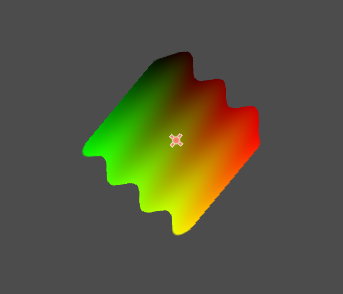
On the image below, a rotated canvas group with a godot sprite child, showing UVs in sprite uv space, deformed by sine in sprite uv space as well.