Godot Version
4.5
Question
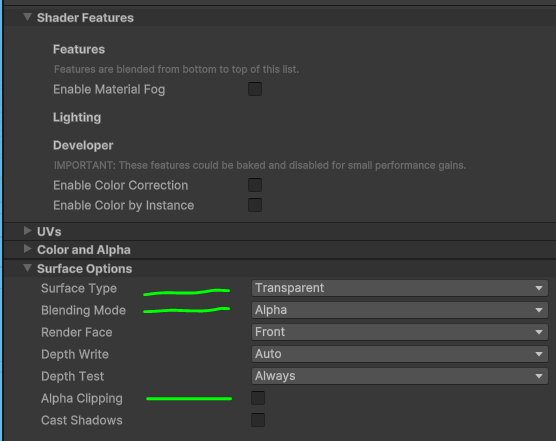
I’m migrating a project from Unity, and one of the main things I was tackling to start was my master materials. I’ve got almost everything rebuilt, but I’m trying to find the most convenient and appropriate way to then have an opaque, transparent, and alpha clipped version without duplicating the shader for each. I don’t need runtime control over this, so it should still pass through standard compilation. Unity allows the transparency mode to be exposed so I can set it per-material, while Godot’s mode is selected by the presence or absence of ALPHA_SCISSOR_THRESHOLD and whether you’ve set a value to ALPHA.
I initially tried to manually recreate this behavior using a uniform enum with if statements preventing those built-ins from being assigned. Technically, if this code were pruned before compiling, the correct transparency mode could be deduced. Godot, however, appears to make that determination early, and checks for the presence of ALPHA_SCISSOR even if its unreachable behind an if (false) line, so I can’t dynamically set transparency modes (before compile time).
My latest attempt is to use #ifdef is_transparent to gate the assignment to the built-ins, then convert the shader into a ShaderInclude with several shallow variants. Each variant only assigns one of the defines and includes the base shader, so it won’t require additional maintenance if I update the base shader. This setup works, and the code correctly prunes out those alpha keywords, but it’s a smidge clunkier than assigning the same shader to everything and tweaking later.
The downside to this method is that, if I wanted to add any other top-level branches, I’d have to make a whole pile of shader variants. They’re basically pre-branched, which feels awkward.
Is there an easier way to do this or is this intended?
I don’t think there’s a way other than using the preprocessor.
I don’t understand the why you’re doing this but if you accept creating multiple materials, you can use includes to add or remove features from a particular shader to try to achieve similar reuse of features, some with transparency and others without transparency.
In Unity, I’d create one master shader that can be conveniently assigned to every material, then branched on the material instance as needed. The initial assignment is painless, and I can adapt it to performance needs as those emerge or as features change.
In Godot using includes, I’d need several shaders borrowing from the same shader include, and that number grows exponentially for every variation I want to add. Performance wise, my app is small enough that the shader branching will align with other divides in batching. I’m really just looking for a way to avoid manually building out all of the possible branches as separate shaders.
I also only just switched from visual shader nodes to writing shaders purely in code, so the nuances of pre-processors haven’t yet sunken in. Another important thing is that I’d like to avoid structurally changing my shader too dramatically until after the migration is complete if possible.
1 Like
What exactly do you mean by “branching”?
You can code opaque versions of all shaders and then just make a script that creates transparent versions of them, at startup or as a tool script.
Branching in the sense that the shader is duplicated into variants at compile time for batching (might be using the term wrong). Not sure how to describe it in a more Godot-centric way. Boolean features tend to cause uniform branching preventing materials from being batched together. Doing it manually would be a pain because you’d have to either maintain code across duplicates, or provide names for each possible set of features.
Uniforms are able to branch custom code, but render modes can only be modified defines that I’m aware of. The alpha workflow in particular, which is either toggled by the assignment to ALPHA or presence of ALPHA_SCISSOR_THRESHOLD keywords, can also only be switched by defines.
Ideally everything would be toggled by uniforms so those settings can remain open and customizable as I create new materials. Not every possible combination of features is going to be used, so I’d rather allow compilation to generate those branching shaders as needed.
The number of shaders I’d need is exponential for each feature combination. In my case, I’d potentially have the 3 transparency modes, 2-4 alpha blend modes, disabled specular, and disabled ambient lighting, which is like 24-48 shaders.
Most of my materials are opaque, and most of them will be “demoted” for performance reasons in a predictable pattern, so realistically I’d still have only a handful, of those used. Trying to avoid having shader names like Master_Lit_AlphaBlend-Multiply_NoSpec_NoAmb.
This is what I’m familiar with in Unity. I’ve also implemented these with keywords in its node editor. In Unity, these flags are exposed and can changed on every material instance as if they were uniforms. All of the branching is still handled at compile time presumably, I just don’t have to make a dozen different shaders for each combination.
Afaik, no way other than #defines or using custom tags in comments and manually parsing the shader code.
I usually just open up a material then “make unique” then “save as” to create a variant.
The shader codes are all pasted into Godots main shader by the shader compiler, so the surfaces will be shadowed and lit by the sky light and the voxel Gi / SDFGI, reflections etc.
So my best guess is that the process is to have the standard material / super material and to create another unique material for each change, as the compiler branches might do the same thing anyway, under the hood, and its just as easy as writing a branch.
There is a lot you can do with shader uniforms, as the uniform appears under the shader parameters, but if the material isnt unique then all surfaces with the same shader will take the changes.
Edit: im sure you can set per instance data with another data source, i.e. noise shaders can be used to switch textures on instances, array textures can be indexed with splatmaps etc and probably overriding the objects draw() method to set shader params with script, but i havent tried that myself.
The problem here is switching render and transparency modes. You can’t do that with uniforms as render modes are not part of the executable shader code, and transparency mode is automatically decided by a mere mention of ALPHA and ALPHA_SCISSOR_THRESHOLD builtins in the code.
Yeah i know the alpha blended stuff is treated very differently by the renderer.
So the only answer i find works with minimal stress is to just make new materials for each type you want to use … simply make them unique, then save-as. When you apply the new material, you can search for its name in the quick find dialog.
I always create separate materials for things that branch like that. Thats just a bunch of different materials for different alpha settings.
Just saying other parameters like color or texture can often be tweaked with shader uniforms by overriding the draw and setting them in script without changing the material.
I think the OP wants render and transparency modes to switch on all materials depending on choices set before runtime. Complier preprocessor (#define #ifdef etc) is the only way to do it afaik.
Yeah, I tend to expose a zillion parameters knowing it’ll all be resolved and baked out before I ever hit play. I am still rather unfamiliar with some of the basic patterns like “make unique” in Godot so I may learn to avoid the issue down the road. I only used the specular and ambient light toggles because of some extreme performance limits (VR - Quest2) which I may loosen moving forward too. Other shaders will cause trouble mainly because I never needed to define subcategories for their shaders and am now doing so after not touching them for ages. I’ll keep an eye out for other options as I collect tools for my toolbox as my current sandbox is woefully small.
The alpha modes are really what threw me for a loop here because they aren’t included as render modes (though there are alpha blend type flags), yet behave much the same and are baked out before the rest of the code. They highlight a frustrating contrast between the preprocessor and logic operator branching during compilation. My understanding is nowhere near deep enough to say exactly why the two need to be different, since for my purposes both can be logically baked down and pruned. If I had to guess, the shader’s alpha mode must be getting locked in before its logic has a chance to run, and the surface-level keyword search and assignment check are the only things that are checked early. Ideally alpha pipeline would wait a step longer so those if statements can prune their code.
- Preprocessors are applied
- Code can be searched for keywords
- Alpha pipeline code is added to the shader
- Logic operators are applied
You can do NoSpec_NoAmb with shader uniforms … just make a uniform for b_specular and make it float, multiply the specular by that and set the uniform. If the float is 0.0, then you wont have specular. Same with Ambient.
Also for shader uniforms, the best advice is to use material.duplicate() in gdscript, or to make the material unique in the editor. When you run the game the materials will compile.
Doesn’t that allow for per-fragment branching if I were to send it a mask with some pixels at 0 and others not?
Does it really matter? You need to handle both using the compiler preprocessor so it boils down to doing basically the same thing in both cases.
Not sure they won’t be calculated though, at least the specular. Ambient can be nullified by setting IRRADIANCE to zero iirc.
Tbh I don’t think you can save much on the performance by disabling ambient, specular and alpha. Have you benchmarked it on your target hardware? Maybe all this is not even worth doing.
Oh it’s almost certainly not worth it given that I’ll be bleeding obvious performance just by using a new engine and forgetting a dozen obvious things. I just like being able to start a shader from zero and build up if need be. It’s also good for documentation to be able to clarify the difference between hiding a value and pruning its code, since the latter is the only thing that affects performance. It may have helped a bit with foliage shaders given the numbers they can deal with, though again there are so many ways to optimize those that trimming some simple lighting code from a shader may be negligible.
Yeah … the per fragment branching is simple … my post above with ‘override draw()’ is wrong because that only works for Canvas item, so i think material.duplicate() or making the materials unique for all variation is the way to go. The scene file, .scn or .tscn saves assigned unique materials even if you dont …
A good way of making shaders is converting the standard material to shader material.
You can add all the bells and whistles first then convert and see the code.
IRRADIANCE = 0.0 has no affect for me, while increasing it creates something like an emission effect. Not sure if I was supposed to have been using that for a PBR material to begin with.
Setting SPECULAR = 0.0 unfortunately only hides specular highlights on non-metallic surfaces (as well as hiding environment reflections), whereas the render_mode specular_disabled actually cuts the highlight for both. That these two are not the same is annoying, especially because the docs don’t mention any exceptions for it. If there is no uniform-driven way to toggle it, I would need to have another layer of shaders set aside for it.
As for ambient/environment light, AO = 0.0 hides both environment light and environment reflections, and it works for metallic and non-metallic surfaces, though its curve is really skewed (0.05 is still full reflection). I don’t think I needed as much control here, though it would be nice to be able to separately control ambient lighting and reflections (which may be more expensive).
Not assigning to either SPECULAR or AO leaves both enabled.
Entirely possible I’m simply not converting whatever language I use in my head for these to what’s actually happening in Godot. It’ll be easier to prioritize what matters once I get more of the project moved over.