Context - I am trying to create a 3rd person CharacterBody3D with a turning circle akin to the system in mario 64 and other 3d platformers/3rd person games.
The solutions I have come up with so far.
1.NodeSeperation: Attach a script to the spring arm (child node) reparenting it to the top of the node hierarchy at runtime and then running and then moving the spring arm every frame to the current CharacterBody3D position in world space : - This works but seems janky and I’m not sure it will gel super well when adding animations to the player.
2.ManualCalculation: Instead of directly changing the root/parent nodes rotation, change the players velocity value to reflect a desired rotation/direction(then rotating the mesh/animation later). First taking the movement input and rotating its magnitude by the desired rotation per second, then applying it through velocity.x and velocity.z (aswell as multiplying by delta and speed ofc) : - This is the most versatile but may be hard to maintain, and maybe also perform worse due to the calculations partially running through gd script (though the math libary runs in c++ so this may not matter, I am unsure.)
3.NodeAssistedCalculation: Similar to the second approach but instead using a node to handle all the math related to the rotation itself:- this adds another node to the scene which is unneccesary clutter and increases load times, though may be simpler to maintain.
Sorry if this is hard to understand, I do not have the best understanding of this engine or of vector math, I am trying my best and would appreciate criticism if neccasery, any other solutions would be appreciated.
For this specific case I am trying to create a playable character similar to the securitrons from fallout: NV, though this is seemingly quite generalisable knowledge which would be useful for other projects where I do not want very tight turning controls and also potentially generalisable to other parts of the engine. I’d appreciate help with both scenarios, in the case where each has a different ‘best’ solution.
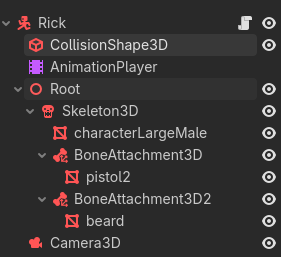
You can see here that the CharacterBody3D is the actual root node, while the name Root is applied to the root of the player Rig. That’s the node that should be rotate, and keeps it separate from your camera.
So solution no.3? use that root node in a magnitude equation to rotate the movement direction with velocity.x and .z? This seems maybe cleaner for simple anims but also might cause trouble if i want more complex transitions between states, I guess solution is dependent on the specific problem then? Thanks for your help, I will do it this way as I don’t think I need more complex transitions (if it even matters tbf).
It actually makes the math easier, even for more complex setups, as your character’s root always has a stable reference point, relative to the world. Then you can structure your tree as needed to have some nodes root/world relative (like the camera) and other things relative to the rotated rig.
I mean your solutions seems easier but there are some cases where the rotation of the forward direction and the visual rotation of the mesh should be decoupled (for example in the resident evil reboots, the characters sway and lag behind movement a little and don’t always face the forward direction exactly if my knowledge is correct) Maybe I am wrong about this though, but from my understanding using ROOT to change the forward direction when applying velo x and z will mean the mesh ALWAYS faces the movement direction no matter what.
I probably shouldve been more clear in my original post and mentioned this is more to do with how to move the player in the right direction aswell thats my bad, it was written to a pretty bad standard.
I think I wrongly assumed that there is a catch all solution to this, when there probably isn’t, though I may still be misunderstanding it to be honest, Thanks for the help though! : )
Yeah it doesn’t help that you are comparing this to games I’ve never played. I have no idea what you’re trying to accomplish. If you want the turn radius to lag, then lerp it with a value that determines how fast you look.
## The speed at which the character turns to look at things.
@export var turn_speed: float = 20.0

func look_toward(_direction: Vector3, delta: float) -> void:
	var target := rig.global_transform.looking_at(rig.global_position + _direction, Vector3.UP)
	rig.global_transform = rig.global_transform.interpolate_with(target, 1.0 - exp(-turn_speed * delta))
Fair enough lol, I wrongly assumed the player is using the node named “root” to decide the forward/movement direction, my use case gets quite tangled so I kinda got lost in the details a little there. I extrapolated a lot stupidly and thought you were explaining how to keep the player direction and mesh facing direction the same. I kinda shouldve explained wayyy more in my original post but oh well to late now.
for context I am trying to create a robot which leans based of a and d input and also the difference between the direction the camera is facing and which direction the player is facing. This lean is then used to determine a turning radius, sharper leans turning faster when the player is moving (which should also effect turn speed(annoyingly)). It works similarly to a unicycle. there is far more to this but that is the skinny of it all.
I am not very good at maths so I probably shouldnt of chosen this as a first game ahaha but I like the concept enough to see it through, its a dumbass platformer which shoulllddd hopefully be kinda fun. itll be unique at the very least lmao.
thx for putting up w my dumbass, imma go sleep now gn
 but there are some cases where the rotation of the forward direction and the visual rotation of the mesh should be decoupled (for example in the resident evil reboots, the characters sway and lag behind movement a little and don’t always face the forward direction exactly if my knowledge is correct) Maybe I am wrong about this though, but from my understanding using ROOT to change the forward direction when applying velo x and z will mean the mesh ALWAYS faces the movement direction no matter what.