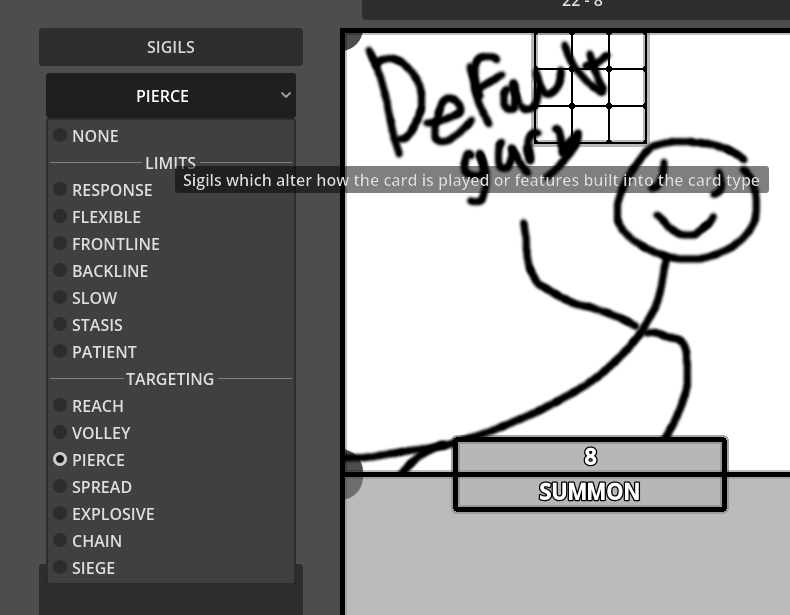
Since this has tripled in viewership, I decided to go ahead and show off how I solved the problem, to help out anyone else hoping for something similar.
Here is my database, and the aforementioned enum (there are actually 8, but only 2 are active at any one time.
enum Summon { NONE, LIMITS, RESPONSE, FLEXIBLE, FRONTLINE, BACKLINE, SLOW, STASIS, PATIENT, TARGETING, REACH, VOLLEY, PIERCE, SPREAD, EXPLOSIVE, CHAIN, SIEGE, }
const SummonCategories : Array = [ 1, 9, ]
const SummonSigil : Array = [ [ "NONE", 0, 1, "", ],
	[ "LIMITS", "Sigils which alter how the card is played or features built into the card type", ],
	[ "RESPONSE", 0, 1.1, "This card can only be played during your opponent's turn as a Phase ends. Cannot be modified", ],
	[ "FLEXIBLE", 3, 1.25, "Ignore [VALUE[1-2]] Special cost spaces. Cannot be Modified", ],
	[ "FRONTLINE", -4, 1, "This card can only be played in the Front Row on your Field. Cannot be Modified", ],
	[ "BACKLINE", -5, 1, "This card can only be played during the Second Summon Phase. Cannot be Modified", ],
	[ "SLOW", 0, 0.9, "This card can only be played during the Second Summon Phase. Cannot be Modified", ],
	[ "STASIS", -10, 1, "Cost is not consumed when cast. This card is sent to the Void when it's cost is no longer on the field. Cannot be Modified", ],
	[ "PATIENT", -6, 1, "This card does not perform a standard attack in combat", ],
	[ "TARGETING", "Sigils which expand the area of effects or allow alternate targets", ],
	[ "REACH", 0, 1.1, "Can declare a target up to [VALUE[1-4]]+1 rows away", ],
	[ "VOLLEY", 0, 3, "Affects all cards in targetted row", ],
	[ "PIERCE", 0, 1.3, "Affects [VALUE[1-4]] cards behind the target", ],
	[ "SPREAD", 0, 1.2, "Affects [VALUE[1-5]] adjacent cards in the same row as a target", ],
	[ "EXPLOSIVE", 0, 3.5, "Affects cards in a [VALUE[1-6]] radius of the target. 1-3 add 4 affected spaces, 4-6 add 8 affected spaces", ],
	[ "CHAIN", 0, 1.6, "Affects [VALUE[1+]] additional cards adjacent to an affected card", ],
	[ "SIEGE", 0, 2, "Can target opponent's constructions", ],
	]
Summon is the enum being turned into a dropdown, and SummonCategories lists the index of the ones which are meant to be separators
	for i in sigil_list[type].values():
		if i in sigil_cats[type]:
			$"../Sigil1".add_separator(sigil_list[type].keys()[i])
			$"../Sigil1".set_item_tooltip(i, (sigil_entry[type])[i][1])
		else:
			$"../Sigil1".add_item(sigil_list[type].keys()[i])
			$"../Sigil1".set_item_tooltip(i, (sigil_entry[type])[i][3])
sigil_list[type] and sigil_cats[type] are just methods I use to access the specific arrays in the above section, essentially you can read those as Summon and SummonCategories respectively. So we take the values from Summon and iterate through the list. Then for each, we check if it’s index is in SummonCategories, if it is, we add its key as a separator, and then add the description as a tooltip. If it isn’t in SummonCategories, we add it as a regular item, and the tooltip is at a different point because for the actual selectable options I needed some extra values.
All of that comes together to create this entirely unthemed OptionButton
I’m happy with it, at least for the editor. Hope someone finds it helpful!