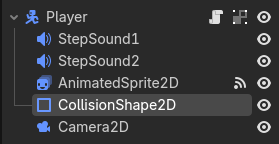
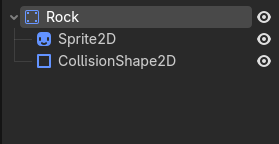
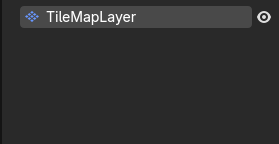
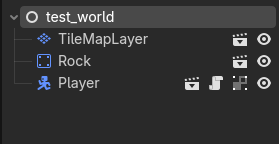
When moving a CharacterBody2D towards a collision, the collision shapes sort of go inside of each other, and when I let go of the key that moves the CharacterBody2D, it snaps the CharacterBody2D out of the other collision.
The code for the player is based on the “dodge the creeps” player code, with the only important difference being an additional move_and_collide() at the end of the movement code.
func _process(delta):
	var movement = Vector2.ZERO
	if Input.is_action_pressed("move_right"):
		movement.x += 1
		$AnimatedSprite2D.flip_h = false
	if Input.is_action_pressed("move_left"):
		movement.x -= 1
		$AnimatedSprite2D.flip_h = true
	if Input.is_action_pressed("move_down"):
		movement.y += 1
	if Input.is_action_pressed("move_up"):
		movement.y -= 1


	move_and_collide(movement * delta)
I apologize if this is worded really weirdly btw, I couldn’t really think of any other way to put it.
And just to be thorough, here’s a video demonstration of the issue I’m describing.
You should call move_and_collide() from _physics_process(), I think that will fix it. You can keep the Input handling in _process() if you want to, or you can move all that code to _physics_process().
Tried out what you suggested and it had no effect, unfortunately.
However, I changed this particular line to comment out the “* speed" part.
if movement.length() > 0:
		movement = movement.normalized() #* speed
		$AnimatedSprite2D.play()
	else:
		$AnimatedSprite2D.stop()
#If you remember, the movement code is based on dodge the creeps.
After testing it out, despite walking very very slowly, the player character collided with other collision shapes in the way I wanted.
Maybe the root problem has something to do with the way that movement is calculated?
Apologies for the late response, I had my left wisdom teeth extracted recently so I didn’t really allot myself much time on my computer within the last 48 hours.
It looks like you’re trying to resolve a CharacterBody2D colliding with an Area2D. Moving at speed causes the problem you are describing. Change the Area2D to a StaticBody2D and it’ll stop clipping - as long as you use move_and_slide().
I would also recommend you do a few more tutorials. Because while the Creeps tutorial is great, it’s not enough to extrapolate a more complex game.
“use move_and_slide() and always do it in _physics_process()" I hope this doesn’t come off as rude through text, but I was already doing that
“I don’t see where you assign the velocity in your video.” I named it “movement“ here because I assumed that it really didn’t matter what I called the variable, since it fulfills the same purpose. Although, admittedly when I said “based on the dodge the creeps player code” I should’ve mentioned that I renamed velocity, so that’s on me.
Let’s see the actual code then and a video of how it behaves. velocity is a built it property required by move_and_slide() to be set in order for things to work properly. You can’t just rename it. You need to assign the current velocity to velocity every frame before calling move_and_slide()
Here’s a hint for the future. If you do not see the variable declaration in your script, you cannot rename it. velocity was not declared by you, so it cannot be renamed.
So initially, I was trying to declare a variable in place of velocity.And then after that, I tried declaring velocity, despite the fact that it was unnecessary. Instead of just assigning a value to velocity in the function.
I’m a bit embarrassed that it took me almost a week to get it right, but I don’t care. I learned something and it feels good.
Thank you all for being so patient with me, and I hope you all have a nice day.