I don’t know the first thing about what could be causing this, so I don’t know what resources to attach, other than the full project.
I did notice that my DirectionalLight3D directional_shadow_mode is set to PSSM 4 Splits while the solution has Orthogonal, but changing that only made my shadow disappear entirely. Bumping up rendering/lights_and_shadows/directional_shadow/size definitely helped, but never matched the solution, and still obscured the root problem, since the solution has the default of 4096.
I created a new project from scratch and followed the instructions again. The shadow looks fine, even though the directional_shadow_mode is PSSM 4. So that tells me that I screwed something up. Maybe I should just move on, it works now, but something is nagging at me. I want to understand what this is, so hopefully I can understand Godot more fully.
What other settings could I look at to discover where I went wrong?
I believe the camera’s projection type affects this. Aside from what the documentation says about bias, if you’re using an orthogonal camera, I think you should reduce its FAR.
As the other guy said. Try changing the ‘far’. If it doesn’t work then go into settings and try looking for “shadows and lights” and change the shadow modes.
The instructions do mention the far attribute, I must have skipped over it.
Something that I didn’t skip over is the directional_shadow_mode of the DirectionalLight3D. The default is PSSM 4 Splits while the solution uses Orthogonal. I noticed that the shadow here is very hard, and is unaffected by the rendering/lights_and_shadows/directional_shadow/soft_shadow_filter_quality setting. In order for that setting to take effect and soften the shadow, the directional_shadow_mode must be Orthogonal.
Why is that? I don’t really know anything about shadow maps, so I find it difficult to speculate. I will have to do some more research on exactly what these modes entail.
Is there an opportunity to improve the tutorial? Perhaps it was accurate at one point when the default was Orthogonal but now it has changed. If so, it may be good to include an instruction to change the mode and explain why.
The shadow map mode doesn’t need to be orthogonal, although for this game’s camera view there’s no real benefits in using cascading shadow maps so a singular map provided by the orthogonal mode is completely sufficient.
The most important parameters for making it look decent in this case are camera near-far range and shadow map resolution. You want to keep the range as shallow as possible and resolution as high as possible so you maximize the shadow map estate per scene pixel.
I’m tracking with the sufficiency argument. With an orthogonal perspective, you don’t really get anything meaningful from different shadow maps because everything appears to be the same distance from the camera anyway, there aren’t different zones objects could fall into.
Despite that, it does still have an effect on the output, specifically the soft_shadow_filter_quality setting. That setting does nothing at all if the shadow mode isn’t Orthogonal. I’m really curious as to why.
The blur setting does help, but it doesn’t look as nice as the soft filter. Both options seem computationally expensive, but I can’t evaluate the difference between them.
I’m not really all that concerned with just making it look right, I’m trying to understand the fundamentals. Do you understand the relationship between the soft filter and the shadow mode?
There’s no “relationship” really. Filter just determines the number of shadow map samples for shadow blur. The dithering you see is caused by low number of samples for a relatively large blur value. The only perceptual difference may be that the perceputal size of the blur for the same blur value may differ depending on the number of cascades used.
Shadow map mode only controls the number of shadow map cascades (1, 2 or 4). While there’s no real benefit in using cascades with orthographic cameras, the engine will still do them. Depending on your shadow settings and camera view - the cascade splits may or may not be noticeable.
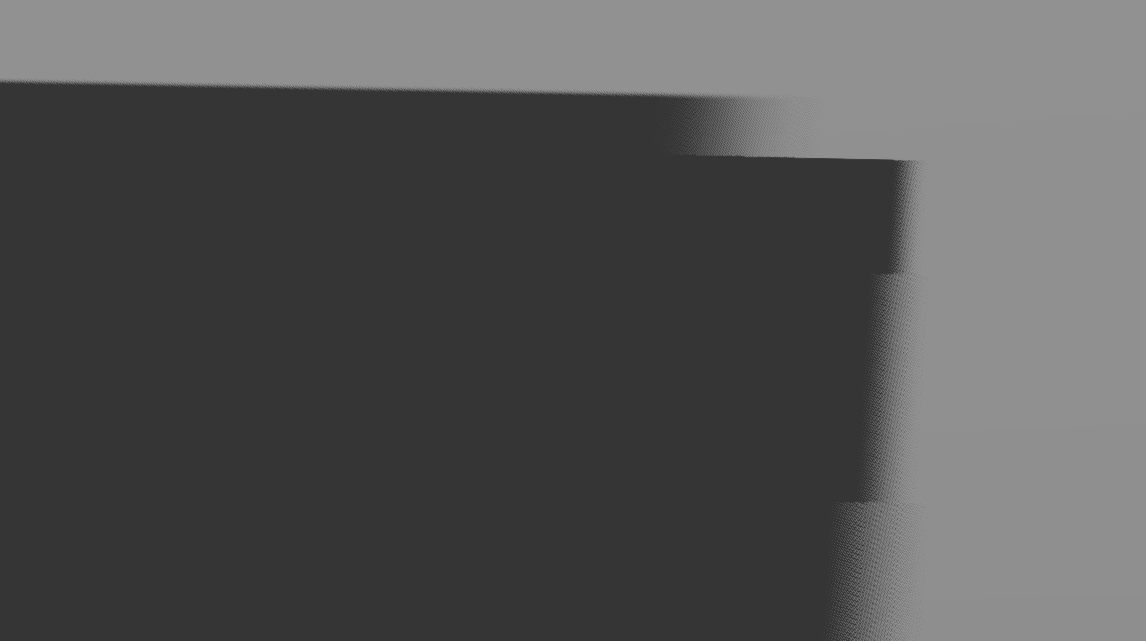
Compare the low filter settings (this is a shadow of a box edge with blur set to 3 and shadow map size 1024):
You’ll notice that the same numerical amount of blur causes perceptually smaller blur radius with 4 cascades. The engine also increases the sampling area up to x2 when more samples are used as noted in the filtering options tooltip in the project settings.
Aside of increasing the soft shadow quality project setting, you can enable TAA in the project settings, or set the Scaling 3D > Mode project setting to FSR2 to get higher quality temporal antialiasing. This will make the shadow dithering pattern change every frame, and temporal antialiasing will effectively smooth it out.
Thank you so much for your patience. I think I’m slowly getting it. I read through the entire tutorial on light and shadow here. I will try to explain it in my own words. Is this correct?
Shadow resolution is decreased for near casters. A shadow receives full resolution when its caster is at the far end of the frustum.
This is fine for close up scenes, but distant scenes suffer when objects are close to the camera.
The fix is PSSM, which provides either two or four shadow maps instead of just one. Each shadow map behaves the same way, casters close to the near edge of the frustum segment receive low resolution shadows, casters close to the far edge receive high resolution shadows.
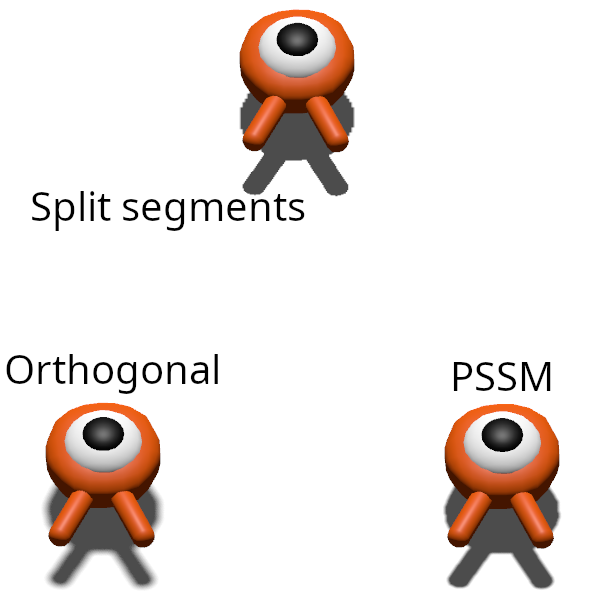
You can physically see this in action by adjusting split 2 and 3 to large values and tweaking split 1 until it cuts a shadow in half. (I can only upload one image as a new user, so see the image below for an example.)
Therefore, in the tutorial scene, there will be an obvious difference in shadow resolution between shadow mode Orthogonal and PSSM, simply because the caster will appear at a different point on the resolution scale, unless the PSSM splits are configured to exactly match the Max Distance on the Orthogonal mode.
Both shadows are softened, but the PSSM shadow is simply higher resolution, so it is less noticeable. Given the parameters of the tutorial, the player spawns closer to the near side of the frustum (segment) on Orthogonal than it does on PSSM.
So the general principles at play are
If necessary, adjust your camera’s max distance and / or light’s PSSM splits so that the shadows in your scene look sufficiently high resolution. directional_shadow/size can also be increased if appropriate.
Soft Filter Quality and blur are complementary features that can smooth out the shadow edge.
Does all of that sound accurate? Thank you again for your patience and kindness.
It may appear so but I wouldn’t describe it like that. Two same sized objects will get the same shadow map estate but, the shadow of the object near the camera will perceptually be much larger. This will result in its shadow looking more pixelated.
It’d be more precise to say that it’s fine for scenes that don’t have a lot of depth, but problematic for scenes with a large depth range.
All cascades have the same resolution. However, depending on how you set the split distances, a cascade that’s near the camera will cover a lot less scene space than a far cascade, providing a lot more resolution for casters that fall into a cascade that’s near the camera. This remedies the apparent low shadow resolution for such casters.
There may be some difference depending on how you set splits and into which cascade the objects fall. Note that you can set the splits in a way that everything falls into one cascade. In that case there will be no difference between the modes. There may be a difference in blur because pssm may choose to blur the cascades using some heuristic that’s different from what’s used with the “orthogonal” mode.
Also note that Max Distance is ignored with ortho cameras. Camera’s near-far range is used instead.
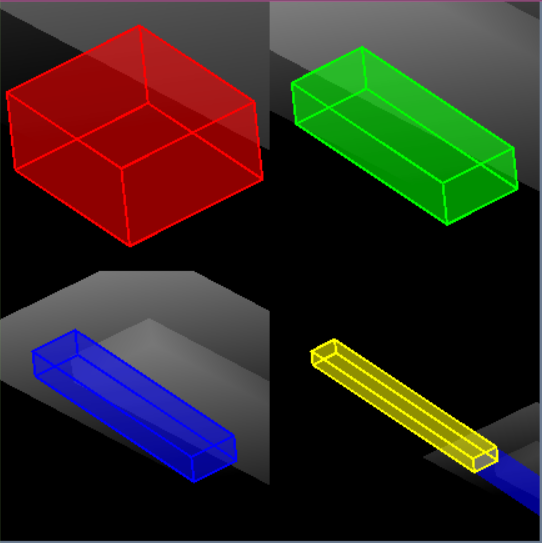
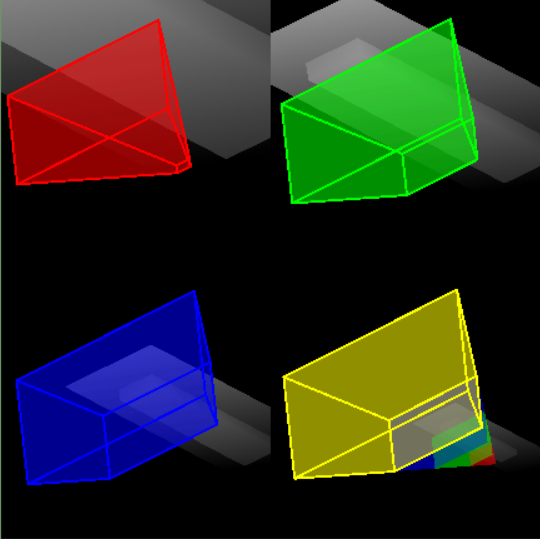
If you’re interested in how it all works, Godot’s SubViewports have a neat shadow map debug preview that shows camera frustum segments as seen by the shadow map. Put everything inside a SubViewport parented to a container and enable Directional Shadow Map debug preview in subviewport’s settings. Now you can change various camera and shadow settings and see how the frustum segments are framed inside shadow maps. Remember that a shadow map is just a depth buffer rendered from the light’s point of view. And shadow maps for the directional lights always use orthographic projection, as all light rays are parallel.
Here’ a 4-cascade shadow map (grayscale stuff) with frustum visualizations for the orthographic camera. The coverage in the map is such that each cascade will fit neatly into the shadow map estate. So if a cascade is small, a lot of shadow map pixels will cover a relatively small area of the viewing volume, providing a lot of “shadow resolution”, and vice versa:
Fantastic! I am very slowly learning. I need to go read about shadow maps. I did not know how they worked.
That explains why increasing `rendering/lights_and_shadows/directional_shadow/size` helped. And that’s why the “size” means pixels. It’s an actual video buffer.
The camera must then sample the depth buffer, doing some math that I don’t yet understand, transforming the pixels from light space to screen space.
A naive solution to the problem of larger shadows looking worse is to just increase the resolution of the shadow map. You could increase it 4x and in theory that is about the same cost as PSSM. But you’d still have an even distribution of detail, which isn’t actually want you want in many cases. PSSM will create four separate shadow maps, for 4x the cost, but spaced according to the splits, so you can dial it in until the low depth casters have enough detail, which is ultimately more efficient.
I wonder then if additional performance is on the table, if you could use a different resolution map for each cascade.
I will do some more research on shadow maps. I’d like to understand that math. And I think I stand to learn a lot by looking at things from the light’s perspective, so I will probably mess with that. But I’m satisfied with this thread for now. Thank you so much for your answers! I learned a ton.