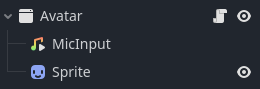
I’m trying to develop a program that shows a character on top of the entire screen that moves every time you speak. The character is put in a Window, and I’d like only the character to be clickable/interactable. However the code I wrote doesn’t seem to make the rest of the window passthrough. I have one script in the Window node.
I have a function to get an exact CollisionPolygon2D of the character, and the code for setting the window as passthrough in _ready
var sprite : Sprite2D = $Sprite
var collision_polygon : CollisionPolygon2D

# creates the polygon area for mouse_passthrough_polygon
func get_polygon():
	var img = sprite.get_texture().get_image()
	var bitmap = BitMap.new()
	bitmap.create_from_image_alpha(img)
	var polys = bitmap.opaque_to_polygons(Rect2(Vector2.ZERO, img.get_size()))
	for poly in polys:
		collision_polygon = CollisionPolygon2D.new()
		collision_polygon.polygon = poly
		sprite.add_child(collision_polygon)
	var polygon = collision_polygon.polygon

    # for aligning the polygon area with the character
	for i in range (polygon.size()):
		polygon.set(i, polygon[i] - (Vector2(bitmap.get_size()/2)))
	collision_polygon.polygon = polygon
You need to enable physics picking for the window to interact with physics objects.
The windows passthrough description is misleading in my opinion, especially since Control nodes all have a mouse filter set to pass which works as you think. I still haven’t actually used it but I think it lets you bypass the window and click on things that are underneath it, not within the window.
I think I found where the issue lies specifically, which is in the code meant for aligning the polygon area. I found that scaling down the polygon allows for passthrough to work, but is inaccurate to the position. What I was doing was moving the position of each point by adding a Vector2 to each point.
for i in range (polygon.size()):
        # works, but with inaccurate position
		polygon.set(i, polygon[i] * (x_scale + 0.01))
        # aligns properly, but polygon area is wrong
		polygon.set(i, polygon[i] - (Vector2(bitmap.get_size()/2)))
	collision_polygon.polygon = polygon
Is there any way to get this code to work without scaling at all or with a combination of scaling and moving position so that it will be accurate with any image consistently?
Is there any way you can change your player to inherit a Control node instead? Those are easier to manipulate with your mouse than Node2Ds.
I am having a hard time getting window passthrough to work on my phone. I won’t be able to assist for a while…
Just to reiterate; you want your user to be able to open up an entirely new window from your game by a menu or something, which shows an image of the character (and perhaps a world). The user can click on the character to have it be selected, then the selected character can be controlled using voice commands. Is that right?
For my project, I’m trying to make something equivalent to reactive pngs that some streamers have if you know what I mean. To clarify, I want a separate window to appear on screen with a character (Sprite2D node) that will “speak” when it detects any mic input.
My goal is to either
a. Make only the Sprite2D area is interactable (any space around it in the window would allow input to pass through) or
b. Make the entire window passthrough, and then create a sub menu to adjust any visual settings (scale, position, etc.) at another time
I tried at first to use a CollisionPolygon2D to achieve the first idea, but it caused errors when it came to scaling the window. I’ve seen people say that using a control node might work, but might only apply to other control nodes. So, I’m wondering if I have to change the current node setup have or if I can continue to use my current setup.
Ah okay, thank you. I am familiar with those but I have no experience with making one, nor knowing how they work.
I just want to make sure of this, but for any application, the root node of your entire project doesn’t need to be a window node. It can be anything. When you launch your program after exporting, it will always open in a window.
The input page from the docs might be helpful to learn the chain of input priority and how Godot handles inputs.
What you could experiment with is wrapping your Sprite2D inside a control node. That would let you easily select the character since it’s a child. It wouldn’t be good if your user decides to resize the window, but you will be able to get a Sprite2D with easy mouse interactions.
Then within the same window I would put your control center somewhere to the side of the character and hide it by changing the self_modulate property to transparent. Then when the mouse enters that control you can use a Tween to have a nice transition from transparent to visible (white), then when the mouse exits you can tween back.