Trinkets might be a bit OP - I used a strategy where I skipped the card shop and bought two trinkets every wave, and it got me all the way to wave 14!
Still, since the campaign will be 20 waves, that’s probably ok…
1 Like
I like that Funko style! 
For you (and whoever else wants to play around):
here’s one of my own shaders you can test.
It’s quite versatile —
with rim glow,
animated sparkle edges, traveling glows, and optional drop shadows.
Ideal for transparent PNGs (e.g., stylized glass, holograms, collectibles, etc.).
So… give it a spin — or just grab a beer 

// ----------------------------------------
// Https://www.RedFlare.nl
// ----------------------------------------
shader_type canvas_item;

// Twinkle parameters
uniform float twinkle_speed : hint_range(0.1, 2.0) = 2.0;
uniform float twinkle_intensity : hint_range(0.0, 6.0) = 0.84;
uniform vec3 twinkle_color : source_color = vec3(5.0, 5.0, 5.0);
uniform float twinkle_density : hint_range(0.1, 5.0) = 1.0;

// Rim glow parameters
uniform float rim_width : hint_range(1.0, 20.0) = 10.0;
uniform vec3 rim_color : source_color = vec3(1.0, 1.0, 2.0);
uniform float rim_intensity : hint_range(0.0, 3.0) = 0.0;
uniform float rim_animation_speed : hint_range(0.1, 5.0) = 0.585;

// Additional glow parameters
uniform float inner_glow_size : hint_range(0.0, 10.0) = 1.267;
uniform float inner_glow_intensity : hint_range(0.0, 3.0) = 1.0;
uniform vec3 inner_glow_color : source_color = vec3(0.0, 0.0, 0.0);

// TRAVELING GLOW parameters
uniform float travel_speed : hint_range(0.1, 3.0) = 0.491;
uniform float travel_width : hint_range(0.05, 0.5) = 0.108;
uniform float travel_intensity : hint_range(0.0, 5.0) = 0.5;
uniform vec3 travel_color : source_color = vec3(1.0, 1.0, 1.0);
uniform float travel_frequency : hint_range(0.1, 2.0) = 0.3; // How often the glow appears
uniform float travel_angle : hint_range(0.0, 360.0) = 45.0; // Direction of travel in degrees
uniform float travel_softness : hint_range(0.01, 0.2) = 0.08;

// DROP SHADOW parameters
uniform bool enable_shadow = false; // NEW: Toggle for shadow on/off
uniform float shadow_offset_x : hint_range(-20.0, 20.0) = 10.0;
uniform float shadow_offset_y : hint_range(-20.0, 20.0) = 10.0;
uniform float shadow_blur : hint_range(1.0, 20.0) = 8.0;
uniform float shadow_opacity : hint_range(0.0, 1.0) = 0.4;
uniform vec3 shadow_color : source_color = vec3(0.0, 0.0, 0.0);

// Anti-aliasing and smoothness
uniform float edge_smoothness : hint_range(0.5, 15.0) = 5.0;
uniform bool enable_antialiasing = true;

// Edge detection sensitivity
uniform float edge_sensitivity : hint_range(0.1, 5.0) = 2.0;

// Noise function for twinkles
float random(vec2 uv_coord) {
    return fract(sin(dot(uv_coord, vec2(12.9898, 78.233))) * 43758.5453);
}

float noise(vec2 uv_coord) {
    vec2 i = floor(uv_coord);
    vec2 f = fract(uv_coord);
    f = f * f * (3.0 - 2.0 * f);

    float a = random(i);
    float b = random(i + vec2(1.0, 0.0));
    float c = random(i + vec2(0.0, 1.0));
    float d = random(i + vec2(1.0, 1.0));

    return mix(mix(a, b, f.x), mix(c, d, f.x), f.y);
}

void fragment() {
    vec4 tex_color = texture(TEXTURE, UV);
    vec2 tex_size = 1.0 / TEXTURE_PIXEL_SIZE;

    // Anti-aliased sampling function (inline)
    float sample_offset = 1.0 / edge_smoothness;
    float alpha_center;

    if (enable_antialiasing) {
        // 4-sample anti-aliasing
        float alpha_sum = 0.0;
        alpha_sum += texture(TEXTURE, UV + vec2(-sample_offset, -sample_offset) / tex_size).a;
        alpha_sum += texture(TEXTURE, UV + vec2(sample_offset, -sample_offset) / tex_size).a;
        alpha_sum += texture(TEXTURE, UV + vec2(-sample_offset, sample_offset) / tex_size).a;
        alpha_sum += texture(TEXTURE, UV + vec2(sample_offset, sample_offset) / tex_size).a;
        alpha_center = alpha_sum * 0.25;
    } else {
        alpha_center = tex_color.a;
    }

    // Edge detection
    float edge_strength = 0.0;

    for(int i = 0; i < 8; i++) {
        float angle = float(i) * 0.785398; // 45 degree increments
        vec2 offset = vec2(cos(angle), sin(angle)) * edge_sensitivity / tex_size;

        float neighbor_alpha;
        if (enable_antialiasing) {
            // Anti-aliased neighbor sampling
            float neighbor_sum = 0.0;
            vec2 neighbor_uv = UV + offset;
            neighbor_sum += texture(TEXTURE, neighbor_uv + vec2(-sample_offset, -sample_offset) / tex_size).a;
            neighbor_sum += texture(TEXTURE, neighbor_uv + vec2(sample_offset, -sample_offset) / tex_size).a;
            neighbor_sum += texture(TEXTURE, neighbor_uv + vec2(-sample_offset, sample_offset) / tex_size).a;
            neighbor_sum += texture(TEXTURE, neighbor_uv + vec2(sample_offset, sample_offset) / tex_size).a;
            neighbor_alpha = neighbor_sum * 0.25;
        } else {
            neighbor_alpha = texture(TEXTURE, UV + offset).a;
        }

        edge_strength += abs(alpha_center - neighbor_alpha);
    }

    // Smoothly determine if we're on an edge
    float is_edge = smoothstep(0.05, 0.15, edge_strength) * smoothstep(0.005, 0.015, alpha_center);

    // TWINKLE EFFECT
    vec2 twinkle_uv = UV * 100.0 * twinkle_density;
    float time_factor = TIME * twinkle_speed;

    // Create multiple layers of noise for complex twinkling
    float twinkle1 = noise(twinkle_uv + vec2(time_factor, 0.0));
    float twinkle2 = noise(twinkle_uv * 2.3 + vec2(0.0, time_factor * 0.7));
    float twinkle3 = noise(twinkle_uv * 0.8 + vec2(time_factor * 1.3, time_factor * 0.9));

    float combined_twinkle = twinkle1 * twinkle2 * twinkle3;
    combined_twinkle = pow(combined_twinkle, 2.0); // Make sparkles more defined

    // Make twinkles more star-like
    float star_pattern = sin(UV.x * 3.14159 * 50.0 + time_factor) * sin(UV.y * 3.14159 * 50.0 + time_factor * 1.2);
    combined_twinkle *= (star_pattern * 0.5 + 0.5);

    // TRAVELING GLOW EFFECT
    float travel_glow = 0.0;

    // Convert angle to radians and create direction vector
    float angle_rad = radians(travel_angle);
    vec2 travel_direction = vec2(cos(angle_rad), sin(angle_rad));

    // Create periodic traveling wave
    float travel_time = TIME * travel_speed;

    // Only create glow during certain periods (intermittent effect)
    float glow_cycle = sin(travel_time * travel_frequency);
    float glow_active = step(0.0, glow_cycle) * smoothstep(0.0, 0.1, glow_cycle);

    if (glow_active > 0.1) {
        // Calculate position along the travel direction
        float travel_position = dot(UV, travel_direction);

        // Create a simple traveling wave that goes from -0.5 to 1.5 over time
        float wave_position = mod(travel_time * 0.5, 2.0) - 0.5; // Complete cycle from -0.5 to 1.5

        float distance_from_wave = abs(travel_position - wave_position);

        // Create smooth glow band
        travel_glow = 1.0 - smoothstep(travel_softness, travel_width, distance_from_wave);
        travel_glow = pow(travel_glow, 2.0); // Make the glow more focused

        // Add some brightness variation for more realistic sunlight effect
        float brightness_variation = sin(TIME * 2.0 + travel_position * 10.0) * 0.2 + 0.8;
        travel_glow *= brightness_variation * glow_active;
    }

    // Only apply traveling glow where there's actual content (not transparent areas)
    travel_glow *= tex_color.a;

    // RIM GLOW EFFECT (outer glow)
    float rim_glow = 0.0;
    int rim_samples = 12;

    for(int i = 0; i < rim_samples; i++) {
        float angle = float(i) * 6.28318 / float(rim_samples);
        for(int j = 1; j <= int(rim_width); j++) {
            vec2 offset = vec2(cos(angle), sin(angle)) * float(j) / tex_size;
            vec2 sample_uv = UV + offset;

            float sample_alpha;
            if (enable_antialiasing) {
                float sample_sum = 0.0;
                sample_sum += texture(TEXTURE, sample_uv + vec2(-sample_offset, -sample_offset) / tex_size).a;
                sample_sum += texture(TEXTURE, sample_uv + vec2(sample_offset, -sample_offset) / tex_size).a;
                sample_sum += texture(TEXTURE, sample_uv + vec2(-sample_offset, sample_offset) / tex_size).a;
                sample_sum += texture(TEXTURE, sample_uv + vec2(sample_offset, sample_offset) / tex_size).a;
                sample_alpha = sample_sum * 0.25;
            } else {
                sample_alpha = texture(TEXTURE, sample_uv).a;
            }

            rim_glow += sample_alpha / (float(j) * float(rim_samples));
        }
    }

    // Only show rim where original texture is transparent
    rim_glow *= (1.0 - tex_color.a);

    // INNER GLOW EFFECT (glow inside the shape)
    float inner_glow = 0.0;
    int inner_samples = 8;

    for(int i = 0; i < inner_samples; i++) {
        float angle = float(i) * 6.28318 / float(inner_samples);
        for(int j = 1; j <= int(inner_glow_size); j++) {
            vec2 offset = vec2(cos(angle), sin(angle)) * float(j) / tex_size;
            vec2 sample_uv = UV + offset;

            float sample_alpha;
            if (enable_antialiasing) {
                float sample_sum = 0.0;
                sample_sum += texture(TEXTURE, sample_uv + vec2(-sample_offset, -sample_offset) / tex_size).a;
                sample_sum += texture(TEXTURE, sample_uv + vec2(sample_offset, -sample_offset) / tex_size).a;
                sample_sum += texture(TEXTURE, sample_uv + vec2(-sample_offset, sample_offset) / tex_size).a;
                sample_sum += texture(TEXTURE, sample_uv + vec2(sample_offset, sample_offset) / tex_size).a;
                sample_alpha = sample_sum * 0.25;
            } else {
                sample_alpha = texture(TEXTURE, sample_uv).a;
            }

            inner_glow += (1.0 - sample_alpha) / (float(j) * float(inner_samples));
        }
    }

    // Only show inner glow where original texture exists
    inner_glow *= tex_color.a;

    // DROP SHADOW EFFECT (only when enabled)
    float shadow_strength = 0.0;

    if (enable_shadow) {
        vec2 shadow_offset_pixels = vec2(shadow_offset_x, shadow_offset_y) / tex_size;

        // Sample the original text at an offset position to create shadow
        vec2 shadow_sample_uv = UV - shadow_offset_pixels; // Note: minus to offset the sampling position

        if (shadow_sample_uv.x >= 0.0 && shadow_sample_uv.x <= 1.0 &&
            shadow_sample_uv.y >= 0.0 && shadow_sample_uv.y <= 1.0) {

            // Create blur by sampling around the shadow position
            float blur_accumulation = 0.0;
            int blur_samples = max(1, int(shadow_blur) * 2); // More samples for better blur
            float total_samples = 0.0;

            for(int i = 0; i < blur_samples; i++) {
                float angle = float(i) * 6.28318 / float(blur_samples);
                for(int j = 0; j <= int(shadow_blur); j++) {
                    vec2 blur_offset = vec2(cos(angle), sin(angle)) * float(j) / tex_size;
                    vec2 blur_uv = shadow_sample_uv + blur_offset;

                    if (blur_uv.x >= 0.0 && blur_uv.x <= 1.0 &&
                        blur_uv.y >= 0.0 && blur_uv.y <= 1.0) {
                        float sample_alpha = texture(TEXTURE, blur_uv).a;
                        float falloff = 1.0 / (float(j) * 0.5 + 1.0); // Better falloff
                        blur_accumulation += sample_alpha * falloff;
                        total_samples += falloff;
                    }
                }
            }

            if (total_samples > 0.0) {
                shadow_strength = blur_accumulation / total_samples;
            }
        }

        // Boost shadow strength and apply opacity
        shadow_strength = clamp(shadow_strength * 2.0, 0.0, 1.0); // Boost the shadow strength
        shadow_strength *= (1.0 - tex_color.a) * shadow_opacity;
    }

    // Animate both glows with pulsing
    float rim_pulse = (sin(TIME * rim_animation_speed) * 0.3 + 0.7);
    float inner_pulse = (sin(TIME * rim_animation_speed * 1.3 + 1.0) * 0.4 + 0.6);

    rim_glow *= rim_pulse;
    inner_glow *= inner_pulse;

    // COMBINE EFFECTS
    vec3 twinkle_contribution = twinkle_color * combined_twinkle * is_edge * twinkle_intensity;
    vec3 rim_contribution = rim_color * rim_glow * rim_intensity;
    vec3 inner_glow_contribution = inner_glow_color * inner_glow * inner_glow_intensity;
    vec3 travel_glow_contribution = travel_color * travel_glow * travel_intensity;

    // Apply shadow color properly (only when shadow is enabled)
    vec3 shadow_contribution = shadow_color * shadow_strength;

    // Combine all effects
    vec3 final_color = tex_color.rgb + twinkle_contribution + rim_contribution + inner_glow_contribution + travel_glow_contribution;

    // Add shadow underneath (blend it in) - only when shadow is enabled
    if (enable_shadow) {
        final_color = mix(shadow_contribution, final_color, tex_color.a);
    }

    float final_alpha = max(tex_color.a, max(rim_glow * rim_intensity, enable_shadow ? shadow_strength : 0.0));

    COLOR = vec4(final_color, final_alpha);
}
2 Likes
I tried it out. Looks pretty sweet, but I’m not sure it quite fits the handdrawn style I’m going for.
I think I’ll be sticking with some doodley particles instead, thanks though!
1 Like
It was just a test… so. hey ho ; )))
1 Like
A new build is OUT!
Featuring:
-Improvements to auto-aim (now auto fires as well)
-New trinket system
-Full controller support (no more need for the mouse!)
-Reworked shopping system (no more number keys!)
-Melee key can also be spacebar (more fun)
Awesome, so:
- Trinket system is pretty cool and they look great; nice work!
-The squash and stretch animation when you pick a powerup is juicy - Overall, this build has definitely improved.
What you might look at :
-The trinkets come after the power-ups, but I found myself usually not having enough to buy them because they show up at the end. So, maybe there could be a HUD of some sort that shows you’re currently on the power-up screen, and the trinket one is next (if you know, then you might save up to buy a trinket).
-The colour of the dotted background when you switch to trinkets could change too. But It’s not that deep, you could just as easily keep it as is. They’re all powerups, but distinction could help. See what looks better.
Thanks for taking a look!
As for issue no. 1, I don’t think I’ll add that, because it’s a bit of UI clutter for an issue that could only happen once (now you know, right)?
As for no. 2, it’s going to be in the next build (stay tuned.)
Features planned in next build:
Proc-gen environments to add map variety
Airdrop system that spawns purchased powerups in a clump in a random spot
Health pickups that drop with the airdrop
1 Like
I’ve been working on alt-art for enemies so that they can have some more variety.
A normal (blue) enemy now has a 1 in 5 chance to spawn with these art instead:
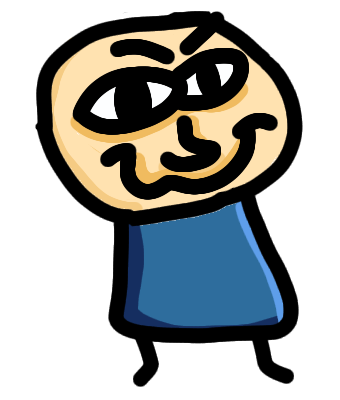

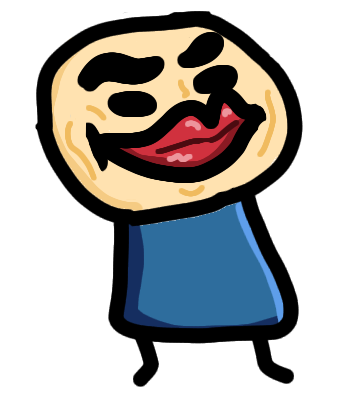
I’ve also made some polishing changes.
I’ll be on holiday until August, so this is the last you’ll hear from me till then - see you soon!
I’ve also decided to not do proc-gen as my dev skills aren’t on the level to implement it yet. Maybe someday…
Airdrops are implemented though. Powerups now spawn in a nice clump after each shop.
5 Likes
Enjoy your holiday! Art looks immense 
1 Like
I played the test build and thought It was really fun, when I was playing I found that when you have to press enter is kinda annoying because you already have one hand on the mouse and one on the other side of the keyboard. other than that this is definitely an awesome game 
1 Like
Thanks guys!
Froggy, I’ll change the key to Space.
Something BIG is in the works for Wombo, so stay tuned!
(hint: gravity!)
2 Likes
this is the best game I’ve seen in a while. This might be the next balatro. It’s the best new indie game I’ve seen in the past month. Keep the great work up.
1 Like
How’s it going, fellows? It’s been a long while, hasn’t it? I’ve been a bit busier, but have still been able to find time to add multiplayer to Wombo. It’s not totally perfect yet, but I thought I’d get something playable out, so you can check out the itch page and grab the new build! Lots of UI and juice improvements have been made, but since I’ve been busy with multiplayer, content hasn’t been the top priority. Still, there are several new upgrades, and the game is quite fun! Have a look yourself:
2 Likes
Forgot to mention how multilpayer works: One person enters their display name and hits “Host Server”, and pastes the room code (which gets copied to clipboard) into some kind of chat with the other player. The other player pastes in the room code and enters their name, then clicks Join Server.
2 Likes
Multiplayer!!!
Let’s gooo
1 Like
yes! mutiplayer
Well you’ve been busy! Liking the new upgrades, new music, and general polish.
It’s really coming along nicely; that was a blast to play.
1 Like
Thanks Zeb!
I don’t really have a ton of time to work; life’s a bit busy. Things should clear up a bit in November.
Coming up next for Wombo is a ‘map of the day’ system: a new random map every day. It’s almost done; should go live sometime this or next week.
If you’d like to play some multiplayer with me, I have a bit of time today (7:30 - 8:30 PST).
2 Likes
Online right now. my code is
NR7IBGPE
Just wrapped up the playtest session - lovely time had by all. Noticed a few bugs to squash that’ll be fixed next time.
1 Like