Godot Version
4.6.1 stable
Question
Hi everyone! I am new to Godot and its been quite a while since I did any 3D coding.
Im setting up the player and cam rig for a little 6dof game I want to prototype. So FPS without gravity and rotation around each axis as well as movement along each axis. Very much like “Descent” or more recently “Overload”.
Turns out that is quit a bit more tricky than I initially thought. No surprise really.
I currently have a setup that allows me to rotate freely and independently on each axis using parent nodes as rotation gimbal elements for each axis. Movement along axies is realized by taking the cams axis as vectors to move on. This took a while to get to work but works well for movement.
System breaks when the player collides, tho. The parent node “gimball_yaw” will separate form the player as the collision handling from move_and_slide() will not apply to it but only to the Player node and its children.
First I tried to use a RemoteTransform3D node inside the Player to update the changes to “gimball_yaw” but it had no effect at all. Is there some thing preventing circular updates in the node tree?
I also tried to do the position update manually when collisions occurred, but that only kind of works. Looks choppy and the nodes still separate after some collisions.
#handle collisons and correct outer gimball if needed
	if move_and_slide():
		gimball_yaw.global_position = global_position
Here is a little clip of what is happening. Pink sphere represents the position of gimball_yaw, so the point all rotations revolve around. As you can see it leaves the playerCollsion body behind after some collisions with the floor.
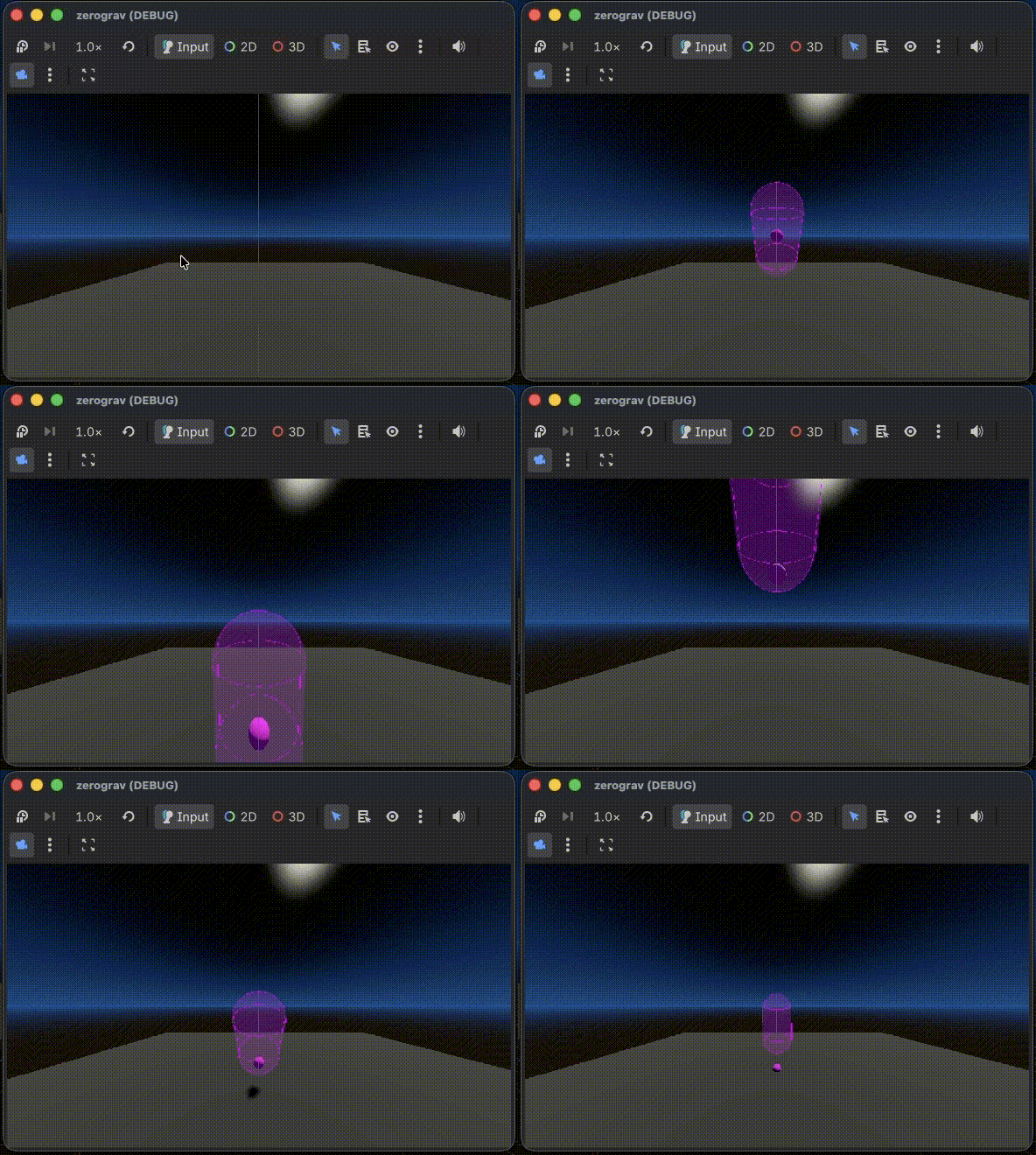
Here is the node tree and the complete script.
Im very happy for any suggestions how to either fix the collisions or how to ged rid of the whole gimbal setup and get independent rotation on each axis within the CharacterBody3D node. Thanks a lot for reading 
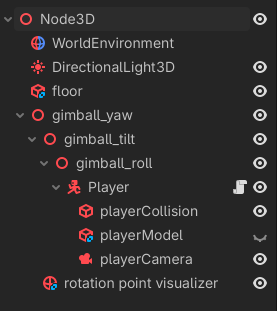
extends CharacterBody3D

@export var pitch_speed := 2.0
@export var yaw_speed := 2.0
@export var roll_speed := 2.0
@export var strafe_speed := 5

@export var gimball_yaw: Node3D
@export var gimball_tilt: Node3D
@export var gimball_roll: Node3D
@export var player_camera: Camera3D

var rx := 0.0
var ry := 0.0
var rz := 0.0


func _input(event: InputEvent) -> void:
	rx = Input.get_axis("pitch_down","pitch_up")
	ry = Input.get_axis("yaw_right","yaw_left")
	rz = Input.get_axis("roll_right","roll_left")
	return

func _physics_process(delta: float) -> void:
	### Gimball approach
	gimball_yaw.transform.basis = gimball_yaw.transform.basis.rotated(gimball_yaw.transform.basis.y, deg_to_rad( ry * yaw_speed))
	gimball_tilt.transform.basis = gimball_tilt.transform.basis.rotated(gimball_tilt.transform.basis.x, deg_to_rad( rx * pitch_speed))
	gimball_roll.transform.basis = gimball_roll.transform.basis.rotated(gimball_roll.transform.basis.z, deg_to_rad( rz * roll_speed))

	# get the gamepad vector for movement along the x,y,z axies (strafe)
	var mx := Input.get_axis("strafe_left","strafe_right")
	var my := Input.get_axis("strafe_down","strafe_up")
	var mz := Input.get_axis("strafe_forward","strafe_backward")

	#get camera oriantation to extract axies (basis) vectors
	var x_strafe_dir = player_camera.global_transform.basis.x
	var y_strafe_dir = player_camera.global_transform.basis.y
	var z_strafe_dir = player_camera.global_transform.basis.z

	#apply movement to outer gimbal
	gimball_yaw.global_position += mx * x_strafe_dir * strafe_speed * delta
	gimball_yaw.global_position += my * y_strafe_dir * strafe_speed * delta
	gimball_yaw.global_position += mz * z_strafe_dir * strafe_speed * delta

	#handle collisons and correct outer gimball if needed
	if move_and_slide():
		gimball_yaw.global_position = global_position