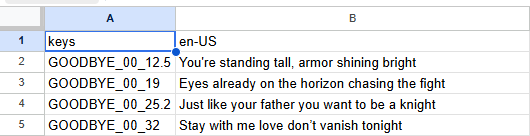
i have a .csv file that works like a time table (where i can see a value and another value and if you put those toghether it gives you a answer, no pattern to it so i must read the file), i want a way to load the file and do
csv_file.get_cell(8,6)
as far as docs go it doesnt say i can do that, i decided to not make an enum as ive been told its not the best way to do it, is there any official way/library to do that?
Can be a single array as well. Just deduce the number of columns when parsing and then calculate the one dimensional index at lookup based on that, from two dimensional coordinates given as input.
Yes. If you know that every column is going to be the same size. Unless I’m missing something.
Holy crap, I just remembered I made code for this two weeks ago. I did something similar for displaying lyrics for a song at timestamps. I just used a Dictionary cause I had floats.
class_name LyricsLabel extends Label

@export var song_title: String
@export_file_path("*.csv") var lyrics_location: String

var timer: float = 0.0
var lyrics: Dictionary[float, String]


func _ready() -> void:
	_load_lyrics()


func _process(delta: float) -> void:
	if lyrics.is_empty():
		return

	timer += delta

	var first_key = lyrics.keys()[0]

	if timer >= first_key:
		text = lyrics[first_key]
		lyrics.erase(first_key)


func _load_lyrics() -> void:
	var file: FileAccess = FileAccess.open(lyrics_location, FileAccess.READ)

	if not file:
		print("Error opening file: ", FileAccess.get_open_error())
		return

	while !file.eof_reached():
		var line_data: PackedStringArray = file.get_csv_line()
		if line_data[0].contains(song_title.to_upper()):
			var second_mark: float = float(line_data[0].get_slice("_", 2))
			var minute_mark: float = float(line_data[0].get_slice("_", 1)) * 60.0
			var time: float = second_mark + minute_mark
			if line_data[1].is_empty():
				lyrics[time] = ""
			else:
				lyrics[time] = line_data[0]
But you could modify the file loading I did for either an Array if you know the number of characters, or an Array of Arrays.