Adjust shader to vanish a texture

Godot Version

v4.7.stable.official [5b4e0cb0f]

Question

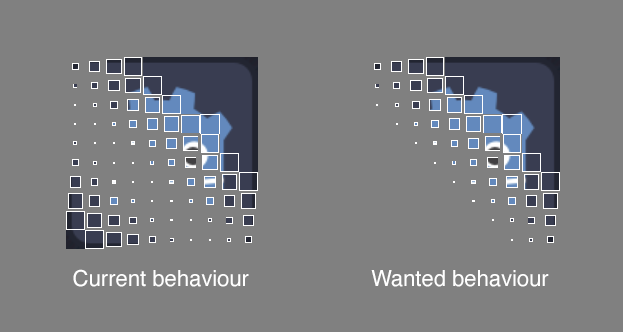
I’m trying to adjust this shader (shader code below) such that the texture disappears on one side of the transition. I’m essentially trying to use this shader to remove things from view.

Related to that, I have trouble drawing the outlines inside the squares. If I do that, they are also drawn on the full sized squares when I want them to be visible only when the squares start to shrink, i.e. on the border of the animation.
shader_type canvas_item;
uniform vec3 color: source_color;
uniform float num_cells: hint_range(2.0, 20.0, 1.0) = 10.0;
uniform float speed: hint_range(0.1,2.0, 0.01) = 1.0;
uniform float smoothness: hint_range(0.5, 2.0, 0.01) = 1.0;
uniform float angle: hint_range(0.0, 360.0) = 45.0;

float rectanglef (vec2 uv, float width, float height, float feather){
	vec2 uv_cartesian = uv * 2.0 - 1.0;
	vec2 uv_reflected = abs(uv_cartesian);
	float dfx = smoothstep(width, width + feather, uv_reflected.x);
	float dfy = smoothstep(height, height + feather, uv_reflected.y);
	return max(dfx, dfy);
}

vec2 rotation (vec2 uv, vec2 center, float ang) {
	mat2 rotation = mat2(
		vec2(cos(ang), -sin(ang)),
		vec2(sin(ang), cos(ang))
	);
	uv -= center; 
	uv *= rotation; 
	uv += center; 
	return uv;
}

void fragment(){	
	
	vec2 igrid = floor(UV * num_cells)/num_cells;

	igrid = rotation(igrid, vec2(0.5), angle * PI/180.0);
	igrid.x += 2.0 - mod(TIME*speed,4.0);
	vec2 fgrid = fract(UV * num_cells);
	float rect_mask = rectanglef(igrid, 0.001,2.0,smoothness);
	float grid_mask = 1.0 - rectanglef(fgrid, rect_mask, rect_mask, 0.0);
	float outline_mask = 1.0 - rectanglef(fgrid, rect_mask + 0.1, rect_mask + 0.1, 0.0) - grid_mask;
	vec3 outline = outline_mask * color;
	vec3 tex = texture(TEXTURE,UV).rgb;
	vec3 output = mix(tex,outline,outline_mask);
	COLOR = vec4(output,outline_mask + grid_mask);
}

PS. I’m not sure how to mark the code as shader code. I’ll happily edit it if someone tells me how.

Try this. Instead of TIME and mod period, there is a uniform parameter progress. Drag it from 0 to 1 to see the effect.

shader_type canvas_item;
uniform vec3 color: source_color; 
uniform float num_cells: hint_range(2.0, 20.0, 1.0)=10.0; 
uniform float smoothness: hint_range(0.5, 2.0, 0.01)=1.0; 
uniform float angle: hint_range(0.0, 360.0)=45.0; 
uniform float progress: hint_range(0.0, 1.0, 0.01)=0.0; 

float rectanglef (vec2 uv, float width, float height, float feather){
	vec2 uv_cartesian = uv * 2.0 - 1.0; 
	vec2 uv_reflected = abs(uv_cartesian); 
	float dfx = smoothstep(width,width+feather,uv_reflected.x);
	float dfy = smoothstep(height,height+feather,uv_reflected.y); 
	return max(dfx,dfy); 
}

vec2 rotation ( vec2 uv, vec2 center, float ang){
	mat2 rotation = mat2(
					vec2(cos(ang), -sin(ang)), 
					vec2(sin(ang), cos(ang))
					);
	uv -= center; 
	uv *= rotation; 
	uv += center; 
	return uv;
}

void fragment(){	
	
	vec2 igrid = floor(UV * num_cells)/num_cells;
	igrid = rotation(igrid, vec2(0.5), angle * PI/180.0); 

	float offset = 2.0 - progress * 4.0;
	igrid.x += offset; 

	vec2 fgrid = fract(UV * num_cells); 
	float signed_front = igrid.x * 2.0 - 1.0; 
	float wave = smoothstep(-smoothness, 0.0, signed_front); 

	float grid_mask = 1.0 - rectanglef(fgrid, wave, wave, 0.0); 
	float outline_mask = 1.0 - rectanglef(fgrid, wave+0.1, wave+0.1, 0.0) - grid_mask; 
	vec3 outline = outline_mask * color; 
	vec3 tex = texture(TEXTURE, UV).rgb; 
	vec3 output = mix(tex, outline, outline_mask); 

	float final_alpha = (outline_mask + grid_mask) * wave; 
	COLOR = vec4(output, final_alpha); 
}

This is super close to what I want! Only thing I’d still like to improve, if possible, is that the squares in your version fade out in opacity when I’d like them to simply scale out of existence.

I achieved the desired look by doing this:

COLOR.rgb = output;
if (wave > 0.0) {
	COLOR.a = (outline_mask + grid_mask);
} else {
	COLOR.a = 0.0;
}

I know if statements are not the best in shaders, but I don’t know a different way to achieve this.