Godot Version
4.6.2
Question
Hi, I have a procedural terrain generation project and want to apply a texture on a generated mesh using a shader.
The mesh is the landscape generated, each vertex is assigned a color value, specifically on the red channel which tells the shader which texture to pick. This color is set to be i.e. either 0.0=sand texture, 0.25=grass texture, 0.5=snow, 0.75=stone. There is no in between like 0.13 when it comes to the color value.
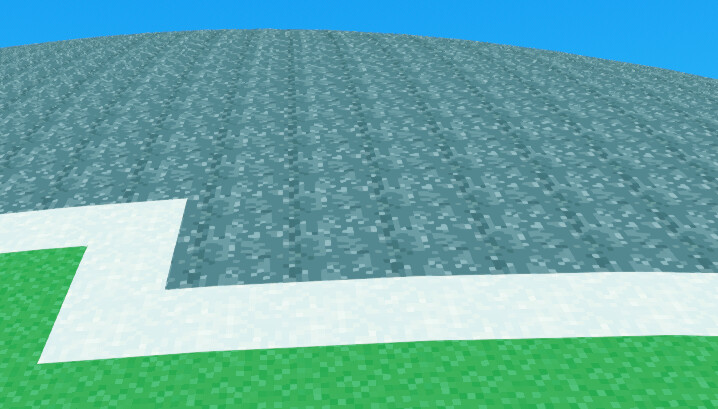
However, in my shader, if it wants to transition from grass to stone, there will be a thin line of snow in between:
My texture atlas/array:

I think I vaguely understand why since all vertices on one “square” of texture on the mesh should usually all have picked i.e. the grass texture but at a transition like that, two would be “grass” and two “stone”. Therefore it results in a snow texture.
I just don’t know how I can circumvent this in a reasonable manner.
Here’s my shader code:
shader_type spatial;

render_mode unshaded;

uniform sampler2DArray texture_array : filter_nearest, source_color;
uniform float texture_scale = 64.0; // 4 textures, each 16x16 pixels == 64

void fragment() {
float selected_texture = COLOR.r*texture_scale/16.0;

ALBEDO = texture(texture_array, vec3(UV*texture_scale, selected_texture)).rgb;

}
I currently feel like my issue cannot really be solved with my current method of applying the texture but I don’t know of any other methods. I want to add blending and mixing so that the transitions are smoother but I don’t think that will solve the problem I have either?
I believe the problem you’re running into is that during rasterization the fragments are interpolated between the vertices, so in your example, a fragment halfway between a “grass” vertex and a “stone” vertex is 0.5, which your fragment shader proceeds to interpret as snow.
If you want to use vertex colors for this information the easiest way would be to just make each quad its own set of vertices, but I would avoid this because that’s easily 3-4x the vertex data you have to move. I believe there should be ways to make the colors per tri (like this in blender), which would be preferable, but I’m not sure how that ports over to Godot.
If I were implementing this, the way I’d do it is to have a texture with nearest filtering, 1 pixel per square, and UV2 be dedicated to sampling it. Then setting a particular square is just a matter of updating that texture.
Edit: when searching through the docs I saw this which seems worth trying, and relatively easy compared to my suggestions above.
Thanks for the replies, both the UV2 suggestion and the edit seem like good ideas!
While I was starting to implement the UV2 method I saw your edit and switched over to that instead. I split up the code between vertex and fragment so texture is selected per vertex, in vertex(), and applied per pixel in fragment(). If I understand what I’m doing that is…
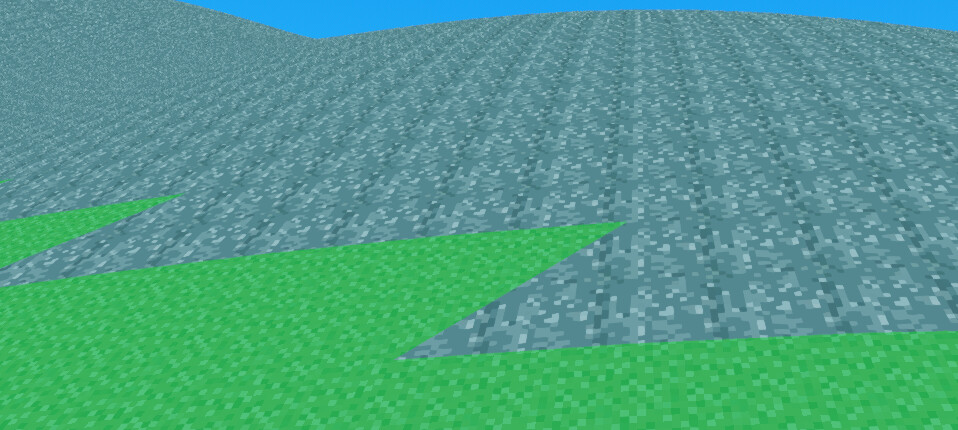
I no longer have the interpolation-snow. It looks a bit weird with the sharp angles, it seems to apply texture to the triangles of each “tile” instead of the entire square but I’ll see if I can work with it. Seems promising to me at least!
Here’s my shader code:
shader_type spatial;

render_mode unshaded;

uniform sampler2DArray texture_array : filter_nearest, source_color;
uniform float texture_scale = 64.0; // 4 textures, each 16x16 pixels == 64

varying flat float selected_texture[1];

void vertex(){
selected_texture[0] = COLOR.r*texture_scale/16.0;
}

void fragment() {
ALBEDO = texture(texture_array, vec3(UV*texture_scale, selected_texture[0])).rgb;
}
Thanks for the help!