Hi,
Im trying to make a game and right now im trying to implement a modular interaction system (eg an area where if the player is in, its possible to click e to progress). Im using a CharacterBody3d for my player node and an Area3d node for the area. I am trying to use a signal from the area. Below is the code.
Player Script
extends CharacterBody3D
class_name Player
@onready var anim = $AnimatedSprite3D

const SPEED = 5.0
const JUMP_VELOCITY = 4.5

func _ready() -> void:
	# Why: Group-based filtering keeps interact logic generic.
	if not is_in_group("player"):
		add_to_group("player")
	print("Player Exists")


func _physics_process(delta: float) -> void:
	# Add the gravity.
	if not is_on_floor():
		velocity += get_gravity() * delta

	# Handle jump.
	if Input.is_action_just_pressed("jump") and is_on_floor():
		velocity.y = JUMP_VELOCITY

	# Get the input direction and handle the movement/deceleration.
	var input_dir := Input.get_vector("move_left", "move_right", "move_backward", "move_forward")
	var direction := (transform.basis * Vector3(input_dir.x, 0, input_dir.y)).normalized()
	if direction:
		velocity.x = direction.x * SPEED
		velocity.z = direction.z * SPEED
	else:
		velocity.x = move_toward(velocity.x, 0, SPEED)
		velocity.z = move_toward(velocity.z, 0, SPEED)


	#Animations
	if is_on_floor():  #it means the character is either idle, running or sprinting
		if velocity.x == 0:
			anim.play("idle")
		else:
			if Input.is_action_pressed("move_left"):
				$AnimatedSprite3D.flip_h = true
				anim.play("walk")
			if Input.is_action_pressed("move_right"):
				$AnimatedSprite3D.flip_h = false
				anim.play("walk")
			if Input.is_action_pressed("move_backward"):
				anim.play("walk")
			if Input.is_action_pressed("move_forward"):
				anim.play("walk")
			else:
				anim.play("walk")
	else: #it means the character is either jumping or falling
		if velocity.y <= 0:
			anim.play("jump")
		else:
			anim.play("fall")

	move_and_slide()
Area Script
extends Area3D

# Called when the node enters the scene tree for the first time.
func _ready() -> void:
	print ("Area Exists")

func _on_interact_body_entered(body: Node3D) -> void:
	if body is Player:
		print ("Entered")

func _on_interact_body_exited(body: Node3D) -> void:
	if body is Player:
		print ("Exited")
I have tried a lot of variations for this code but i just cant seem to get it to flag when the player enters the area. Both player and area are in layer 1 and mask 1, monitoring is on and through the prin statements i know that both player and area are loaded in the scene.
Have you enabled “Visible Collision Shapes” in the debug settings to check if both shapes are in their expected positions?
Are the area’s signals connected?
I just tried enabling “Visible Collision Shapes,” and they all appear to be in the correct positions.
I’m new to Godot, so this might not be what you are asking, but when setting up the signal, I clicked “Connect” on the body_entered event.
I only added the group because some tutorial used it and i thought it might be a fix. I tried it again without it and still nothing. Which is very weird because now i know for sure it reads the interaction due to the previous suggestion that was made.
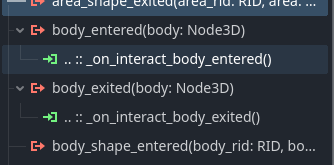
Okay, I’m not sure how this could have happened, but I think I found the issue? .. references the parent node, not the node itself. So it seems the signal is not connected to the Area3D, but to its parent? Try editing the connection and make sure it’s connected to the Area3D itself.
That actually fixed it! Thank you so much! I assume its not meant to do that by default? I never touched that except when i initially made the connection. Let me know because if its not ill try to recreate what i did for future reference, in case anyone faces this problem.
When you connect a signal, you can choose to which node/function you want to connect. It will automatically create the function in the specified node’s script then (if it doesn’t exist already).
Since the function was in the Area3D’s script I didn’t expect this to be problem. Because this would imply you moved the function from one script to another or had this script attached to the Area3D’s parent before (or something like that).
I actually kept tinkering after i fixed it and i found this tutorial of an implementation method for a modular interaction system, that works just as well for 2d and 3d, which i feel is closer to what i needed. If anyone is interested here is the Interaction Tutorial i ended up using.
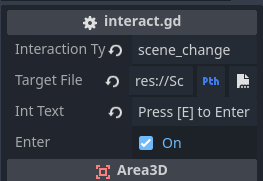
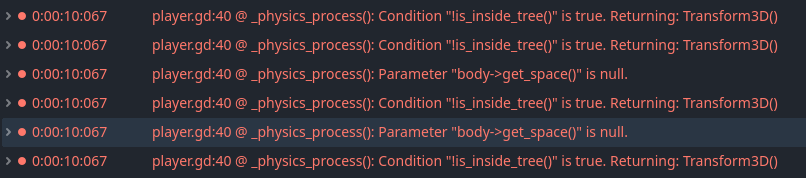
Ok so the system i am trying to create is one where my 3d player walks in front of a door, gets the indication that the door can be entered, enters the door with scene change. I solved this, by creating an area3d scene with variables for the file path, the interaction type, the text that the 3d label on top of the player is to display and a boolean var for if the door is an entrance or an exit (because i am now trying to make it so if the player leaves the building he will spawn in the previous scene in the position he left using a stack of his previous positions). On this Area3d I have only monitorable enabled. Then on the player himself i have another Area3d with monitoring enabled and a function that executes a code block depending on the interaction type of the area. Here is what i have in terms of code. It does work, but it also throws some physics errors which i believe are from the move_and_slide() in the physics process. I didnt have a lot of time to finish this but i wanted it to be modular so i can use the same system for interactable items, npcs etc.
The Area3d Interaction Scene code
extends Area3D

@export var interaction_type = ""
@export_file() var target_file = ""
@export var int_text = ""
@export var enter = true
The Player Code
extends CharacterBody3D

@onready var anim = $AnimatedSprite3D

@onready var all_interactions = []
@onready var InteractLabel = $Interaction/Label3D


const SPEED = 5.0
const JUMP_VELOCITY = 4.5


func _ready() -> void:
	InteractLabel.text = ""
	print (global_position)

func _physics_process(delta: float) -> void:
	# Add the gravity.
	if not is_on_floor():
		velocity += get_gravity() * delta

	# Handle jump.
	if Input.is_action_just_pressed("Jump") and is_on_floor():
		velocity.y = JUMP_VELOCITY

	# Get the input direction and handle the movement/deceleration.
	# As good practice, you should replace UI actions with custom gameplay actions.
	var input_dir := Input.get_vector("Left", "Right", "Backwards", "Forwards")
	var direction := (transform.basis * Vector3(input_dir.x, 0, input_dir.y)).normalized()
	if direction:
		velocity.x = direction.x * SPEED
		velocity.z = direction.z * SPEED
	else:
		velocity.x = move_toward(velocity.x, 0, SPEED)
		velocity.z = move_toward(velocity.z, 0, SPEED)

	if Input.is_action_just_pressed("Interact"):
		execute_interaction()

	move_and_slide()

	#Animations
	if is_on_floor():  #it means the character is either idle, running or sprinting
		if velocity.x == 0:
			anim.play("Idle")
		else:
			if Input.is_action_pressed("Left"):
				$AnimatedSprite3D.flip_h = true
				anim.play("Run")
			if Input.is_action_pressed("Right"):
				$AnimatedSprite3D.flip_h = false
				anim.play("Run")
			if Input.is_action_pressed("Backwards"):
				anim.play("Run")
			if Input.is_action_pressed("Forwards"):
				anim.play("Run")
			else:
				anim.play("Run")
	else: #it means the character is either jumping or falling
		if velocity.y <= 0:
			anim.play("Jump")
		else:
			anim.play("Fall")


func _on_area_3d_area_entered(area: Area3D) -> void:
	#print ("Player Entered")
	all_interactions.insert(0, area)
	update_interactions()

func _on_area_3d_area_exited(area: Area3D) -> void:
	#print ("Player Exited")
	all_interactions.erase(area)
	update_interactions()

func update_interactions():
	if all_interactions:
		InteractLabel.text = all_interactions[0].int_text
	else:
		InteractLabel.text = ""

func execute_interaction():
	if all_interactions:
		var cur_interaction = all_interactions[0]
		match cur_interaction.interaction_type:
			"scene_change":
				if cur_interaction.enter == true:
					print ("Scene Enter Change Initiation")
					print ("Scene target:", cur_interaction.target_file)
					Global.position = self.global_position
					print (Global.position)
					get_tree().change_scene_to_file(cur_interaction.target_file)
				elif cur_interaction.enter == false:
					print ("Scene Exit Change Initiation")
					print ("Scene target:", cur_interaction.target_file)
					get_tree().change_scene_to_file(cur_interaction.target_file)