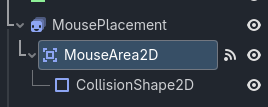
I have this game that has a ‘mouse placement‘ node. It follows the mouse and previews where a tile will be if you place it. It has an area, and when that area is inside a ‘placeable tile‘ area it shows, but when it’s not, it hides.
The problem though, is that it hides a frame late:
The “hardware” mouse is handled by the operating system, getting it’s position does have a delay that may not be resolvable, especially without consolations. One such solution would be to draw your own “software” mouse by hiding the mouse Input.mouse_mode = Input.MOUSE_MODE_HIDDEN and updating a sprite2D to the mouse’s position every frame, much like you are doing now, but without the snapping (which you might be able to do better with .snappedf(50).
Here’s another thread on the subject, there have been a few but I understand they are hard to search for.
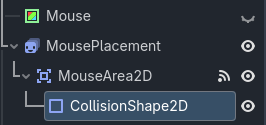
Okay. So I made a ‘mouse‘ node that goes to the mouse position and I hid the real mouse. I then made it so ‘mouse placement‘ goes to the ‘mouse’ node, but it still acts exactly the same. Did I do something wrong? Thanks for helping by the way.
Ah sorry I missed that your issue is with specifically hiding the object, that “if areas has overlapping areas”. It may be better to use _physics_process and signals as the _process (and all functions) run from top to bottom without stopping so there is no space fro the area to detect collision between your placement and your if statement.
Maybe execution order too? Is your area up or down from mouse_placement in the scene tree? I think if you can move the area down after mouse_placement it should process collision after each movement.
Currently the area that is detecting the ‘placeable tiles‘ and has the functions that make ‘MousePlacement‘ show or hide, is the child of ‘MousePlacement.‘
But I did try making MouseArea2D not be a child of MousePlacement but rather be above or below MousePlacement but it didn’t change anything. I also tried moving the Mouse node around in the tree but no change.
It might be from the physics server not immediately reflecting your change.
If so: You can change your code to use raycast or shapecast, and use the “force update” methods. Or in code get the physics state and do an immediate raycast.
Direct physics queries allow you to detect collision at any point in code without a node. The nodes require their own processing time where direct queries happen immediately.
Here’s a link to another post of mine with a sample using a ShapeQuery
I don’t have a tutorial on hand, but the documentation I linked to is a short guide.
To summarize the problem: _process ticks away independently of our physics world. Sometimes you want to set things up, connect some signals, and let the physics world handle the nitty-gritty. Other times you would rather have instant information from the physics world.
For ray-casting, all you are doing is this:
get the physics world (called a space state)
set up some query: a point, a line (ray), a shape
use the query to get a list of things you hit
do stuff with the info
So you want mouse_placement to know when its inside a placeable_tile area. And you’ve got a CollisionShape2D on hand. Could try something like this:
#change this to point to the shape (not sure where your script is at in the tree)
@onready var shape: CollisionShape2D = $CollisionShape2D
func _physics_process(delta: float) -> void:
	$Mouse.position = get_global_mouse_position()
	mouse_placement.position = (round(($Mouse.position - Vector2(25,25)) / Vector2(50,50))) * Vector2(50,50) + Vector2(25,25)
# 1. Get the physics world state
var space_state = get_world_2d().direct_space_state
# 2. Set up our query
var shape_query = PhysicsShapeQueryParameters2D.new()
shape_query.shape = shape
shape_query.transform = mouse_placement.transform
shape_query.collide_with_areas = true
shape_query.collision_mask = 1 << 8 #change 8 to the physics_layer you've put `placeable_tile` areas
# 3. Use the query and get a list (dictionary) of results
var result = space_state.intersect_shape(shape_query)
# 4. Do stuff with the info -- I guess in this case we don't care about how it collided, just that it did.
if result.is_empty(): # we aren't touching a placeable area
mouse_placement.hide()
else:
mouse_placement.show()
Might have made some typos. Assuming nothing weird with the transform, it should work.
Do you intend to hit layer 3 or both/either layers 1 and 2? Currently this line detects layers 1 and 2, not 3. If you wanted 3 you could write 0b100 or 1 << 2
It may also help to move some of the query parameters to _ready so you aren’t creating new objects and duplicate work each frame
@onready var shape : Shape2D = $MousePlacement/MouseArea2D/CollisionShape2D.shape
var shape_query := PhysicsShapeQueryParameters2D.new()

func _ready() -> void:
	shape_query.shape = shape
	shape_query.collide_with_areas = true
	shape_query.collision_mask = 0b100

func _physics_process(_delta: float) -> void:
	# etc...
	var space_state = get_world_2d().direct_space_state
	shape_query.transform = mouse_placement.transform
	var result = space_state.intersect_shape(shape_query)
	# etc...