Best way to learn GDscript as a new programmer?

Godot Version

4.5

Question

SO, I've been following along with an online video tutorial series I bought on Udemy (clearcode’s tutorial)and I can confidently call it a great series. I’m slightly over 50% of the way through the course (almost done with the farming tutorial) and I’ve got a big googledoc I’ve been filling up with notes throughout the course, that’s about 75 pages now. It’s all screenshots of code, me guessing what he’s going to do next, trying to solve the exercises and leaving notes where I went wrong (or celebrating when I did it right). But the one thing I’m really struggling with, in all of this, is the coding itself.

I’m a newbie coder, all my experience is in art and so on. I’ve been doing lots of studying on GDscript outside of this course, including but not limited to GDQuest’s GDscript from Zero course. This course was a great start to helping me solve my problem, but I’m still struggling to grasp some of the basic programming concepts that come from gdscript.

See, here’s a screenshot of a snippet of the code we’ve been writing in his clear code course:
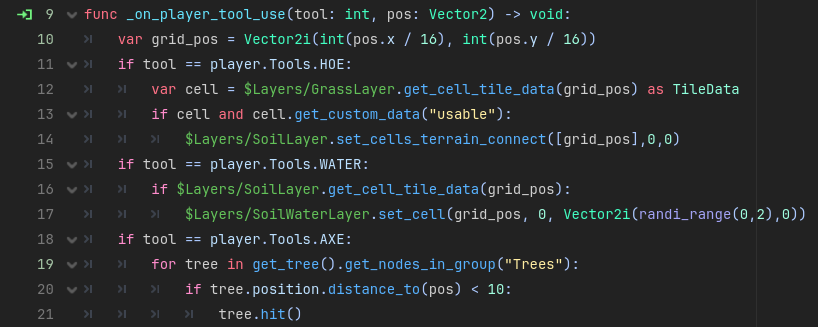
I can follow along with most of that. I know the $name/thing is specific nodes being called from the node tree, and the .function() is the function we are asking to be performed on/by that object at that point in the code. But when we start to get more specific than that, I start to get lost, just because I haven’t been able to find it anywhere.

I can hardly tell the difference between an assignment and an argument and every other term. I think what I really need is not just help understanding the syntax, but the definitions of those terms. And, I’ve got a downloaded offline copy of the GDscript manual for me to try to read to understand, but I have to admit I’m still struggling to understand the manual after trying to read it. Lots of that manual seems to be written for people who are already familiar with coding concepts and are just trying to learn gdscript specifically. People like myself, who only want to master GDscript so they can have mastered a really simple 3D game engine with which to make their funny little 3D models do their thing in.

Is there a lesson series for GDScript somewhere that I don’t know about? Or a book? Something, not unlike “Learn GDScript from Zero,” that teaches you everything from that very beginning intro level, but keeps going? I was gaining a lot out of that course, and was sad it was only 30 lessons long! If I can find something like that that can reliably teach me what i need to know in order to be able to read just about any code that gets presented to me in gdscript, I’ll pay top dollar.

Feel free to ask me any questions about what I’m asking about.

An assignment is when you give a variable a value. It usually invloves a single equal sign (=). Like this:

# Create a Variant and assign an int value of 10
var my_variable = 10
# Create an int and assign a value of 10
var my_variable: int = 10
# Create a variable and assign an int value of 10, then infer it's type as int and assign that type
var my_variable := 10

# These all also do the same thing as above, but with an object.
var mr_area = Area2D.new()
var mr_area: Area2D = Area2D.new()
var mr_area := Area2D.new()

An argument is a value you pass to a function.

func foo(bar: String) -> void:  # <-- Declaring an Argument
	print(bar) # <-- Using an Argument

func _ready() -> void:
	var message: String = "Hello World" # <-- Assignment
	foo(message) # <-- Passing an Argument

I started one. It’s here: Godot: Learn To Be A Professional Game Developer by Making a 3D RPG From Scratch — Dragonforge Development It was intended for people like you. I made it free since I didn’t have the time to finish and monetize it.


BTW, in that code example you shared, there are some bad habits. For example, line 12 should be two lines, one at the top of the script, then a second replacement of that line:

@onready var grass_layer =  $Layers/GrassLayer

var cell: TileData = grass_layer.get_cell_tile_data(grid_pos)

Sounds like you’re doing the work. You’ll get there!

2 Likes

So an “Assignment” is literally just the thing you “assign” to a variable, right? like var bread := 1 as int? Or something?

Really good to know, about the “bad habit” for that kind of coding- that’s something I copied directly from clear code’s tutorial. Most of my notes are just reading his coding and then making my notes about how it works based on what I can read, but I’ve been showing screenshots to other devs like you’ and they’ve been introducing me to different concepts clearcode doesn’t cover. Someone just introduced me today to "small functions” and “self documenting code,” for example.

I remember you from posting on my previous post actually, where I asked something similar; I’m mostly just trying to find out where else I can learn this stuff than just online tutorials. But it sounds like I’m doing right by joining communities and presenting my code for critique. I promise I’ll take a look at your project eventually. Currently I’m more than halfway done with this tutorial series, so I want to finish this one first.

Yep

I figured. I used to do that too when I started using Godot. The problem is that is you use that node reference multiple times and then move the node in the scene tree, you have to fix every reference instead of you the @onready variable conveniently at the top of the page.

Good stuff. I would call small functions atomic code. Basically, your function does one thing and does it well, and then farms out other stuff to other functions. It’s basically using encapsulation inside of functions.

Self documenting code is reeeeeaaaally helpful. I get so annoyed when people ask questions on here and they have one-letter variable names. Just avoid the mistake most intermediate developers make which is they add no comments to their code, because what they’re writing seems self-explanatory.

This is something where you an let your anger guide you, opposing Yoda’s advice. If you’re reading someone else’s code, or even Godot documentation of code and you’re frustrated by the sparse description of what is going on or how to use something - remember that. Then when you write code, make sure to leave enough comments to help people coming behind you. Because 90% of the time, the person coming behind you who is mad about the lack of comments is future you.

Definitely.

No worries. It’s there either way. Enjoy the journey!


I will give you one other thing to read now if you’re interested. I am currently documenting my daily progress in a game jam. You can scroll to the bottom of the page and see the devlogs. They’re not too long, and I try to make them entertaining. Katamari Mech Spacey (カタマリメカ スペイシー) by Dragonforge Development You can also follow the progress of my actual game development as I’m uploading a new version every day.

No pressure though. :slight_smile:

2 Likes

There is nothing to learn, you run code in function and store stuff in variables.
If you have a problem its probably a typo or a specific issue with Godot.

Another option could be to take a step back and learn programming first. There are probably good books (my recommendation) or sites out there that teach programming in Python to beginners. Python is a good language to learn because GDScript is very similar to it.

Once you know the fundamentals you can come back and get on with Godot and GDScript and probably see things in a different light. Because at this point you try to learn a couple of different things: A programming language, programming in general and the engine.

1 Like

You are aware that this is completely not helpful to a beginner, right?

3 Likes

This topic was automatically closed 30 days after the last reply. New replies are no longer allowed.