Bizarre Bug With My Inventory Resources, I Am Losing My Mind

Godot Version

4.5

Question

I am working on a 2D RPG which has 3 different inventories. These inventories are stored as typed arrays within their own resources so that they can be easily accessed throughout the game. This used to work just fine, however very recently (in the past week or so), this suddenly just broke when it’s connected to my menu system.

I have it so each menu that acts alone is its own scene, which are instantiated and deleted as the player chooses certain options and goes back. Each menu has its own script handling its functionality, with the menus that need to access the inventory referencing them as such:
@export var item_inventory : ItemInventory

image
Thus, it doesn’t create a new instance of the inventory.

Now here’s the actual issue if you’ve been skipping over my infodump: Sometimes when I try to access the arrays within the inventories, it simply will not work, and the array will return empty. I can not discern any pattern to this. This error:

image
Appears as it attempts to access the arrays.

I will give everything I know about this issue. When accessing the item inventory, this problem only occurs for the combat item menu and not the main item menu outside of combat. This issue also occurs for the weapon and armor inventories when trying to update the list of armor or weapons, an issue which did not happen before. I haven’t done any work with the weapon and armor inventories since I finished these menus.

These errors:

image
Are thrown as I load into the combat scene. It doesn’t tell me which array is causing this issue, but I can only presume it is the inventory arrays that I already know have issues. These errors do not appear in the overworld scene where the weapon and armor inventories have issues. I have tried removing the typing from the arrays, to no avail.

Last thing to note is that the battle item menu works just fine when ran as its own scene. However, the equipment menu still has this issue even when when I run the scene individually.

This has left me scratching my head and, like many roadblocks, slowly losing my mind as I become more confused as to what the issue could be. I’ve tried looking it up, typing my issue into google and even putting in my errors, but the issues I find are varied and don’t really apply to what’s happening here. The closest I saw was that it could be a bug with the engine, but I’m not sure. Any help would be greatly appreciated.
Couple of things:

  1. Please right-click on those errors and select Copy Error. Then paste them here with ``` on the lines above and below. There’s more info in them and they are very hard to read in screenshots. (It’s also hard to copy and paste them to do additional research on them.)
  2. Have you tried putting breakpoints in your code to hunt down where and when this happens?

For the first request, I’ll post all the errors below:

E 0:00:00:766   _internal_validate_object: Attempted to assign an object into a TypedArray, that does not inherit from 'GDScript'.
  <C++ Error>   Method/function failed. Returning: false
  <C++ Source>  core/variant/container_type_validate.h:135 @ _internal_validate_object()
E 0:00:00:766   assign: Unable to convert array index 1 from "Object" to "Object".
  <C++ Error>   Method/function failed.
  <C++ Source>  core/variant/array.cpp:234 @ assign()
E 0:00:01:947   BattleItemMenu.update_item_list: Out of bounds get index '0' (on base: 'Array[Item]')
  <GDScript Source>battle_item_menu.gd:28 @ BattleItemMenu.update_item_list()
  <Stack Trace> battle_item_menu.gd:28 @ update_item_list()
                battle_item_menu.gd:40 @ _ready()
                battle_menu_manager.gd:57 @ _on_battle_options_item_requested()
                battle_options.gd:79 @ _input()

The third error is very similar in the equipment menu.

As for where in the code this error occurs, I first noticed it within this function:

func update_item_list() -> void:
	for i in range(len(item_list)):
		if item_inventory.items[(cur_page*10) + i]:
			item_list[i].text = item_inventory.items[(cur_page*10) + i].item_name
		else:
			item_list[i].text = "-"

When item_inventory.items is first accessed. Set through Godot and on disc, this is supposed to always have an array size of 20.

It’s a similar story for the equipment menu, occurring when weapon_inventory.weapons is first accessed in the following segment.

if cur_selection == 0:
	for i in range(len(item_list)):
		if weapon_inventory.weapons[i]:
			item_list[i].text = weapon_inventory.weapons[i].weapon_name
		else:
			item_list[i].text = "-"

Unless this is not what you mean by “where and when”, in which case it’d help to clarify!

So it would help to see your Array declarations, but my best guess is that this is because an Array declared as Array[GDScript] is having an object assigned to it that is not a script.

This is very odd, because Object is a Godot type, but I think this might be a case of the word serving double duty because this is a C++ error.

Looking at the Godot Engine code this is in the Array definition for Variant arrays and it’s in the assign() function. What this tells us is the Array isn’t strictly typed, and that the error happened when an “Object” was assigned to it that could not be converted to an Object (see line 228 in the code). Everything in GDScript is an Object, even a GDScript (as above).

Based on this, my best guess is that you have a class you’ve created that does not inherit from anything that you put in this array, and it works one place, but when you try to pass it somewhere else in the code, Godot chokes on it. If this is the case, I recommend using Object, Resource or RefCounted as the base class to inherit from.

This one is the easiest to track because it tells you where in your GDScript code it’s happening.
So battle_item_menu.gd is calling its _ready() function and then that calls the update_item_list() function on line 28. The error indicates that nothing is located in position 0 of your Array[Item] Array. Which means it has a length of -1. There’s two potential ways to fix this.

  1. If the Array should be empty, check for that and if it is return.
func update_item_list() -> void:
	if item_list.is_empty():
		return
	for i in range(len(item_list)):
		if item_inventory.items[(cur_page*10) + i]:
			item_list[i].text = item_inventory.items[(cur_page*10) + i].item_name
		else:
			item_list[i].text = "-"
  1. If the Array should have data in it, you are running into a race condition, where the array has not been populated before the battle_item_menu.gd is being created. In which case you should wait for that to happen, or send a signal when it happens to then have this updated.

This is helpful. My question now is assuming item_list is of type Array[Item], what’s the code for the Item class?

The array should have data, but even waiting half a second wields the same result, unless it’s taking an absurdly long time to load the data.

As for the resources, I have

  1. Item class, which is nothing but data
class_name Item
extends Resource

@export var item_name : String
@export var item_description: String
@export var texture : Texture2D
@export var use_text : String
  1. Item inventory, which is nothing but an array of items
class_name ItemInventory
extends Resource

@export var items : Array[Item]
  1. The Weapon class, which contains data and an array of attacks which doesn’t have any issues
class_name Weapon
extends Resource

@export var weapon_name : String
@export var weapon_description : String
@export var texture : Texture2D
@export var damage : int
@export var defense : int
@export var speed : int
@export var crit_chance : float
@export var crit_multiplier : float

@export var attacks : Array[BattleSkill]
  1. Weapon Inventory, same as Item Inventory but for weapons
class_name WeaponInventory
extends Resource

@export var weapons : Array[Weapon]

UPDATE: Waiting 5 seconds on the item menu loading in fixes this issue. My jaw dropped to the floor like a dumbass it literally did just take an absurdly long time to load.
ANOTHER UPDATE: This was a false alarm. While it let the menu load, after the timer was up and it attempted to update the text the same error still occurred.

Nothing weird here. Which means I now suspect that it’s a loading order issue. I think that the first and second errors are happening before your Resource objects are loaded which is frankly really odd.

5 seconds may not be long enough.

My next question is where do these Resource items sit in the node hierarchy? Are they owned by a Node that is farther down the tree than the battle_item_menu.gd node? If so, what happens if you move the battle_item_menu.gd node to the bottom of the Scene Tree?

Increasing the timer to 10 seconds doesn’t help, and if 10 seconds isn’t enough I’m sure nothing will be.

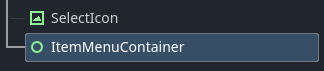
As for changing node priority, it doesn’t seem to help either. How I did it was creating a container for the item menu that’s at the very top of the hierarchy, and putting the instantiated item menu inside that container.
image

get_tree().current_scene.get_node("ItemMenuContainer").add_child(item_menu)

A bit hack, but I believe it works to order the menu in the scene tree. These items are also not physical objects in the game scene, only data that is accessed and changed, so I don’t think that they’ll be able to themselves sit in the node hierarchy.

1 Like

All used to work until recently?
Could you test the one causing troubles separately in a smaller scene?
If it works, add things gradually until it stops working.
If it doesnt work, you can rule some other things out.
You’ll get a good hint either way it goes.

Did you try ‘not using typed array’ but a generic array on the array where you are having an issue, and see what happens?

In theory, this should not cause an ‘extra’ issue to your code, so you’ll see if this fixed problem. Then you know it’s about the classes you are assigning. If you still see an error (probably a different one), then you know your issue is actually different but typed array error is probably just a result of that.

if inheritance is not explicitly defined, the class will default to inheriting RefCounted.

Per the official docs,
Cheers !

1 Like

Good to know. Makes that error even weirder, but once I knew more about the code that clearly wasn’t the issue anyway.

1 Like

Did you try ‘not using typed array’ but a generic array on the array where you are having an issue, and see what happens?

I have, doesn’t fix a thing.

What does it mean for inheritance to not be explicitly defined? For all of my scripts I have extend [whatever] at the top.

It means not having that line at the top.

Sorry, thought you were saying here that you had solved the problem.

If that’s not the case, here’s my next recommendation:

Create an Autoload and create/load all your resources in it. Autoloads are all loaded before the game starts, which will eliminate any race conditions you might be encountering.

Using an Autoload fixes the issue with the item inventory in the combat menu, but not the weapon inventory in the equipment menu. I created a script that works with Autoloads, and then made a variable for each inventory as so,

extends Node

@export var item_inventory : ItemInventory = preload("res://Resources/Inventory/item_inventory.tres")
@export var weapon_inventory : WeaponInventory = preload("res://Resources/Inventory/weapon_inventory.tres")
@export var armor_inventory : ArmorInventory = preload("res://Resources/Inventory/armor_inventory.tres")

Then I just added Inventories. to the beginning of each reference to the inventories. The item menu works fine now. The same issue with the equipment menu persists.

This makes me wonder though, since resources are saved to disc, and I’m referencing the resource itself and not creating a new object from it, how come there’s an issue with race conditions? Do the resources not load when the scene starts, and if so how come Autoloads aren’t allowed to also load resources?

"Then I just added Inventories. to the beginning of each reference to the inventories. " What do you mean with that?

I guess its a problem with the array. Anyway, i make suggestion not to use array.
So you dont need to have this code:
for i in range(len(item_list)):
if item_inventory.items[(cur_page*10) + i]:

Without knowing you project, but i guess you also want to have more of the same item in your inventory, no?
How you handle this? Use Dictionaries.
Also, why you have different classes, should be just one Inventory class enough for Item, Weapon and Armor Inventory?

Here is my approach:

Your Inventory.gd (the resource script) can have items as Dictionary instead of Array:

@export var items: Dictionary[InventoryItem, Dictionary] 
## "InventoryItem" is the reference to the Item Res, "Dictionary" another Dict to store additional data, like amount or slot number (of the UI), we creating in the insert function

Then you have the Func to insert items to your Inventory, you can place this function in the Inventory.res aswell.

func insert(item: InventoryItem, amount: int):		
	##check existing
	if items.has(item):
		items[item]["amount"] += amount
	else:
		items[item] = {"amount": amount}
	
	inventory_update() ## call a function or set a signal here, to update the inventory UI
	return

Also removing items from a dict is more nice then from an array:

func removeItem(item: InventoryItem, amount: int):
	for key in items.duplicate().keys():
		if key == item:
			if items[item]["amount"] - amount < 1:  ## we need to delete the item
				items.erase(key)
			else:
				items[item]["amount"] -= amount
	
	inventory_update() ## call a function or set a signal here, to update the inventory UI

In your global script (that is set in autoload), my is named “Global”:

var item_inventory: Inventory
func _ready():
	item_inventory = load("res://your path to the ressource")

To access your inventory you can then just use this:

for key in Global.item_inventory.items.keys():
	var value = item_inventory.items[key]
	var my_item = key
	var my_amount = value["amount"]

Just tried this again. It works now?? For both menus??? All I did was consolidate all the inventories into one resource and then use an Autoload to load that, but it somehow works. Just prior to this I tried preloading that consolidated inventory resource and it threw an error that it couldn’t preload. My best guess as to what happened was that there was perhaps some jank in how the scene instantiated, or maybe just with preloading those resources in particular, and this caused it to bug out and thus it failed to load the data inside the resources? And since Autoloading is loaded at the beginning of runtime and always remains loaded it avoids this? I honestly have no clue but it finally works.

1 Like

Glad you got it working. The consolidation will also likely pay off in other ways in the future.

This topic was automatically closed 30 days after the last reply. New replies are no longer allowed.