Godot Version
4.2.2.stable
Question
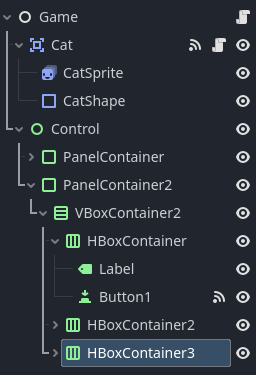
I have a button, Button1, that should be emitting a signal when pressed that connects to the following function in the Game parent node:
func _on_button_1_pressed():
	print("purchase1")
However, this hasn’t been working in my testing and I haven’t been able to figure out why. The scene tree is listed below:
I have tried disconnecting and reconnecting the signal and it has not worked. I’ve tried turning the button to “pressed” via the node properties, but it won’t let me. I don’t know if I have some setting set incorrectly, but the only non-default property I can see is the button text?
if the function is connected there should be an icon next to it (on the left).
I don’t connect signals from the panel, those are mostly to teach people about signals. It is better to connect signals from code.
func _ready() -> void:
	$Control/PanelContainer2/HBoxContainer/Button1.pressed.connect(_on_button_1_pressed)
I would bet your PanelContainer2 there has its mouse_filter set to Stop, which will intercept your mouse input before its children (including your buttons) see it.
If you go into the inspector panel for PanelContainer2, try looking at Mouse in the Control section, and check the Filter setting. You want it to be Pass or Ignore, not Stop.